Proofyard

Asana vs Proofyard

An Asana alternative for AI project management

We ran our web studio on Asana for years and are moving it to Proofyard, which we build. This page compares the two for agency work: the AI in each, what a team pays, how client work runs, where Asana is still better and how to move. Every fact about Asana comes from Asana's own pages, listed at the end with the day we read them.

14 days, every feature, no card.

By Ali Demirci, founder of Woofocus. Updated 13 October 2026, with Asana's plans and prices read on asana.com that day.

The short answer

Two good tools, made for different jobs

Asana

A work management tool for every kind of team, with 18 years behind it, native mobile apps, a large app directory, portfolios and goals. Its AI is a set of products on top of the boards: AI Studio, AI Teammates and Asana Dash. For agencies there is now Asana Client Management, generally available since 28 September 2026, with a client portal on its Advanced plan.

Built for
Any team: marketing, operations, product, HR and agencies
AI
Products added to the boards, metered in AI requests and AI Studio credits
Price
From $10.99 a user a month, billed yearly
Client work
A client portal on Client Management Advanced, listed at $24.99 a user a month
Proofyard

A production board for web and design agencies, first written on 3 October 2026. Claude does the connecting work from the first request: it turns a brief into tasks, keeps the board current and asks on the task when something is missing. People direct it and make every decision that matters. Proofyard is young, and this page says where that shows.

Built for
Agencies that take a brief to a live site
AI
Claude in every step, counted at what it costs
Price
$12 a team member a month, billed yearly; clients free
Client work
Review links, website feedback and approvals, all in the one plan

Pick Asana if you run many kinds of teams on one tool, need native mobile apps, a big app directory or enterprise controls such as SAML and data residency, or already have years of work in Asana and want a client portal on top of it.

Pick Proofyard if most of your work is websites and design for clients, you want Claude doing the routine connecting work rather than a set of AI products to configure, and you want client review and website feedback next to the tasks without moving up a plan.

Feature by feature

Asana vs Proofyard at a glance

What each tool does out of the box, and on which Asana plan. Plan names are Asana's own, read on asana.com on 13 October 2026.

38 features

FeatureAsanaProofyard
Getting started
Free planPersonal, free for up to 2 peopleNo free plan
Free trialA free trial of the paid plans; 14 days for Client Management14 days with every feature, no card
Bring your Asana projectsYou are already thereRead-only import, then Asana Sync keeps it current
A flow made for web workTemplates and custom fields you set up yourselfBrief, design, review, build and testing phases come ready
Planning and tasks
List and board viewsYesYes
Calendar, timeline and GanttCalendar on every plan; timeline and Gantt from StarterWorkload shows each person's work by day, week or month; no calendar or Gantt yet
Custom fieldsFrom StarterIn every workspace
Task dependenciesYes"Blocked by", with a warning when the dates clash
Repeating tasksYesYes
Rules and automationsUnlimited from StarterRules per project, such as moving or assigning a task when it enters a phase, each run with Undo
FormsFrom Starter; branching logic on AdvancedNo form builder; requests go to Claude, and site visitors use the feedback widget
WorkloadOn Advanced, inside portfolios; Team Capacity on Client Management AdvancedIn every workspace, with Claude and agents as rows
Portfolios and goalsOn AdvancedNo
Time trackingThrough integrations; estimated against actual on Advanced; timesheets are an add-onEstimates on tasks, and a Toggl Track timer on every task
AI
AI in the planAI Teammates and Dash: 5 requests per user a month, pooled, up to 50 for the account on Starter and Advanced3,000 credits per team member a month, pooled; 1,000 credits are $1 of Claude's use
Credits for AI workflowsAI Studio: 50,000 credits a month per account on Starter, 75,000 on AdvancedOne pool covers all of Claude's work
More AI when you need it$0.50 a request in packs, or $0.60 pay as you go10,000 credits for $15
When the allowance runs outFeatures that need requests or credits stop until more are boughtClaude rests until the next month; the board keeps working
AI agents30+ prebuilt AI Teammates, and 4 for agencies in Client ManagementAgent teammates with a role, skills, instructions and a named supervisor
New requests shaped by AI firstCan be built with AI Studio steps in forms and rulesBuilt in: a request, brief or link goes to Claude, which drafts the tasks and asks what is missing
An AI assistant for your workAsana Dash, "Your AI Chief of Staff"Ask Claude from any page, with that page attached
A person signs off before a client sees anythingApprovals on Advanced; AI Teammates follow the permissions you setA rule of the product: Claude never publishes, emails a client or approves
Meeting notes to tasksMeetings to tasks on Client Management Advanced; Zoom transcripts can attach to tasksPaste notes or a transcript; you check the list before anything is made
Works with Claude over MCPAn MCP server with read and write toolsA connector for claude.ai; that work runs on your own Claude plan
Client work
Clients cost nothingUnlimited free guests from Starter; portal clients take no seatClients, reviewers and site visitors are free
Client portalOn Client Management Advanced: status, deliverable reviews, feedback and approvalsClients added to a project see the tasks you make visible to them; anyone can review from a link, without an account, for 30 days
Approvals with a recordApprove, request changes or reject, on AdvancedWho approved what, and when, stays on the task
Comments pinned on designsProofing on images and PDFs, on AdvancedPinned comments on design boards, and new versions back from Claude Design
Feedback on the live websiteProofing covers PDFs and images; we used BugHerd for notes on our sitesA widget on the live or staging site files each note on the project's board
Budgets and timesheetsThe Timesheets and Budgets add-on; no published price, contact salesNo budgets or invoicing
Team
Team chatTask comments and project messages; we kept our chat in a separate appNo chat of its own: talk about the work stays in task comments
Comments and mentionsYesYes
Security and platform
Two-factor sign-inWith an authenticator appWith an authenticator app
SAML single sign-on and SCIMOn EnterpriseNot yet
Where your data livesA choice of data residency on Enterprise+Database and uploads in Frankfurt, Germany; files over 1 MB in your own Google Drive; Claude runs on Anthropic's API
Mobile appsiOS and AndroidInstalls from the browser as an app, with notifications; not in the app stores
Integrations100+ free integrations and a public APIA few: Claude, Asana, Google Drive and Toggl Track
Track record18 yearsFirst code written on 3 October 2026

The AI, side by side

How the AI works in each

Both tools now have AI agents and an MCP server, so "has AI" tells you little. The differences are in where the AI sits, what it may do on its own and how it is billed.

Asana

AI Studio
AI steps inside rules and workflows, built without code. It runs on credits per billing account: 50,000 a month on Starter, 75,000 on Advanced and 200,000 on Enterprise. When they run out, those workflows stop until more are bought.
AI Teammates
Agents that work in your projects with shared context and the permissions you set, which several people can train. More than 30 come prebuilt, such as Content Writer, Project Manager and Capacity Planner, and Client Management adds 4 for agencies: Creative Producer, Account Advisor, Operations Coordinator and Executive Advisor.
Asana Dash
Asana calls it "Your AI Chief of Staff". It draws on the same AI requests as AI Teammates.
How it is billed
An AI request is "one successful unit of work executed by AI Teammates or Asana Dash". Each user adds 5 a month to a shared pool, capped at 50 for the account on Starter and Advanced and 250 on Enterprise. More cost $0.50 a request in packs or $0.60 pay as you go.
MCP
An MCP server with tools that read and write tasks, projects, comments and status updates, so Claude or ChatGPT can work with Asana.

Proofyard

Claude first
Every new request starts with Claude: type it, paste a brief or drop a link, and Claude drafts the tasks, routes them and asks on the task about anything missing.
Claude's state on every card
Queued, working on a step, waiting for a person, done or failed, on every card, row and task pane, as it happens.
Ask Claude from any page
Claude's mark in the top bar, or Cmd+J, opens a panel with the page you are on attached. Claude reads your tasks, the Inbox, a teammate's work or recent meetings by itself and shows each step.
Agents with an owner
Agent teammates get a role, skills, instructions and a named person who supervises them. What an agent makes is a draft until that person approves it, and Pause stops it at once.
How it is billed
Claude's work is counted at what it costs at Anthropic's list price: one credit is a tenth of a cent. Each team member adds 3,000 credits a month to one pool, and the AI usage page shows who used what. If the pool runs out, Claude rests until the next month and the board keeps working.
MCP
A connector for claude.ai, so you can pick up work, answer Claude's questions and hand in drafts from a Claude chat. That work runs on your own Claude plan.

How the AI is billed

AsanaProofyard
What is countedAI requests for AI Teammates and Dash, and AI Studio creditsCredits at Claude's real cost: 1,000 credits are $1
Included each month5 requests per user, pooled, up to 50 for the account on Starter and Advanced, plus 50,000 to 75,000 AI Studio credits per account3,000 credits per team member, pooled
Buying more$0.50 a request in packs, $0.60 pay as you go10,000 credits for $15, for the month you buy them in
When it runs outFeatures that need requests or credits stop until more are boughtClaude rests until the next month; the board keeps working
Where you see itAlerts at 65%, 85% and 100% of the allowanceThe AI usage page, per person and per month

Who decides

The line Claude does not cross

Claude never publishes a site, emails a client or approves anything on its own. It prepares; a person decides. In Asana, what an AI Teammate may touch is set with permissions, and approvals are a feature of the Advanced plan.

Pricing

What a team pays

List prices per user a month in US dollars, before tax, read on asana.com and on our own pricing page on 13 October 2026. Asana lists Client Management at the same prices as Starter and Advanced; it needs an active Starter or Advanced subscription, and Asana's pages do not say whether it is charged on top.

PlanBilled yearlyBilled monthlyWhat an agency gets
Asana Personal$0$0Free for up to 2 people: lists, boards and a calendar, and no AI.
Asana Starter$10.99$13.49Timeline and Gantt, forms, unlimited automations, custom fields, free guests and AI Teammates. On Client Management Starter, a client directory but no client portal.
Asana Advanced$24.99$30.49Approvals and proofing, portfolios, goals and workload. On Client Management Advanced, the client portal, meetings to tasks and team capacity.
Asana EnterpriseQuoteQuoteSAML and SCIM, up to 250 AI requests a month for the account, and add-ons for compliance and permissions.
Proofyard Studio$12$15Everything, with 3,000 AI credits per team member a month. Clients, reviewers and site visitors are free.

On top of the seat price

  • Asana: more AI requests at $0.50 each in packs or $0.60 pay as you go; Timesheets and Budgets as an add-on with no published price; compliance and permissions add-ons on Enterprise.
  • Proofyard: 10,000 more AI credits for $15, for the month you buy them in. Nothing else is sold separately.

Asana bills seats in steps: one at a time from 2 to 5, then in fives up to 30, tens up to 100, and larger steps after that. A team of 8 pays for 10 seats. Proofyard counts each team member.

Proofyard has published its prices, but paid plans are not open yet: in October 2026 no workspace is charged. Before that changes, we email each workspace owner.

Work out a year for your team

Billing
Asana planApprovals, proofing and the client portal need Advanced.

Asana Advanced

$2,998.80 a year

10 seats billed for 8 people

Proofyard

$1,152 a year

8 team members, clients free

Proofyard costs $1,846.80 less a year at list price.

Seat prices only. AI beyond what is included, add-ons and tax are not in these numbers.

Where it differs

Eight things that work differently in Proofyard

  1. 01

    Every request starts with Claude

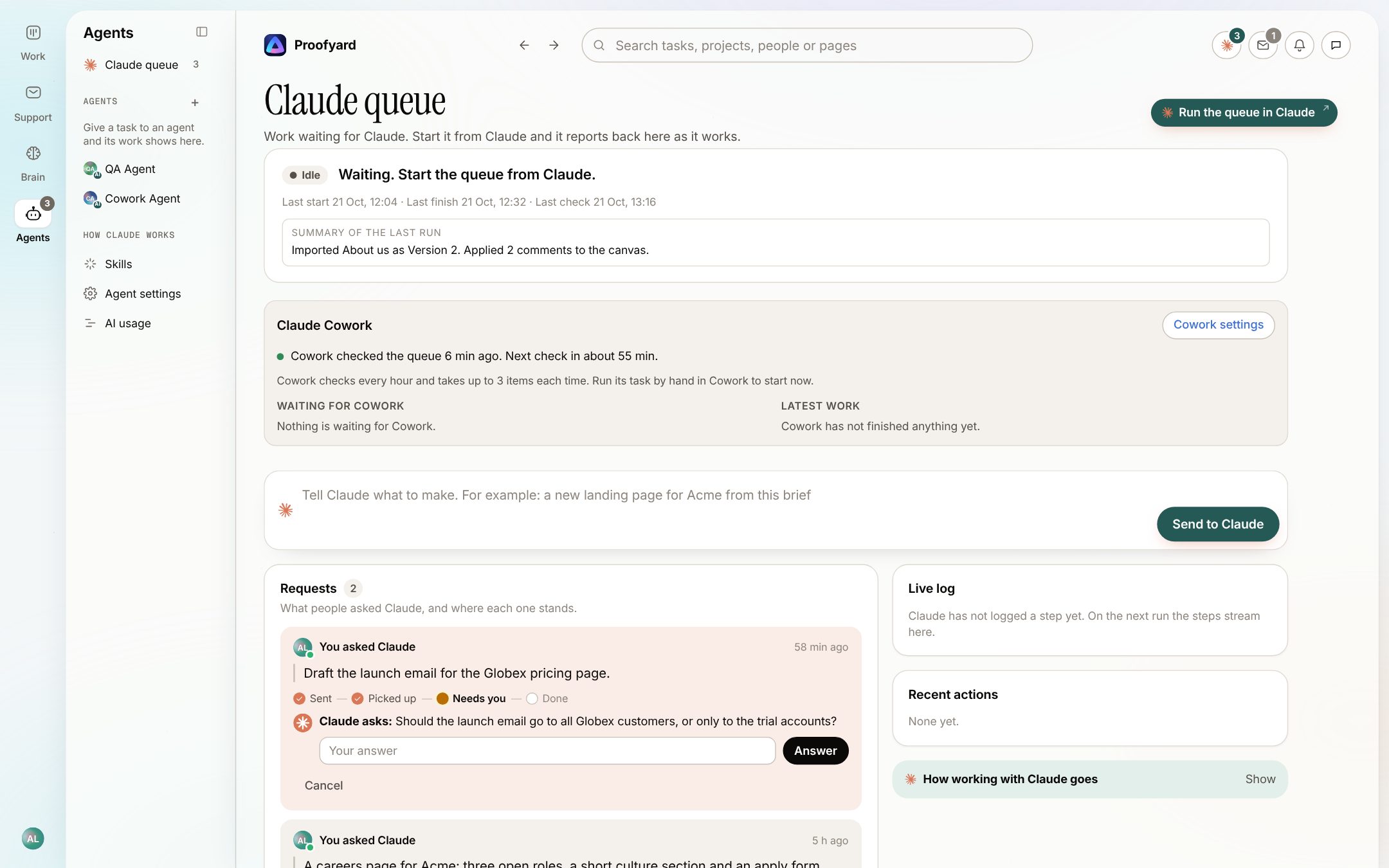
    Type what you want, paste a brief or drop a link. Claude drafts the tasks, routes them and asks about what is missing, and each request shows where it stands: sent, picked up, working, needs you, done.

    In Asana Work starts from a task, a form or a template that a person fills in. AI Studio can add AI steps to those rules, paid for in credits.

    The Claude queue: a box to tell Claude what to make, requests with their progress, and a question from Claude waiting for an answer
  2. 02

    Ask Claude from any page

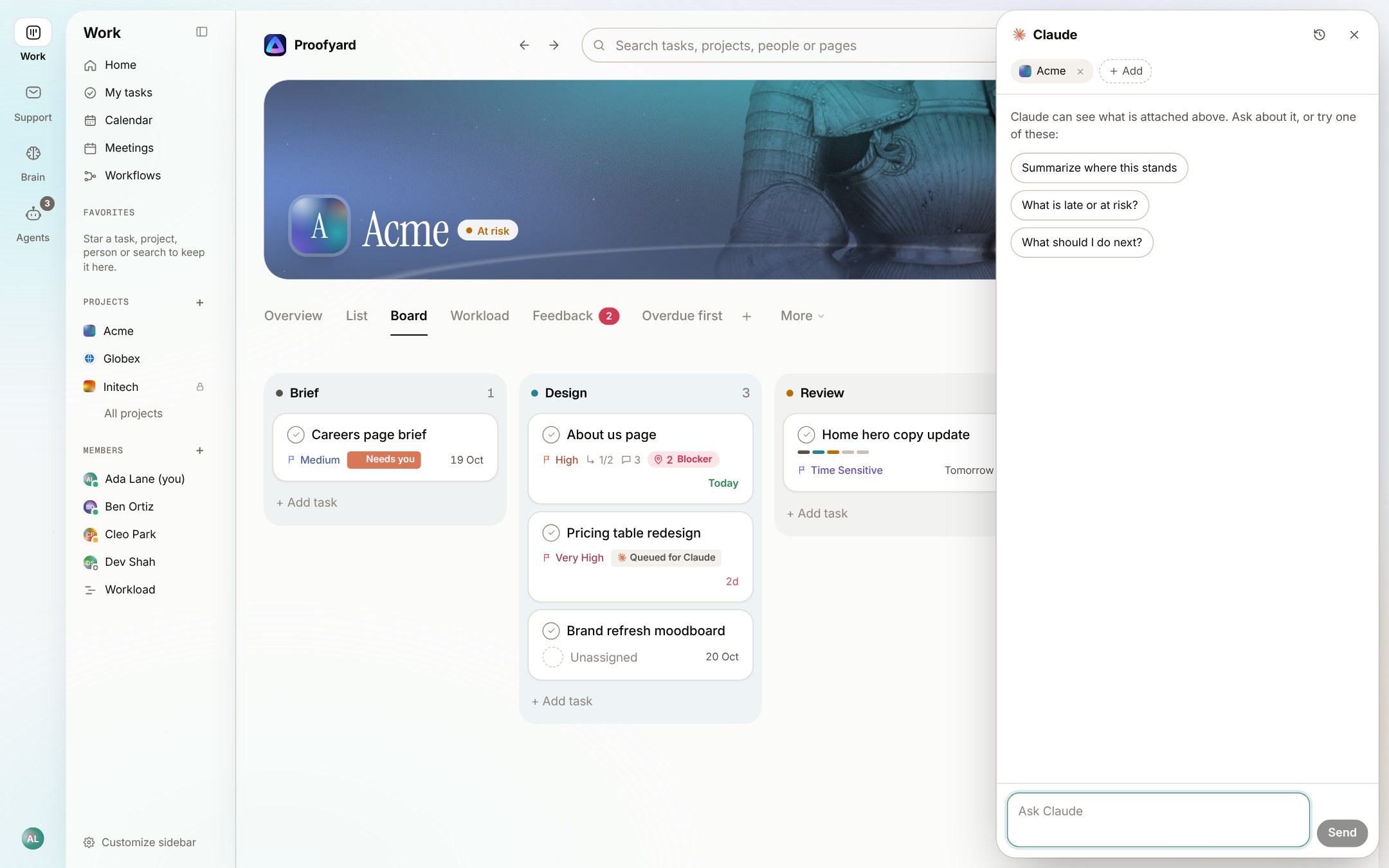
    Claude's mark in the top bar, or Cmd+J, opens a panel with the page you are on attached. Ask where a project stands, what is late or what to do next; Claude reads tasks, the Inbox and recent meetings by itself and shows each step.

    In Asana Asana Dash, which Asana calls "Your AI Chief of Staff", draws on the same monthly AI requests as AI Teammates.

    The Ask Claude panel open beside a project board, with the Acme project attached and three suggested questions
  3. 03

    Claude's state on every card

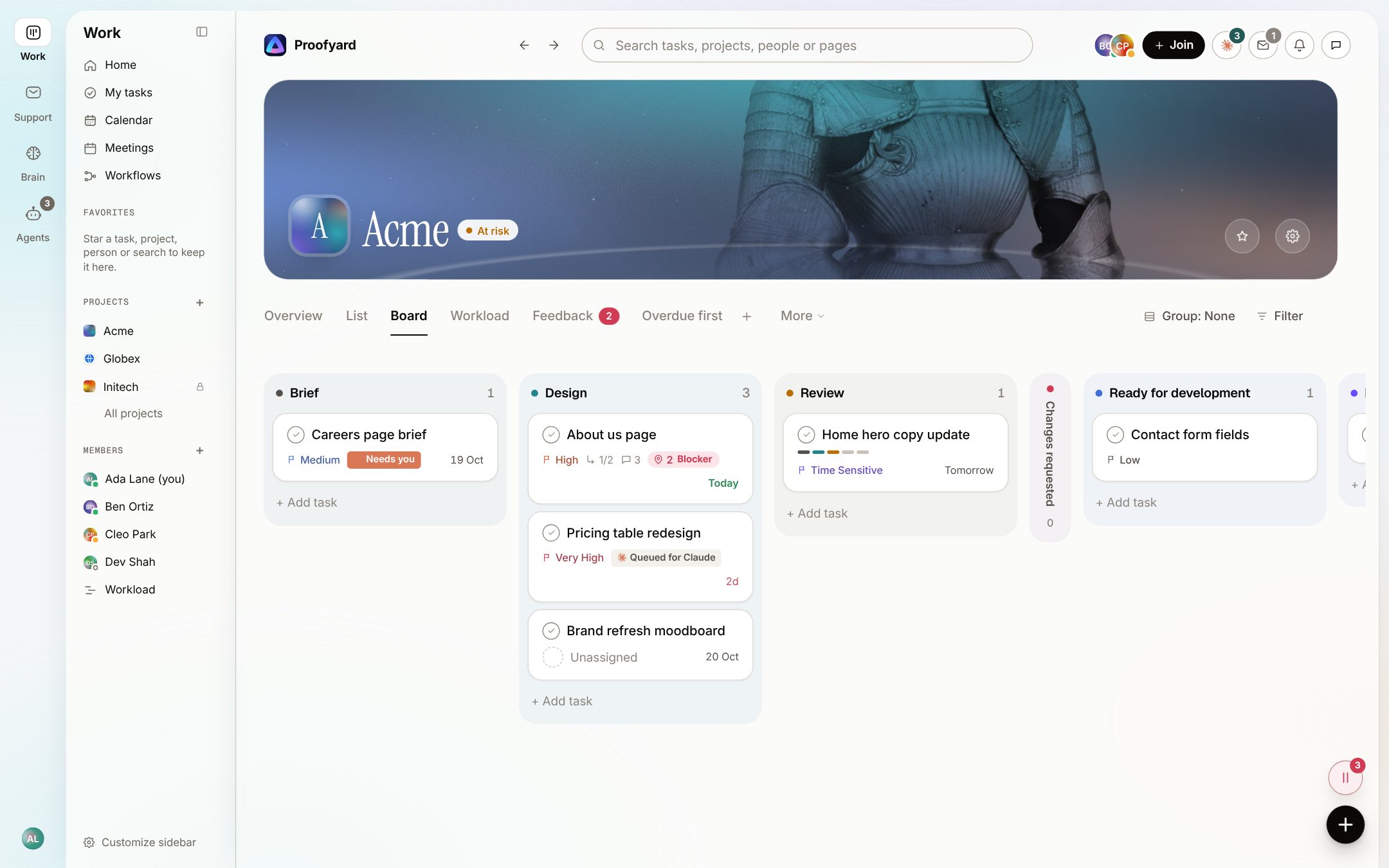
    Queued for Claude, working on a step, needs you, done or failed: on every card, row and task pane, as it happens. A producer reads the whole board at a glance without asking anyone.

    In Asana Cards are built around assignees, dates and custom fields; you open a task to see what has happened on it.

    A project board with phases from Brief to Review; cards show chips such as Needs you and Queued for Claude
  4. 04

    Feedback pinned to the live website

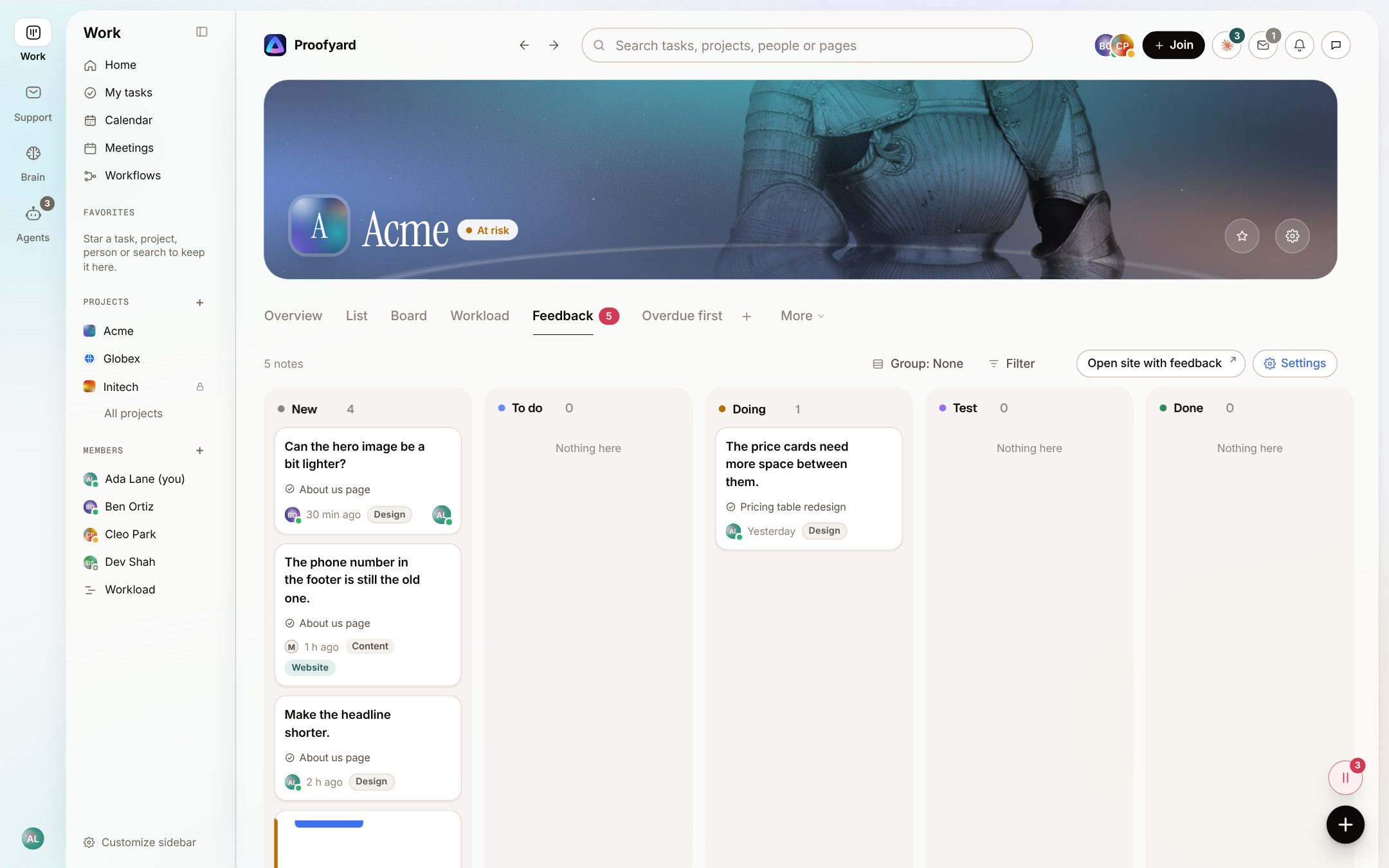
    Clients and the team click on the live or staging site to leave a note on the exact element. Browser, device and page come with it, and every note lands on the project's feedback board, linked to its task. No extension, and no account for clients.

    In Asana Proofing works on images and PDFs attached to tasks, on Advanced. For notes on a live site you connect a separate tool; we used BugHerd.

    More about it

    The project's Feedback tab: notes from the website in the columns New, To do, Doing, Test and Done
  5. 05

    Workload that includes Claude

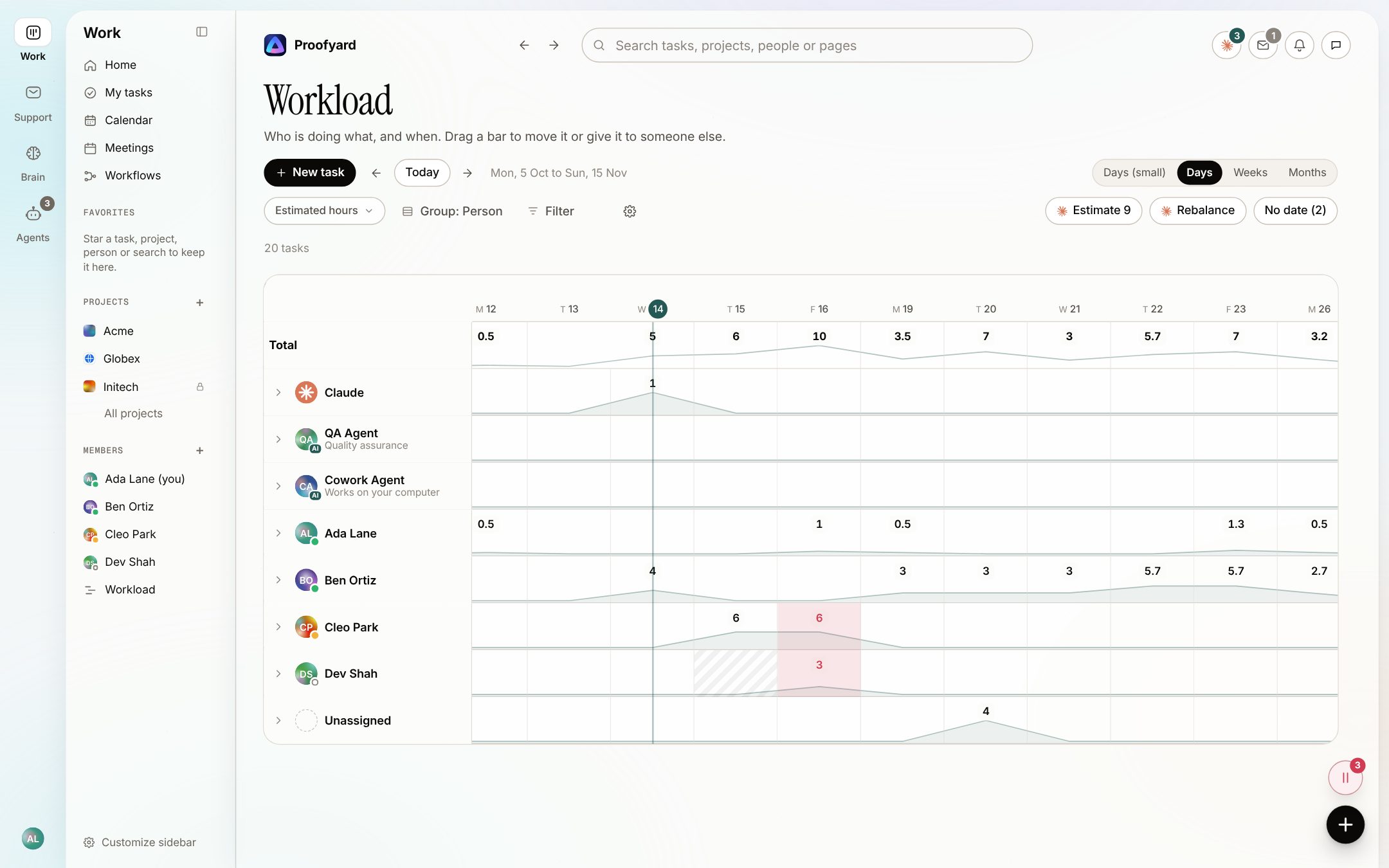
    See who is doing what each day, Claude and agent teammates included, and drag a bar to move work or hand it to someone else. Claude suggests estimates for tasks that have none and proposes a rebalance; nothing moves until you accept.

    In Asana Workload sits inside portfolios on Advanced, and Team Capacity comes with Client Management Advanced.

    The workload view: daily hours per person, with Claude and the QA Agent in their own rows, and buttons to estimate and rebalance
  6. 06

    Agent teammates with a human owner

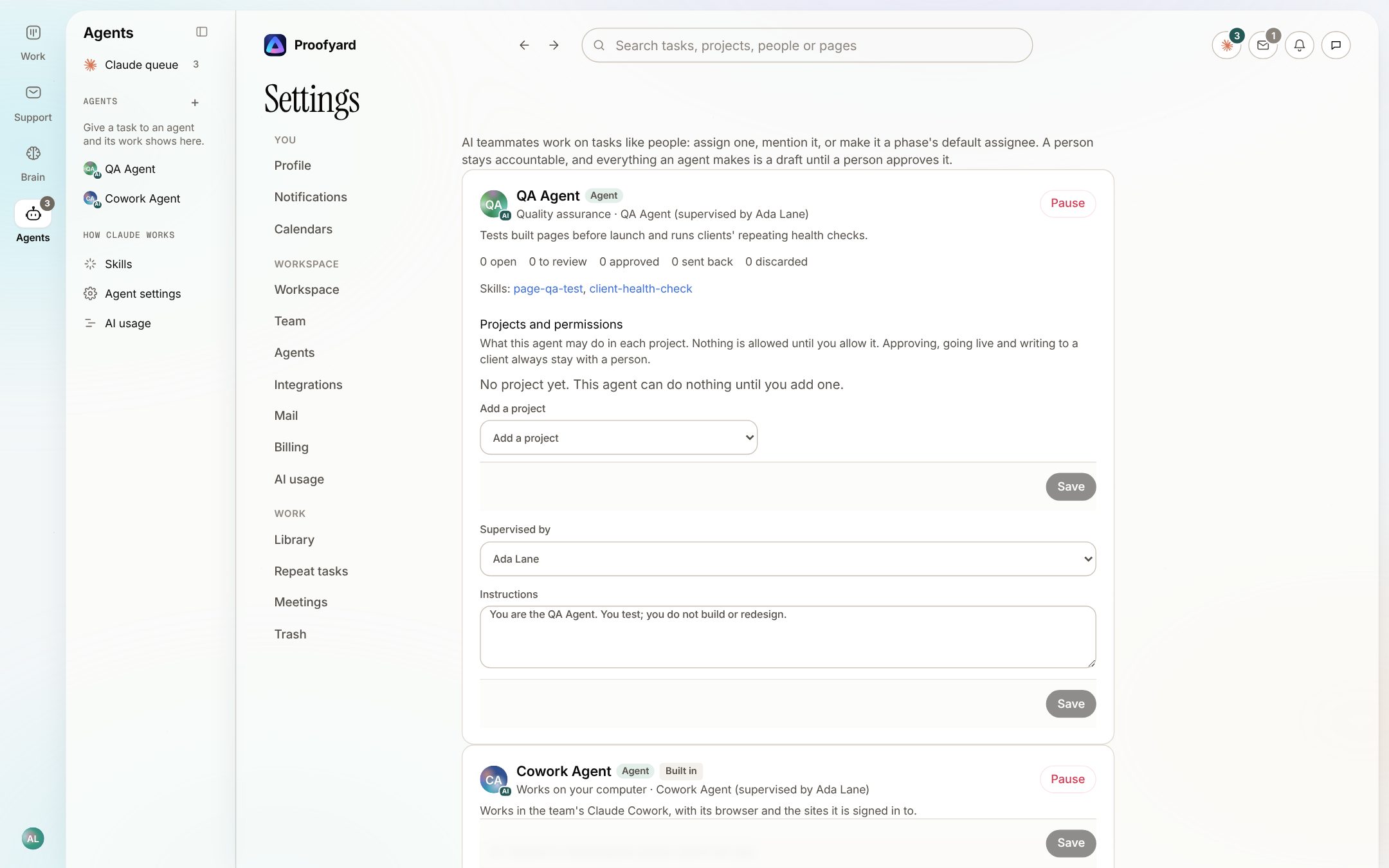
    Give an agent a role, skills and instructions, and assign it tasks like anyone else. A named person supervises it, it may do nothing in a project until you allow it, what it makes is a draft until that person approves, and Pause stops it at once.

    In Asana AI Teammates follow the permissions and data boundaries you set, and several people can train one. More than 30 come prebuilt.

    Agent settings: a QA Agent supervised by a person, with its skills, its permissions per project, instructions and a Pause button
  7. 07

    Meeting notes become tasks, then follow-ups

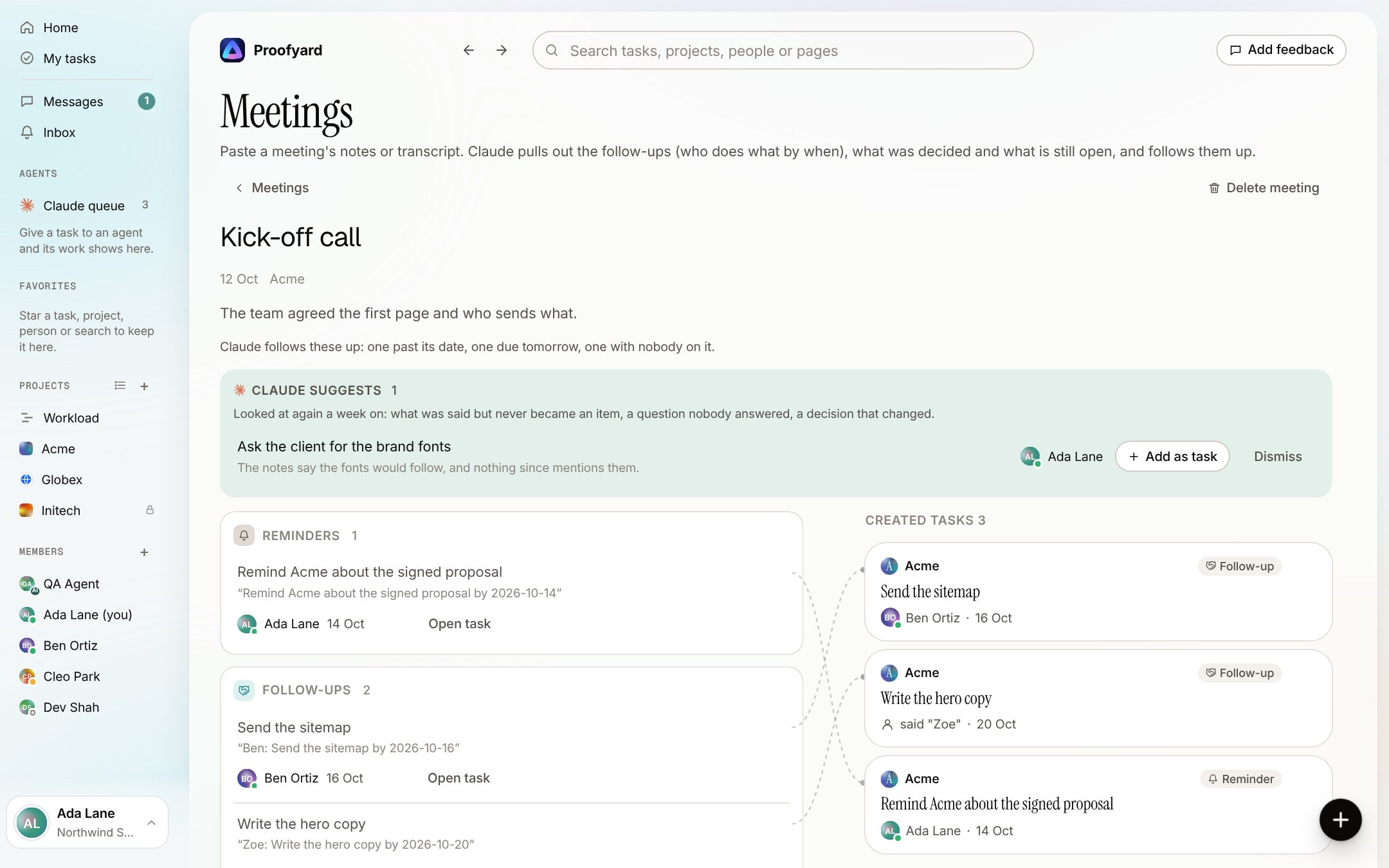
    Paste a meeting's notes or transcript. Claude lists who does what by when, what was decided and what is still open, each with the line it came from. You create what you keep, and Claude follows up on what slips.

    In Asana Meetings to tasks is part of Client Management Advanced, and Zoom transcripts can be attached to tasks.

    More about it

    A meeting after its tasks were created: task cards tied to the lines they came from, and a suggestion from Claude for something the notes mentioned

To be fair

Where Asana is the better choice

We build Proofyard, so weigh this page with that in mind. These are the places where Asana is stronger today, by its own pages and our own use of it.

  1. One tool for every team

    Marketing, operations, HR and product can share Asana, with portfolios and goals across them on Advanced. Proofyard is made for agency production and nothing else.

  2. Planning views

    A calendar on every plan, and timeline and Gantt views from Starter. Proofyard's workload shows work by person over days, weeks or months, but there is no Gantt chart or calendar view yet.

  3. Rules and forms

    Unlimited automations from Starter, and forms with branching logic on Advanced. Proofyard has rules you set per project, such as moving or assigning a task when it enters a phase, each run with Undo, but no form builder; new requests go to Claude instead.

  4. Apps and integrations

    Native iOS and Android apps, more than 100 free integrations and a public API. Proofyard installs from the browser and connects to a handful of tools: Claude, Asana, Google Drive and Toggl Track.

  5. Enterprise controls

    SAML single sign-on and SCIM on Enterprise; data residency, audit logs and SIEM integrations on Enterprise+. Proofyard has two-factor sign-in and keeps its database in Frankfurt, and nothing yet for a large IT team's checklist.

  6. Track record

    Asana has 18 years behind it. Proofyard's first line of code was written on 3 October 2026, and we are moving our own studio onto it now.

  7. If your agency already lives in Asana

    Client Management adds a client portal, a client directory and agency AI Teammates to the work you already have there, with no move.

From our own Asana

What 90 days of our Asana showed us

Before building, we read Woofocus's own Asana workspace through the Asana API, read only. Four things stood out, and each one changed what we built.

  • 868due-date changes in 90 days: 756 pushed later, 3 pulled earlier, a median push of 5 days

    So a key on any row moves a date (T today, M next Monday, +3 and so on), and a task pushed three times or more shows how often on its row.

  • 54%of reassignments came within 2 minutes of a comment by the same person, across 418 assignments and 414 comments; 43 tasks changed hands four or more times

    So Hand off is one step: the note, the new owner and the date together, and the task shows one line for it.

  • 0clients in our Asana: we reached them by email, Telegram and BugHerd

    So clients review from a link without an account, and a widget on their site files every note on the board.

  • 0real Asana approvals in the workspace, no goals, one portfolio with no updates, and timeline and forms hardly touched

    So we built no portfolios or goals; approval is a phase in each project's flow, with the approver on the task.

Source: Woofocus Asana workspace, last 90 days, read through the Asana API on 5 October 2026.

Moving over

Move from Asana without a switch day

This is how we are moving our own ~7,000 Asana tasks. Proofyard only reads Asana: nothing there is created, changed or deleted.

  1. 1

    Open a workspace

    Free for 14 days, with no card. Invite the team now or later.

  2. 2

    Connect Asana

    Paste a personal access token that you make in Asana. It is used only to read.

  3. 3

    Pick a project and check the plan

    One project at a time. Before anything comes over you see where each Asana field and each person will go, and can change it. The first tasks arrive as a sample to check.

  4. 4

    Bring over the rest

    Sections, tasks, subtasks, comments, field values, followers, files, "blocked by" links and repeating tasks. Repeats arrive switched off, so nothing is made twice while Asana still repeats them.

  5. 5

    Run both until you are ready

    Asana Sync brings over what changed in Asana since the last sync: titles, dates, assignees and new comments. Switch project by project, when the team is ready.

What stays in Asana

  • Attachments over 1 MB
  • Subtasks of subtasks
  • Portfolios, goals and rules, which have no place to go

Questions

Asana alternative: common questions

What is the best Asana alternative for AI project management?

It depends on the work. For a company with many kinds of teams, Asana with its AI Teammates is hard to beat. For a web or design agency whose week is briefs, reviews, approvals and launches, a board built around that work, with Claude doing the connecting, fits better; that is why we built Proofyard. Run the feature table above against your own week.

Is Asana's AI included in the price?

Partly. Every paid plan includes AI Assists. AI Teammates and Asana Dash use AI requests: each user adds 5 a month to a shared pool, capped at 50 for the account on Starter and Advanced and 250 on Enterprise. AI Studio has its own credits per account. Beyond that, requests cost $0.50 each in packs or $0.60 pay as you go.

Does Asana have a client portal now?

Yes. Asana Client Management became generally available on 28 September 2026. The client portal is on its Advanced plan, listed at $24.99 a user a month billed yearly; it needs an active Starter or Advanced subscription, and clients use it without taking a seat.
Is Proofyard cheaper than Asana?

Per seat, Proofyard is $12 a team member a month billed yearly, against $10.99 for Asana Starter and $24.99 for Advanced. For agency work the fair comparison is often Advanced, where Asana's approvals, proofing and client portal are, and Asana bills seats in steps, so a team of 8 pays for 10. Proofyard has published its prices but is not charging yet.

Can I import my Asana projects?

Yes, one project at a time and read only: tasks, subtasks, sections, comments, field values, followers, files up to 1 MB, "blocked by" links and repeating tasks. You see where every field and person goes before anything comes over, and Asana Sync keeps the project current until you switch.

Do my clients need an account?

No. A review link works for 30 days without an account, and the feedback widget on their site needs none either. Clients you invite to a project join with an email link, no password, and get their own client area: the tasks you make visible to them, the project's progress and what waits on them, never an internal comment.

Does Claude act on its own in Proofyard?

Claude drafts, sorts and prepares. It never publishes a site, emails a client or approves anything; those need a person's explicit action. Agent teammates make drafts that their supervisor approves.

What does Proofyard not have yet?

Native mobile apps (it installs from the browser), a Gantt chart or calendar view, a rule or form builder, SAML single sign-on, budgets or invoicing, and more than a few integrations. If one of these is essential today, Asana is the safer choice.

Who makes it

Made by Woofocus, a web studio, for its own work first

Woofocus has built and looked after client websites since 2010. We made Proofyard because our own production was spread across a task tool, a feedback tool and long chat threads, and we are moving our studio's work into it now. Any agency can open its own workspace.

Ali Demirci

Ali Demirci

Founder of Woofocus

Ali has designed, built and looked after client websites since 2010 and runs Woofocus, a small web studio. Proofyard is the board he built to run Woofocus's own production after years of carrying work between Asana, BugHerd and chat.

  • 4.99/5rating on Codeable across 219 projects for 74 clientsSource: Codeable profile, October 2026
  • Since 2010building and looking after client websitesSource: woofocus.com
  • ~7,000tasks in our own Asana workspace, the work Proofyard was built to runSource: Woofocus Asana workspace, read 3 October 2026
What clients say about our work

“Communication was always clear and timely, making it easy to stay aligned on progress.”

“Ali delivered on time and worked tirelessly with us to make sure that we were satisfied.”

Sources

Where each Asana fact comes from

Asana's own pages, read on 13 October 2026. Plans and prices change often, so check them before you buy.

  1. Asana pricing
  2. Asana Client Management pricing
  3. Asana Client Management is generally available (28 September 2026)
  4. Asana Client Management
  5. Asana help: Client Management pricing and plans
  6. Asana AI Teammates
  7. Asana Dash
  8. Asana Product-Specific Terms: AI requests and AI Studio credits
  9. Asana help: proofing
  10. Asana help: Zoom and Asana
  11. Asana help: two-factor authentication
  12. Asana developers: MCP tools reference
  13. Asana apps and integrations
  14. Asana: about the company

Our numbers: Woofocus Asana workspace, last 90 days, read through the Asana API on 5 October 2026.

Proofyard's prices: our pricing page.

Bring one Asana project over

Open a workspace, import one project from Asana, read only, and let Claude take the first pass at your next brief.

Try Proofyard free

14 days, every feature, no card.

Asana is a trademark of Asana, Inc. This is an independent comparison by the makers of Proofyard, not affiliated with or endorsed by Asana. Asana's plans and prices were read on asana.com on 13 October 2026. Screenshots show Proofyard with sample data.