Claude project management system
Claude project management for agencies
Proofyard is a project board where Claude does the coordinating work: it turns requests into tasks, drafts what it can, asks when something is missing and shows where every job stands. Your team directs it and makes every decision.
The short answer
What is a Claude project management system?
It is a project board where Claude, the AI model made by Anthropic, is part of the team instead of a chat window on the side. Claude reads every new request, breaks it into tasks, routes them, works on the ones it can, and keeps the board up to date as it goes.
People stay in charge. Claude prepares the work and the next step; a person approves, sends to the client and takes it live.
How it works
From request to done, with Claude in the loop
- 1
Tell Claude
Type what you need, paste a brief or drop a link. No form to fill in first.
- 2
Claude shapes the work
It creates the tasks, picks the phase and owner, and drafts what it can.
- 3
Claude asks when it needs you
A missing detail becomes a question on the task, and the work waits for your answer.
- 4
Every step is visible
Queued, working, needs you, done or failed: on every card, live.
- 5
A person decides
Approvals, client emails and going live always need a person's click.
Inside the board
Six parts of the board, with screenshots
- 01
One place to ask Claude for anything
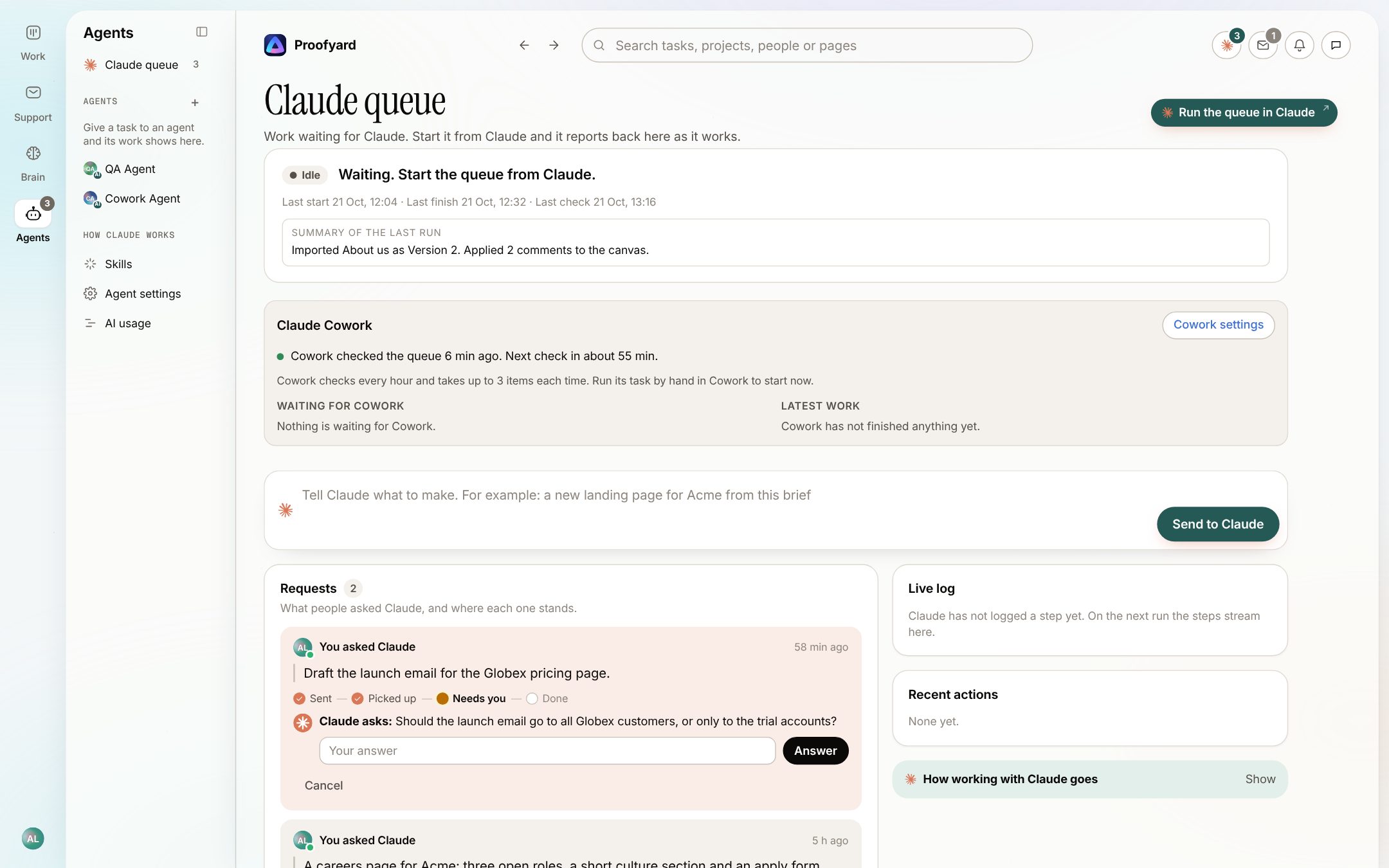
The Claude queue takes requests in plain words, such as "a careers page for Acme with three open roles". Each request shows its progress from sent to done, with Claude's summary of what it did.
- 02
Claude asks instead of guessing
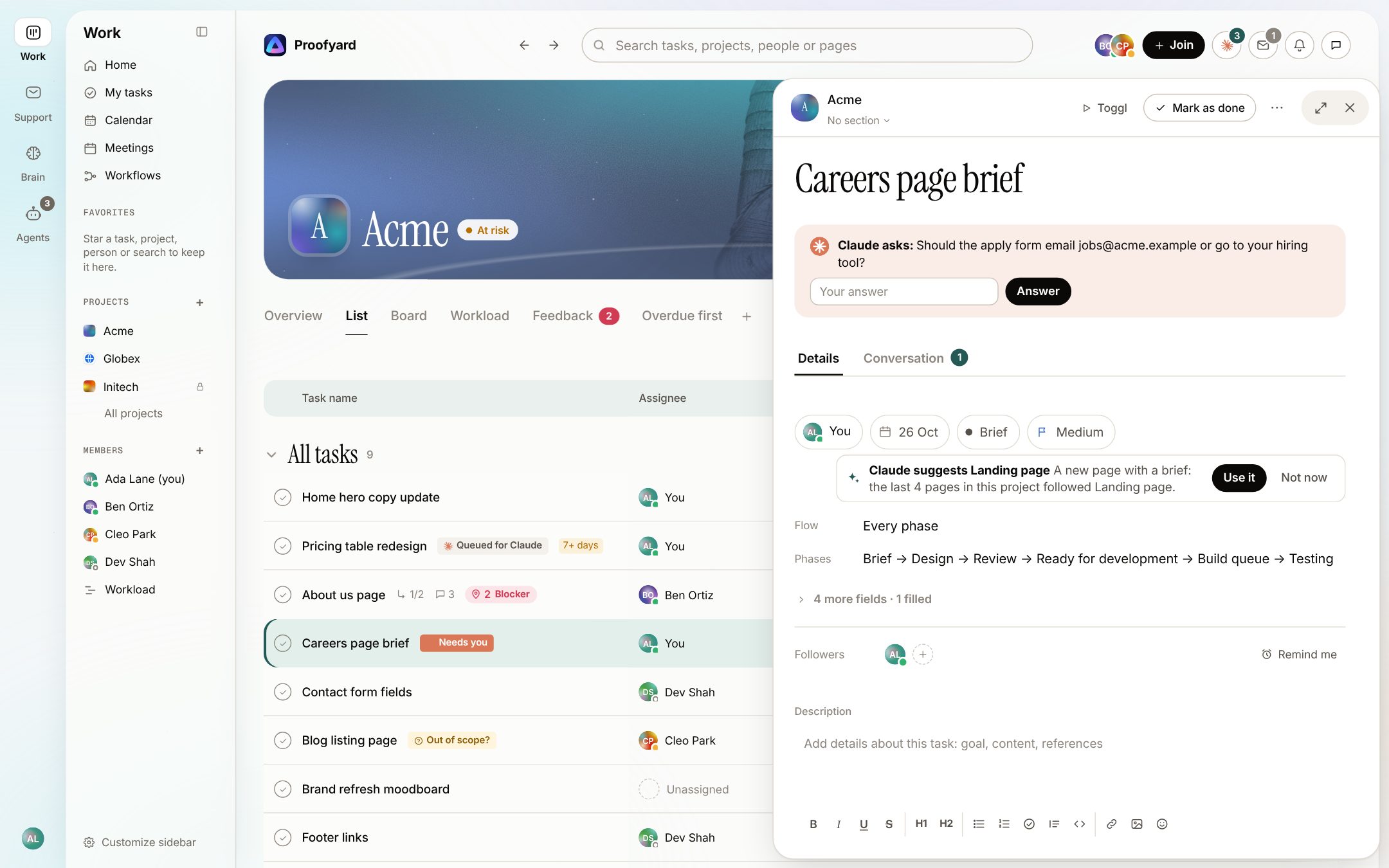
When a brief leaves something open, Claude asks on the task itself and marks it Needs you. Answer in one line and the task goes back to Claude's queue.
- 03
Claude's state on every card
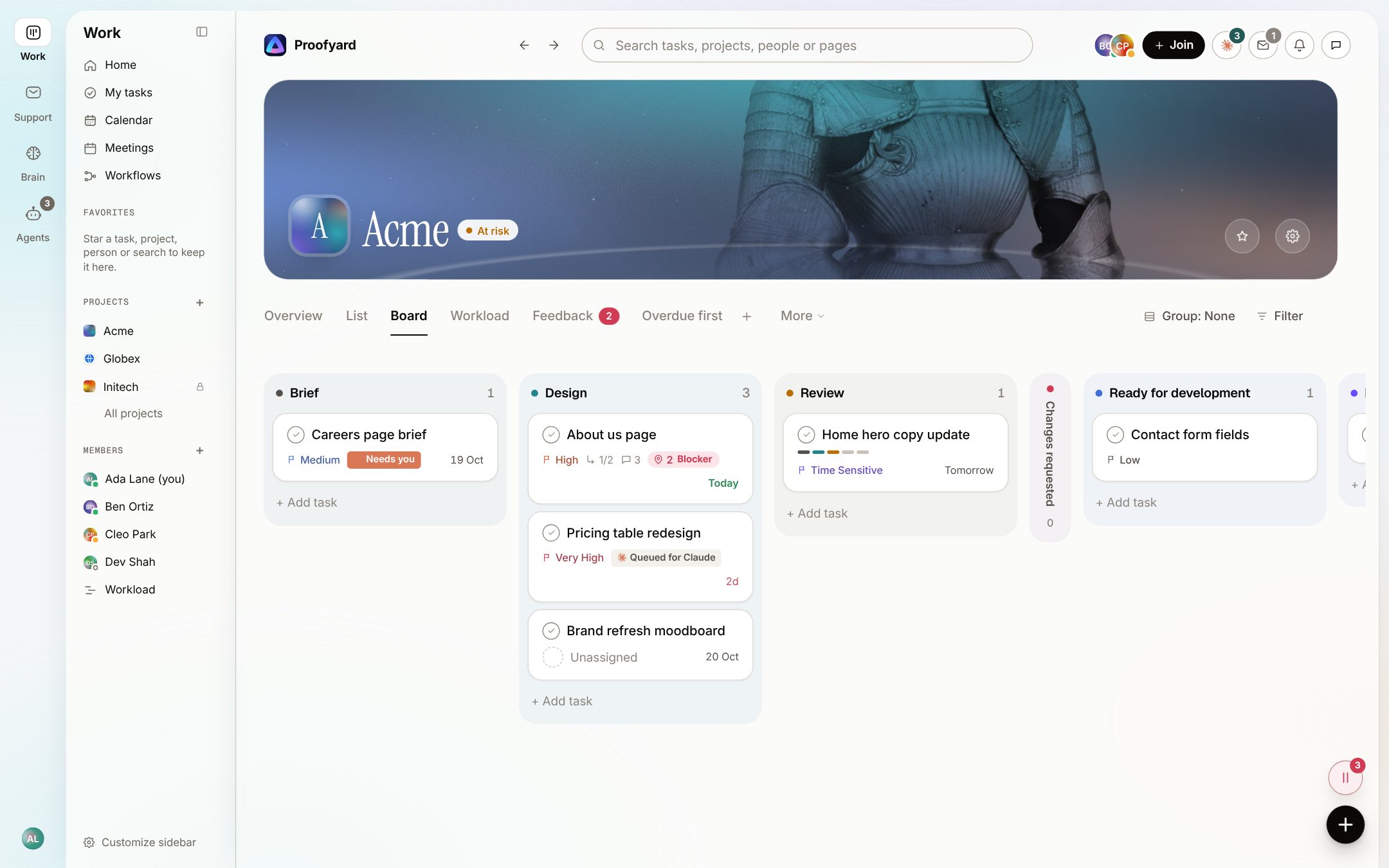
Queued for Claude, working on a step, needs you, done or failed. A project manager reads the whole project at a glance, without a status meeting.
- 04
Use the board from Claude on claude.ai
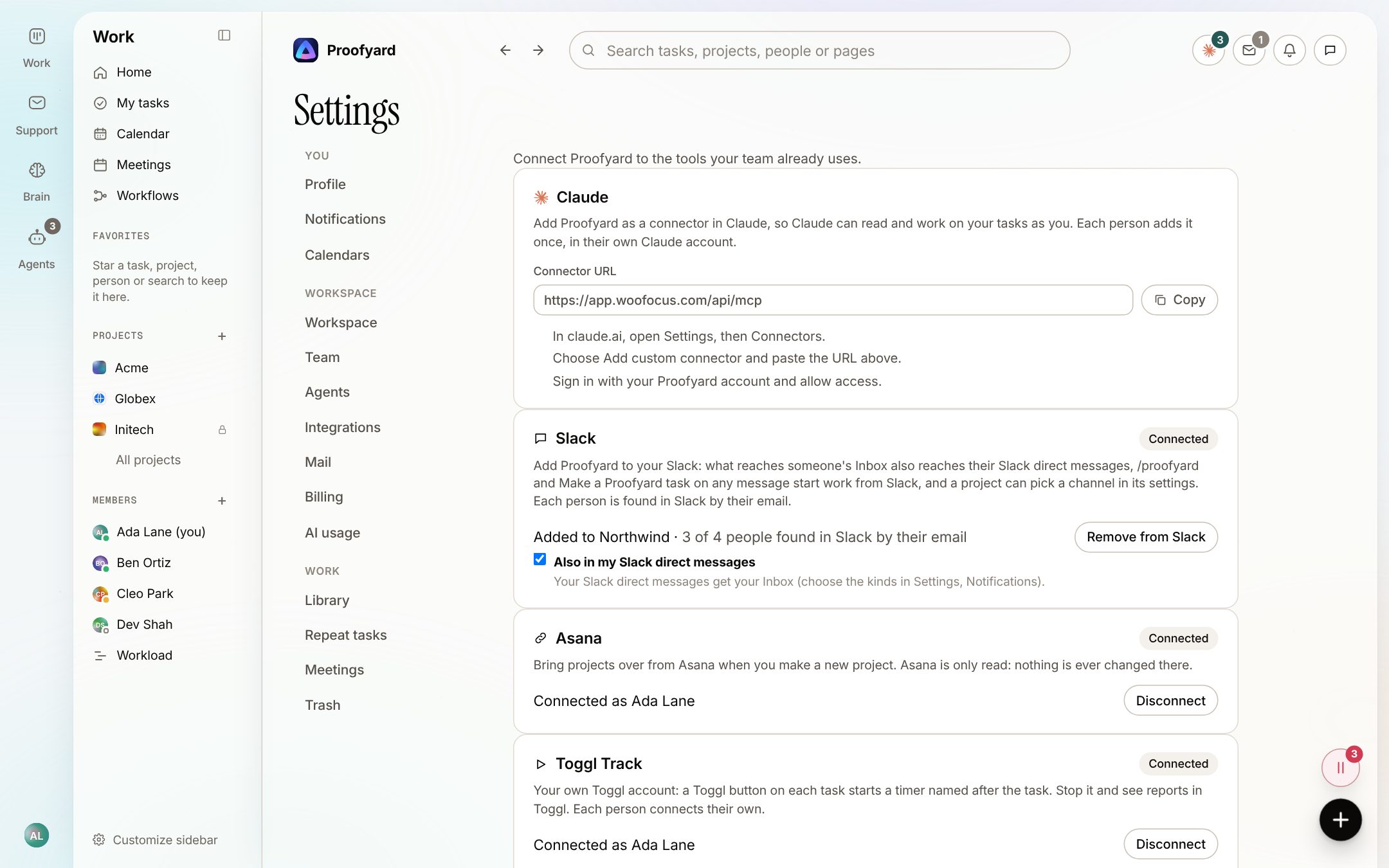
Add Proofyard as a connector in Claude and ask from any chat: "what is waiting for the client on Acme?", "create tasks from these meeting notes", "hand this draft in for review". Claude works as you, with your permissions.
- 05
Planning that includes Claude
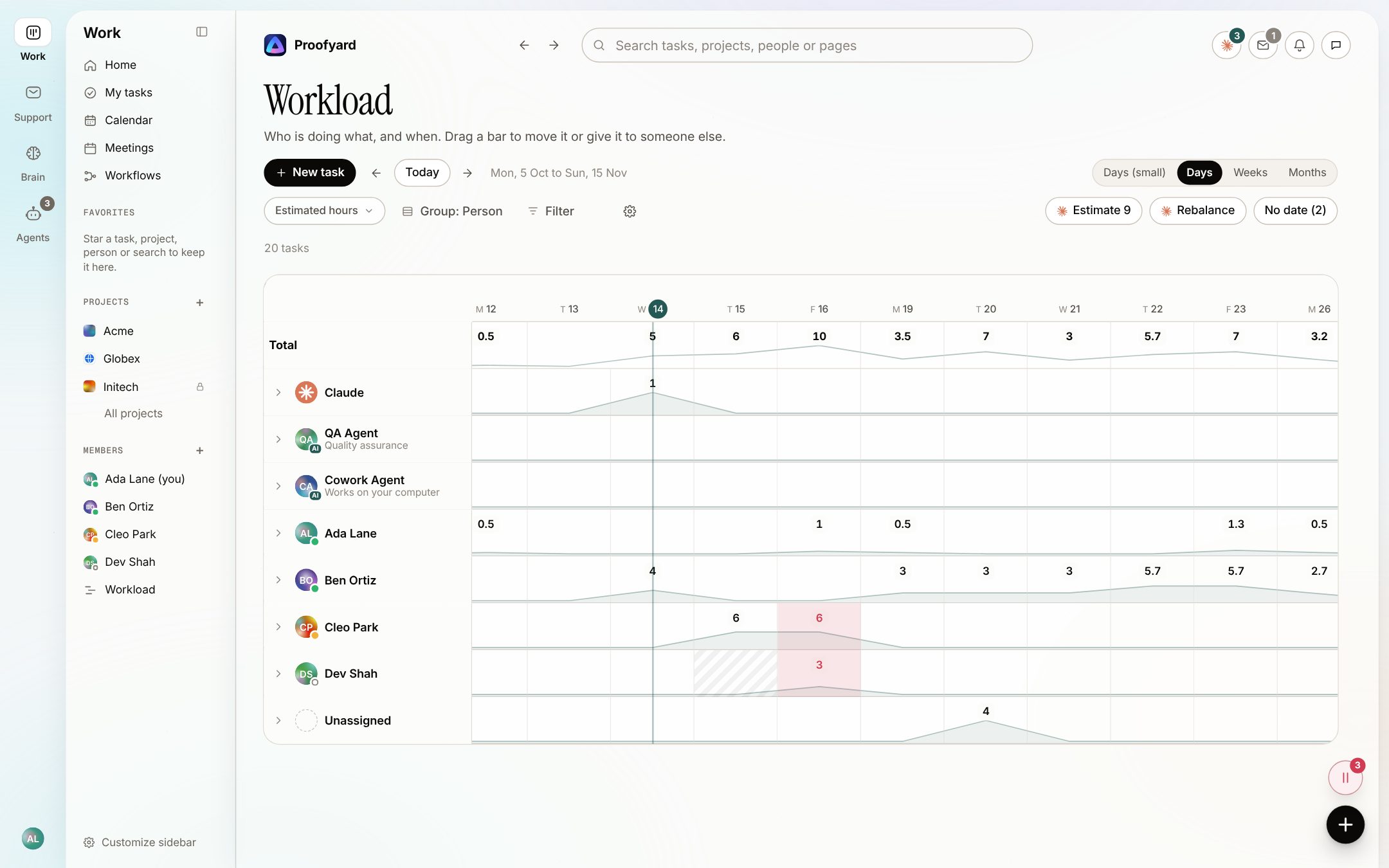
Claude has its own row in the workload view next to your team. It suggests estimates for tasks without one and proposes a rebalance when someone is overloaded; nothing moves until you accept.
- 06
Claude agents with a human owner
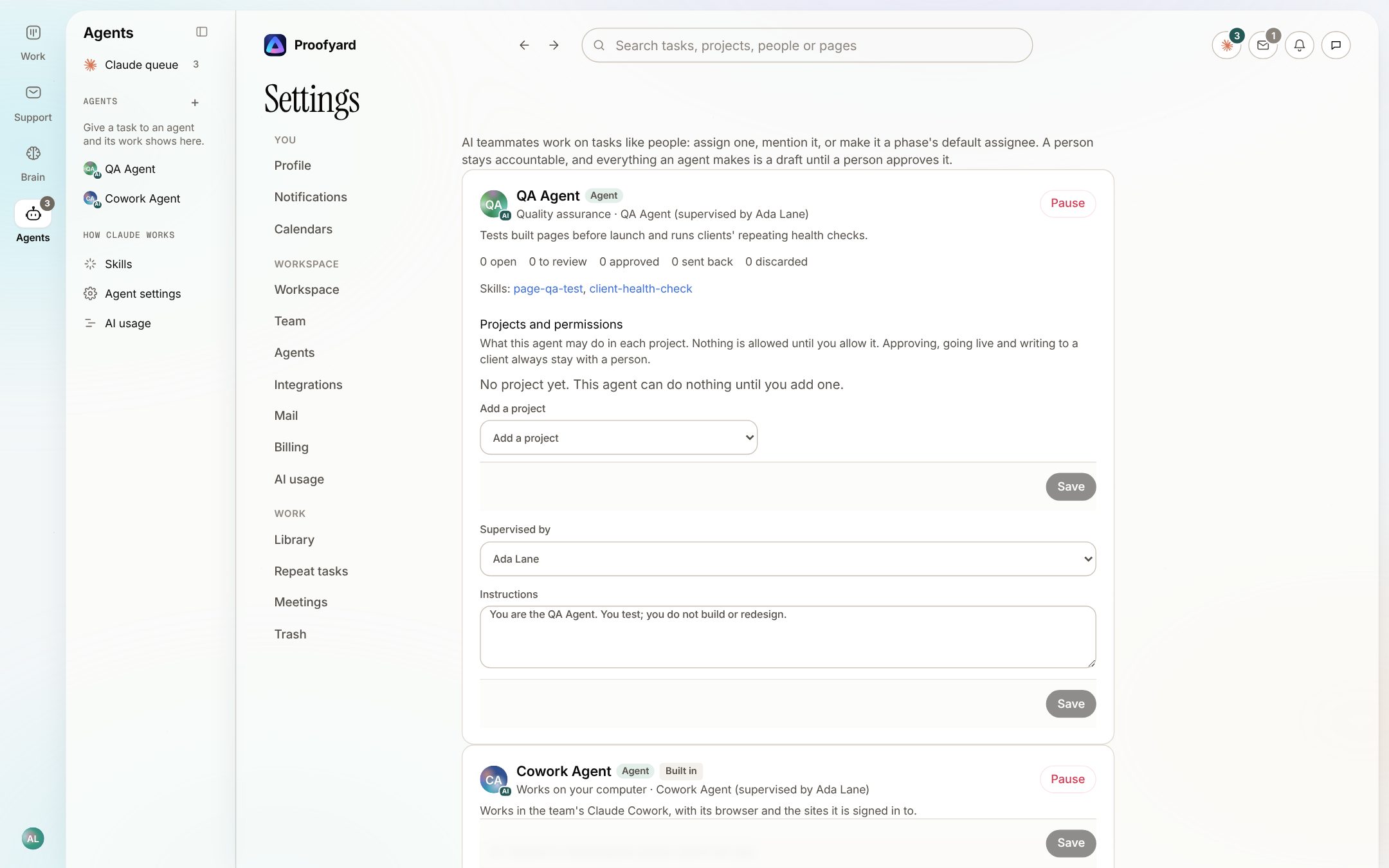
Set up agents such as a QA Agent with a role, skills and instructions. Each one has a named supervisor, its output is a draft until that person approves it, and Pause stops it at once.
Over MCP
What Claude can do on your board
Proofyard runs its own MCP server, so Claude on claude.ai, Claude Code and agents can work the board with the same tools:
Find work
List your tasks and projects, search, and see what is waiting on you.
Create and update tasks
Make tasks from a brief or notes, move them through phases, set dates and owners.
Talk on the task
Comment, ask a person a question, and hand work over with a note.
Report live
Say when work starts, which step it is on and when it is done, with a link to the result.
Hand in designs
Save a design from Claude Design to its task as a new version for review.
Follow up on meetings
Add meeting notes, save decisions and post a project status update.
Work website feedback
Read pinned feedback from the live site, link it to tasks and mark it resolved.
Use your skills
Read the workspace's skills and project files, so Claude works your way.
Guardrails
What Claude never does on its own
Claude prepares each of these and a person decides. Every action says what happened, and most can be undone with one click.
Publish a page or take a site live
Email or message a client
Approve a design, a draft or a task
See more than the person who asked it
Questions
Claude project management: common questions
What is a Claude project management system?
A project board where Claude does the coordinating work: it turns requests into tasks, drafts what it can, asks questions, and reports every step, while people approve and decide.
Does Claude have project management built in?
Projects on claude.ai group chats, files and instructions; they are not a task board with owners, phases and approvals. Proofyard is that board, and you can connect it to Claude so both work together.
How do I connect Proofyard to Claude?
In claude.ai, open Settings, then Connectors, add a custom connector with your Proofyard connector URL and sign in. Each person adds it once in their own Claude account.
Can Claude publish or email clients without me?
No. Going live, anything sent to a client and every approval need a person's explicit action. Claude prepares them and waits.
Who is it for?
Web and design agencies and studios that take briefs to live sites: copy, design, review, client approval, build and QA, on one board.
Is Proofyard made by Anthropic?
No. Proofyard is an independent product built on Claude. Claude is made by Anthropic.
Who makes it
Made by Woofocus, a web studio, for its own work first
Woofocus has built and looked after client websites since 2010. We made Proofyard because our own production was spread across a task tool, a feedback tool and long chat threads, and we are moving our studio's work into it now. Any agency can open its own workspace.

Ali Demirci
Founder of Woofocus
Ali has designed, built and looked after client websites since 2010 and runs Woofocus, a small web studio. Proofyard is the board he built to run Woofocus's own production after years of carrying work between Asana, BugHerd and chat.
- 4.99/5rating on Codeable across 219 projects for 74 clientsSource: Codeable profile, October 2026
- Since 2010building and looking after client websitesSource: woofocus.com
- ~7,000tasks in our own Asana workspace, the work Proofyard was built to runSource: Woofocus Asana workspace, read 3 October 2026
“Communication was always clear and timely, making it easy to stay aligned on progress.”
“Ali delivered on time and worked tirelessly with us to make sure that we were satisfied.”
Give Claude your next brief.
Open a workspace, tell Claude what you need, and approve what comes back.
Claude is a trademark of Anthropic, PBC. Proofyard is an independent product built on Claude and is not made or endorsed by Anthropic. Screenshots show Proofyard with sample data.