Feature
Meeting notes to tasks
Paste a meeting's notes or transcript; Claude lays out who does what by when, you check it, and the follow-ups become tasks that get chased.
Meeting notes to tasks
Paste a meeting, get the tasks, and nothing slips after the call
After a client call, someone has to go back through the notes and turn "Ben sends the sitemap Friday" into a task with Ben's name and a date. Often nobody does, and the promise is found again two weeks later.
In Meetings you paste the notes, a transcript or the summary your call recorder wrote. Claude reads it and lays out the follow-ups (who does what by when), what was decided, what is still open and what someone should be reminded of. Nothing is made until a person checks it.
- 01
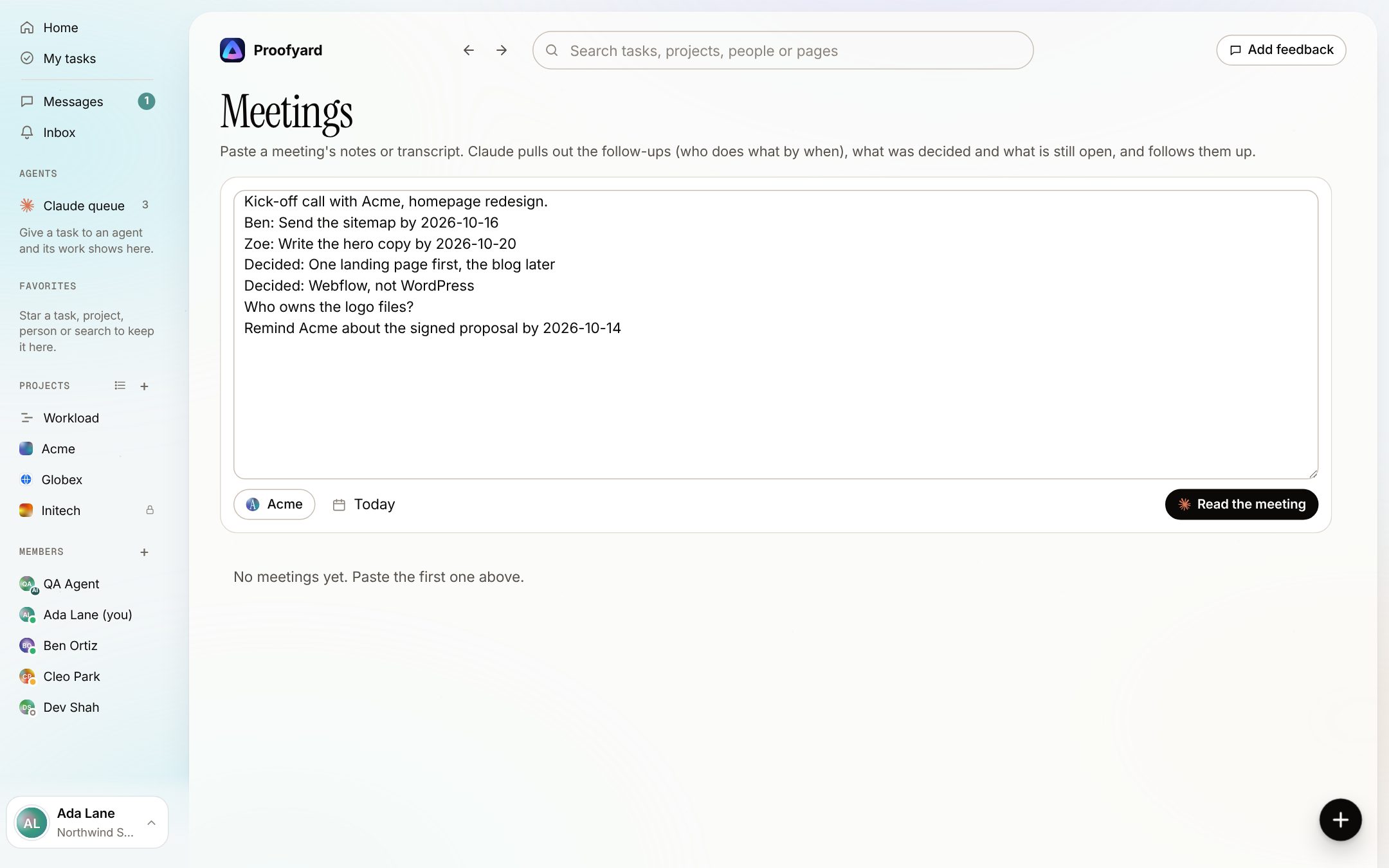
Paste the notes
Notes, a transcript or a recorder's summary. Pick the project and the day of the meeting. Claude reads the first 60,000 characters, which is a long call.
- 02
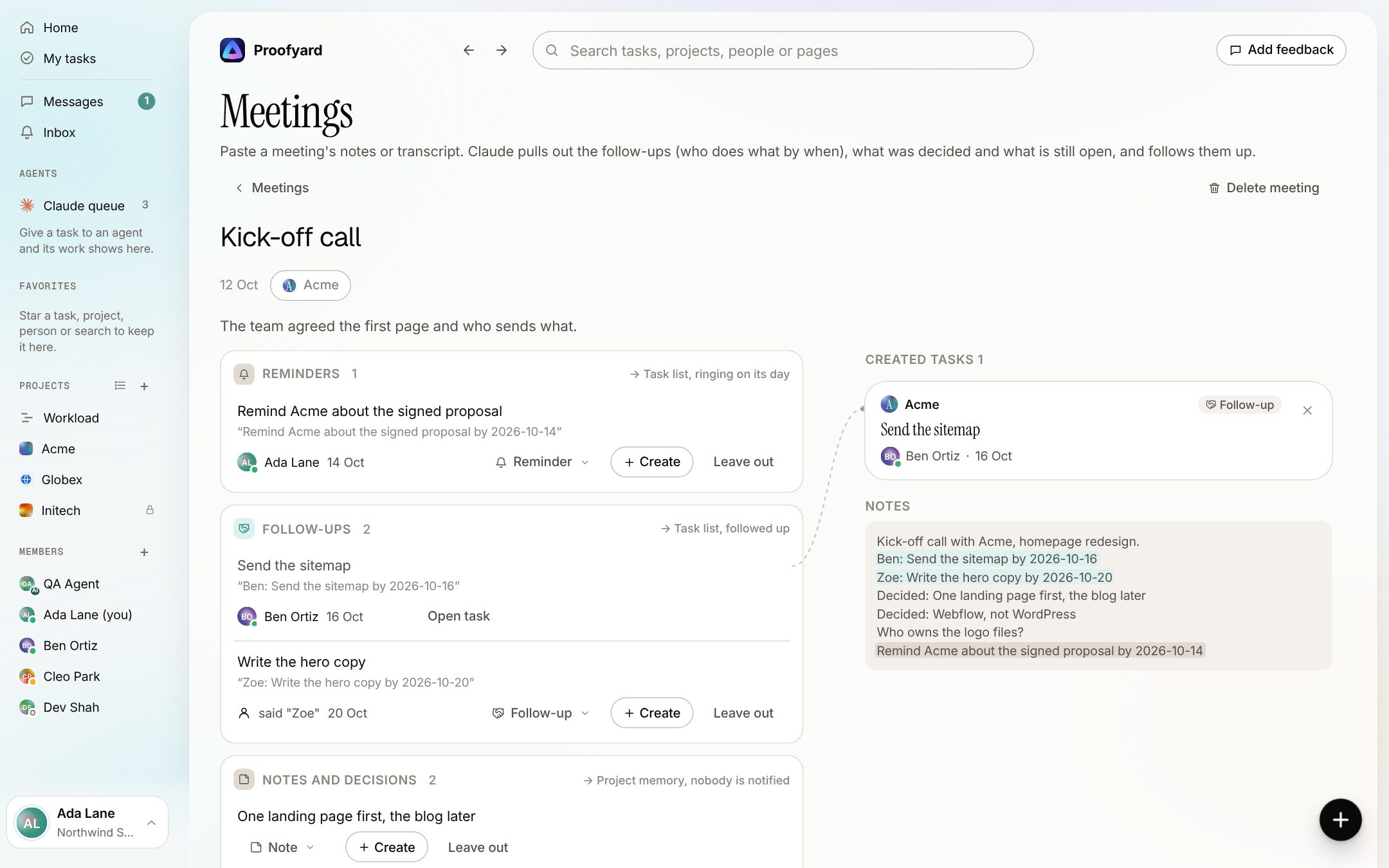
Check what Claude read out
Follow-ups with an owner and a date, reminders, notes and decisions, and questions still open, each with the line it came from. Change who or when, change the type, leave an item out, or create one right away: it shows on the right as a task card tied to its line.
- 03
Create the rest, then let Claude follow up
What is left becomes tasks in the project with their owner and date; decisions go to the project's memory. Undo takes it back. Claude then reminds the owner when a follow-up is late or due tomorrow, and a week later suggests what was said but never became a task.
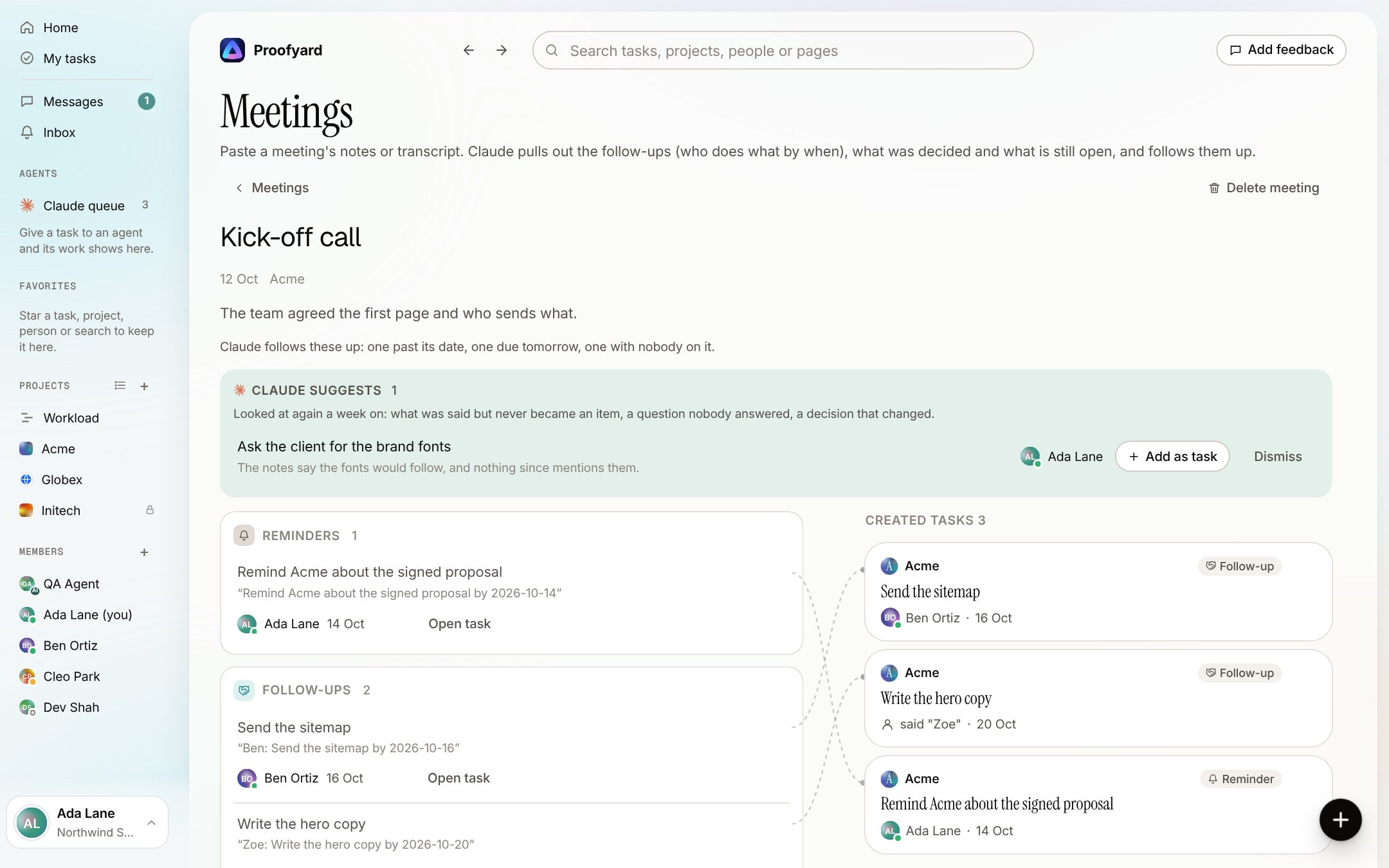
The screenshots are from the app with sample data: Acme, Maya and the team are made up.
Where agencies use it
The calls that end with promises
Client kick-off
The sitemap, who writes the copy, when the logo files arrive. Each becomes a task with a name and a date on it.
Weekly status call
Promises go both ways. "Remind Acme about the signed proposal Tuesday" becomes a reminder that rings for you on Tuesday.
Discovery or sales call
Questions nobody could answer on the call stay listed as still open, so the proposal does not go out with a gap in it.
Internal team sync
Who picks up the QA round, who chases the hosting login. Names are matched to your team; a name nobody has stays as it was said for you to pick.
A recorder's transcript
Any tool that gives you text works: paste its transcript or summary. Proofyard does not join or record calls itself.
From Claude over MCP
If you talk to Claude in claude.ai with the Proofyard connector, it can add a meeting for you with add_meeting. You still check it in Proofyard before anything is made.
What it will not do
Claude prepares, a person decides
It never makes a task on its own: every item waits for a person to create it or leave it out.
It never writes to the client. Meetings and their items are for the team; a client in the workspace does not see them.
It keeps a date only when one was said and makes sense, and it does not guess between two people with the same first name.
It does not record or join calls. It reads the text you give it.
Questions
Meeting notes to tasks
What can I paste?
Plain text: your own notes, a transcript, or the summary a call recorder made. The notes need a few sentences; very short notes are turned back with a message.
Who sees a meeting?
The team on its project, or the whole team for a meeting with no project. Clients never do.
What happens to decisions?
They are saved to the project's memory, where Claude and the team can find them later. Nobody is notified about a decision.
How does the follow-up work?
Once a day Claude checks the follow-ups from the last two months: past its date or due tomorrow, the owner hears about it; with nobody on it, whoever added the meeting does. Each item reminds at most every three days.
Can I take it back?
Yes. Each created task has Undo, and a task card can be taken back from the meeting.
Who makes it
Made by Woofocus, a web studio, for its own work first
Woofocus has built and looked after client websites since 2010. We made Proofyard because our own production was spread across a task tool, a feedback tool and long chat threads, and we are moving our studio's work into it now. Any agency can open its own workspace.

Ali Demirci
Founder of Woofocus
Ali has designed, built and looked after client websites since 2010 and runs Woofocus, a small web studio. Proofyard is the board he built to run Woofocus's own production after years of carrying work between Asana, BugHerd and chat.
- 4.99/5rating on Codeable across 219 projects for 74 clientsSource: Codeable profile, October 2026
- Since 2010building and looking after client websitesSource: woofocus.com
- ~7,000tasks in our own Asana workspace, the work Proofyard was built to runSource: Woofocus Asana workspace, read 3 October 2026
“Communication was always clear and timely, making it easy to stay aligned on progress.”
“Ali delivered on time and worked tirelessly with us to make sure that we were satisfied.”
Try it with your last meeting
Open a workspace, paste the notes from your last client call and see what Claude reads out.