Feature
Smart actions
The board fills in who, when and how important, suggests the next step after a comment, balances the week with you and keeps the inbox quiet. Each one is a suggestion: one click takes it, and Undo takes it back.
Smart actions
Small decisions, prepared for you. You still make them.
When we read 90 days of our own Asana in October 2026, a lot of the activity in it was housekeeping: 868 due-date changes, 756 of them pushed later, and 54% of reassignments made within two minutes of the same person writing a comment, usually because they had just asked someone a question.
So the board does that housekeeping as suggestions. Some are plain rules that answer the moment you type. Some ask Claude, which reads the words the way a colleague would. Every item below says which. None of them sends anything to a client, approves work or publishes.
- Claude Claude reads the words and suggests. Uses AI credit.
- Rule A plain rule, the same answer every time. No AI credit.
- Rule, then Claude A rule answers at once; Claude's answer follows a moment later.
The ones you will notice first
- 01
A new task fills itself in
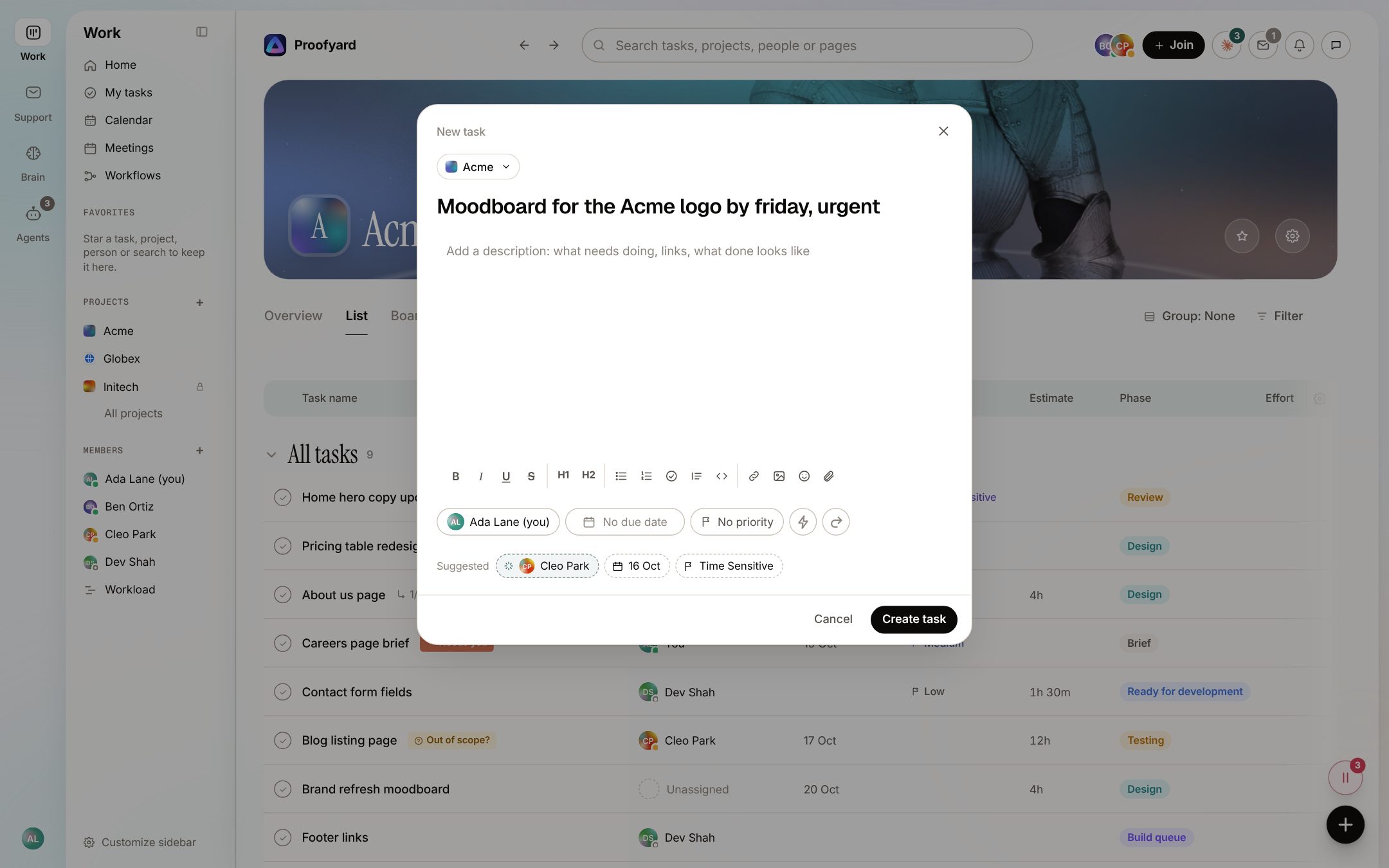
Rule, then ClaudeType "Moodboard for the Acme logo by friday, urgent" and the form suggests the project, who it is for, the day and the priority. A rule reads names, projects and dates at once; Claude follows with the person whose role fits. Once you pick a field yourself, it stops suggesting for it, and a suggested day never falls on a weekend unless you wrote one.
- 02
The next step after your comment
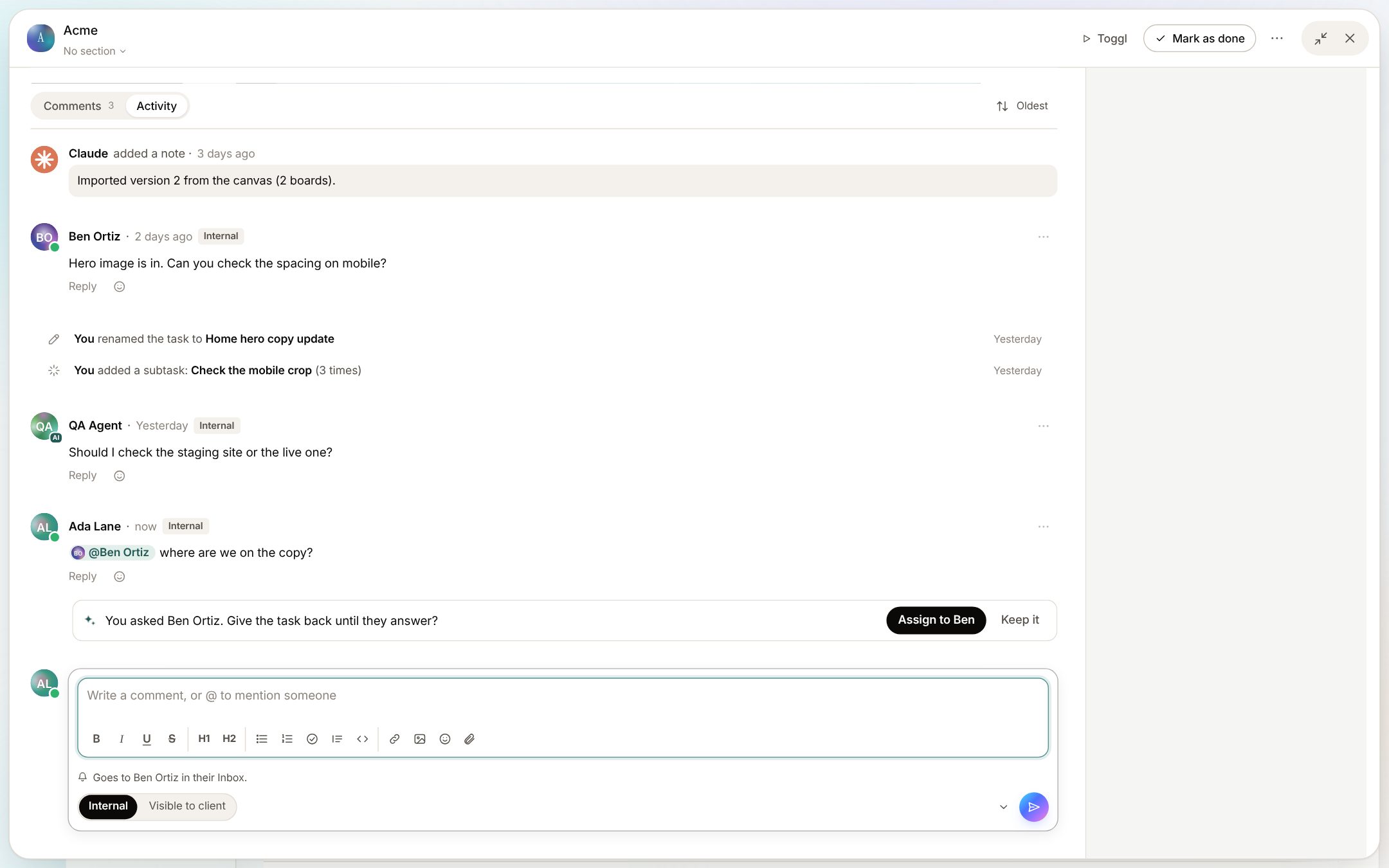
ClaudeAsk Ben a question on a task you hold and Claude looks for a moment, then offers one step: give the task back to Ben until he answers. It can also suggest the day you mentioned, a priority or the next phase. One button does it, with Undo. Say Keep it three times to the same kind and Claude stops offering it.
- 03
Rebalance the week
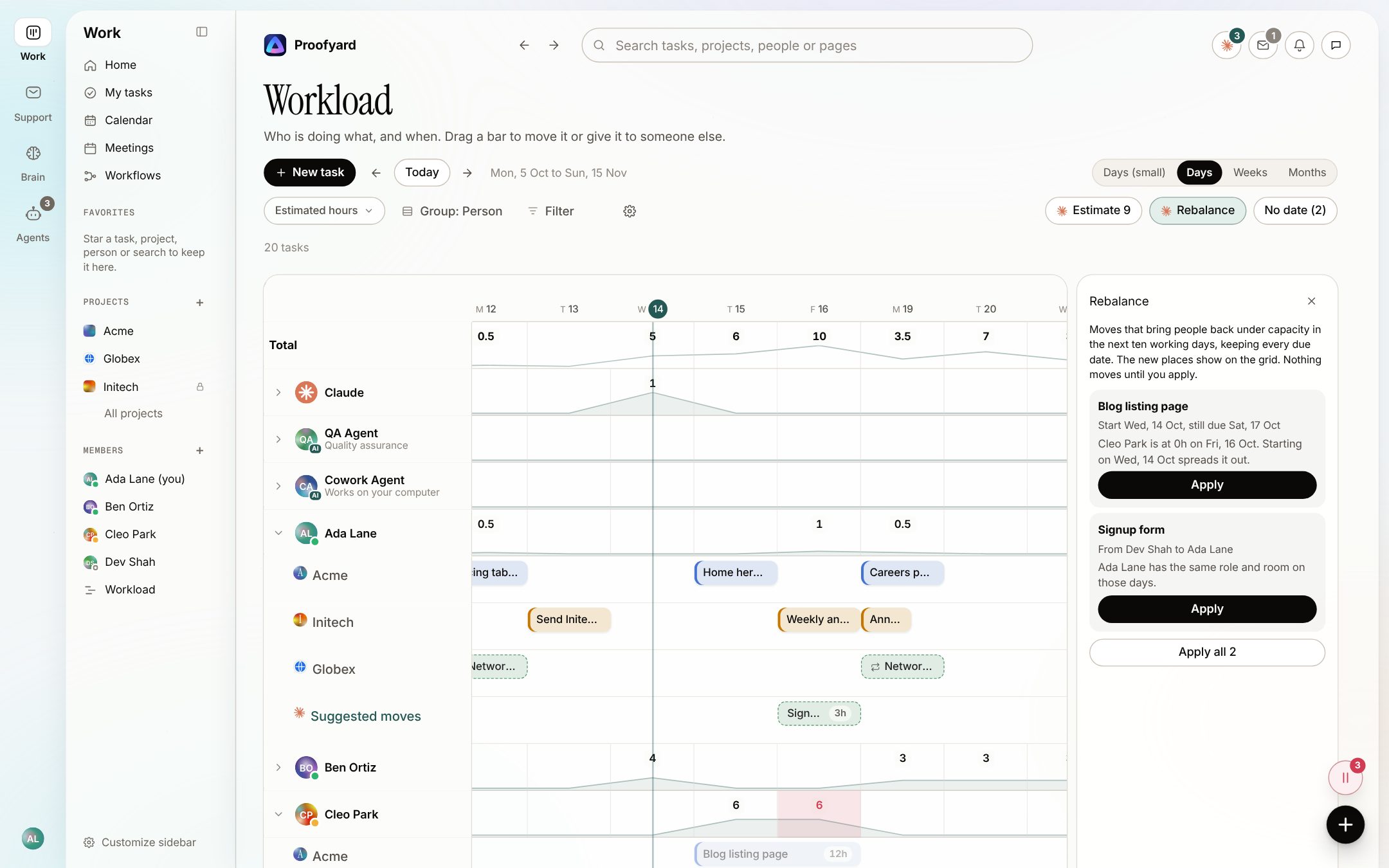
Rule, then ClaudeWhen someone is over capacity, Rebalance proposes moves for the next ten working days that keep every due date: start a task earlier, or give it to someone with the same role and room. The moves come from a rule; Claude writes the reason for each. Nothing moves until you press Apply. Beside it, Estimate suggests hours for tasks without any, from the median of similar tasks.
- 04
A quieter inbox
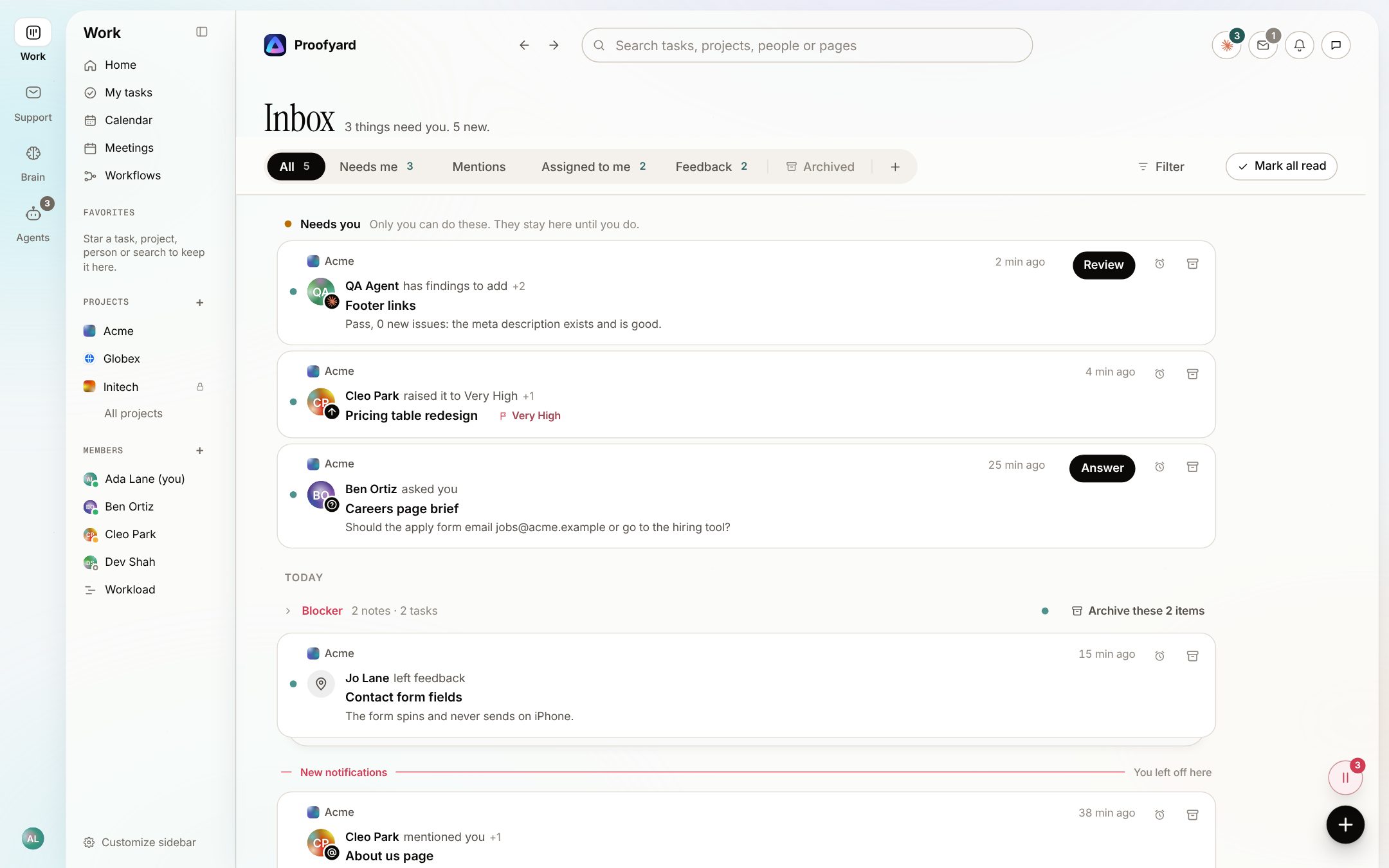
RuleFeedback arrives stacked by Blocker, High and From clients, and four or more alike items from one place fold into one. Approvals, questions and mentions are never folded. Due tomorrow comes as one line, only for important work, and a push waits ten seconds and is dropped if you already saw it in the app.
- 05
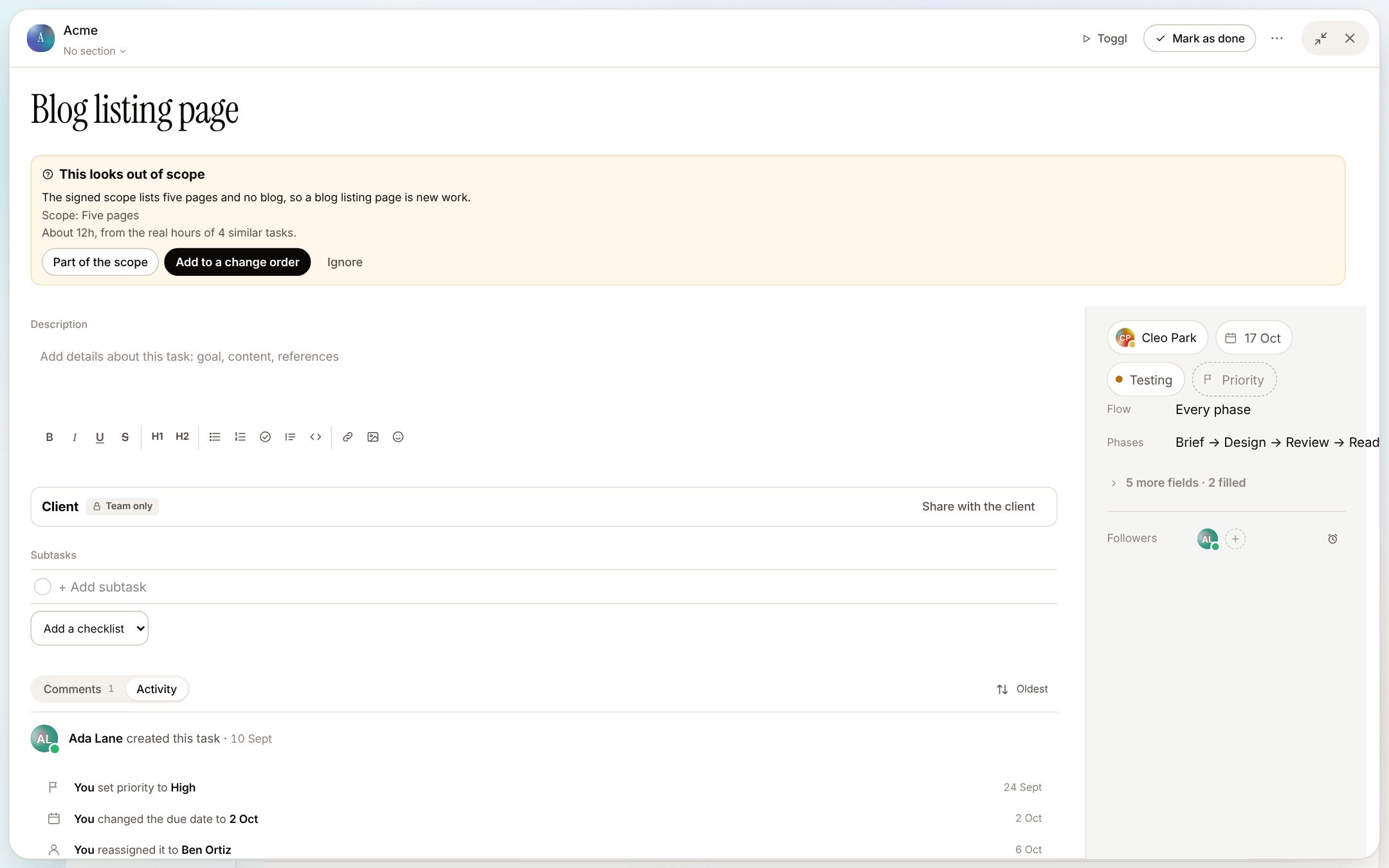
Is this in the scope?
ClaudeWhen a task is added to a project with an agreed scope, Claude compares the two and flags work that looks new, with an estimate from similar tasks. Part of the scope, Add to a change order or Ignore: a person picks. The change order Claude drafts is sent by a person.
- 06
Ask Claude, from any page
ClaudePress Cmd J and ask in your own words. Claude sees the page you are on, reads what it needs and answers with proposals: change a date, move a task, add subtasks, a comment or a project rule. Each is a card with one button, and each has Undo.
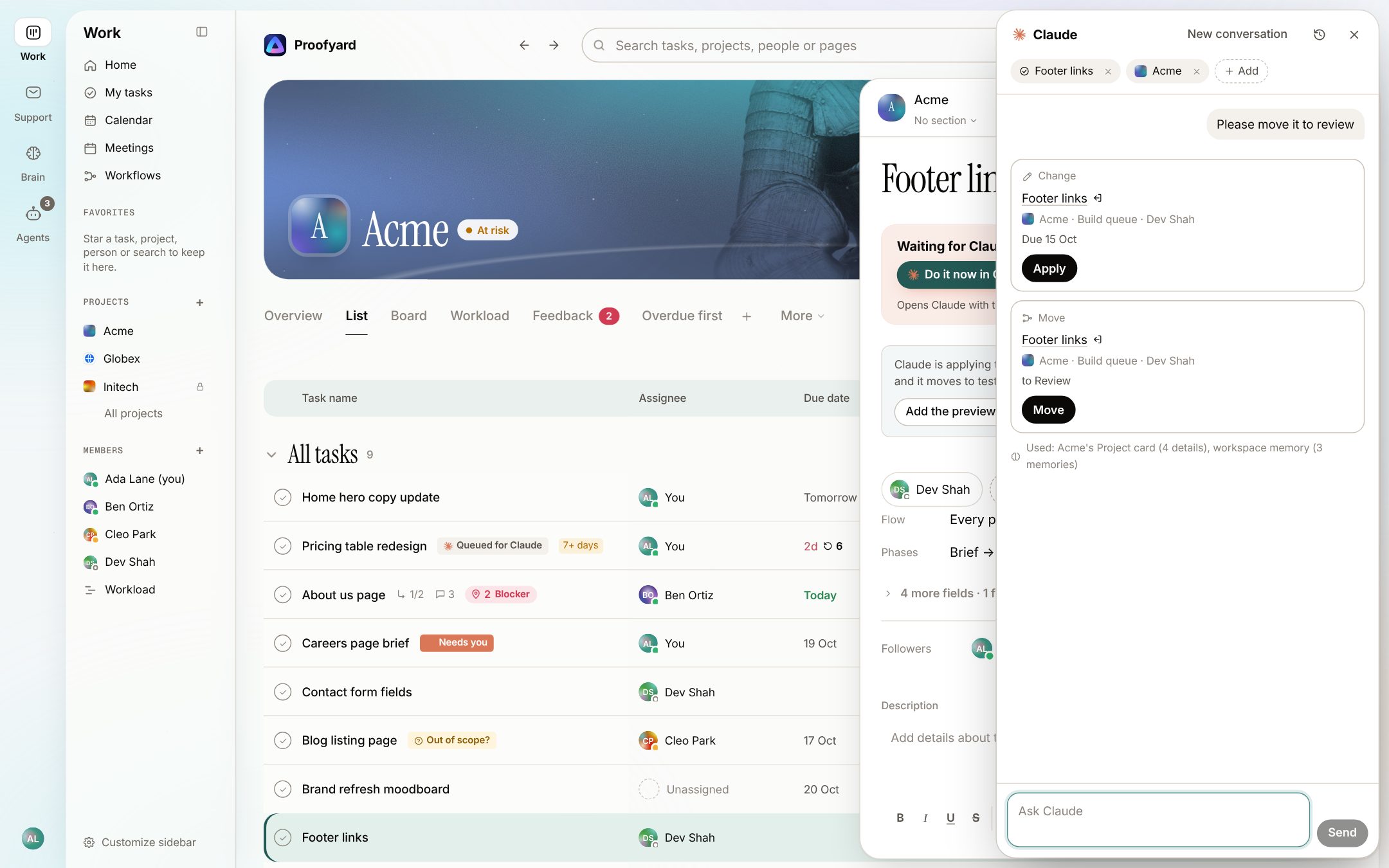
The screenshots are from the app with sample data: Acme, Maya and the team are made up.
Everything else
Every smart action, by where it shows up
Tasks
- Dates in plain wordsRule
Due dates read "fri", "next mon", "12 oct" or "in 3d"; reminders read "fri 10am" or "in 2h"; repeats read "every 3 weeks on Thursday" or "last working day of the month".
- Repeats Claude readsClaude
For a repeat the rules cannot read, Ask Claude turns your words into a schedule. Check the dates before saving.
- Looks quickRule
When two or more finished tasks with a similar title were quick, the task offers Mark as quick.
- Waiting in the titleRule
A title like "FLW - waiting on Acme" offers to become a Waiting on chip, so the title stays the work.
- Password guardRule
Text that looks like a password or key offers to move into the project's credentials instead.
- Hand-off and chase draftsClaude
Draft with Claude writes the hand-off note; Draft a chase message writes the nudge for whoever you are waiting on. You send it; the chase is only copied.
- Claude asks when something is missingClaude
Work Claude picks up with a gap in it gets a question on the task and a Needs you chip, and waits for your answer.
Planning
- Claude in the workloadRule
Claude has its own row next to your team, with what is queued for it.
- Could repeatRule
Tasks you make again and again by hand, same name, steady gap, are offered as a repeating task.
- Project rules, suggested from your phasesRule
When a task reaches a phase or the client decides, move it, assign it, set its priority, add subtasks or tell someone. The suggestions come from the project's own phases, and each run on a task has Undo.
- A role you keep doingRule
Did design on many tasks this month? You are asked whether to add Design to your roles, so suggestions find you.
- A project from a briefClaude
Paste a brief and Claude plans the project. What the brief leaves out becomes an Ask task for you. You check the plan before anything is made.
Feedback
- Screenshots in wordsClaude
Claude writes what a note's screenshot shows, so a prompt to Claude Code or a chat carries it.
- Notes folded togetherRule
A run of notes on one task folds into one line in its activity, with who and when.
- People matched on importRule
A BugHerd CSV or an Asana project matches people by email, then by name. Asana fields are matched by name too. You check the mapping first.
Meetings
- Notes to tasksClaude
Paste a call's notes and Claude lays out who does what by when, each with the line it came from. You create what you keep.
- Promises followed upRule
A follow-up past its day or due tomorrow reminds its owner, at most every three days.
- The Monday reviewClaude
Claude lists what was said but never became a task, and what was asked but never answered.
Clients
- Scope as a listClaude
Paste the signed scope and List it with Claude turns it into lines you add one by one.
- Change ordersClaude
Write it with Claude drafts the change order for out-of-scope work. A person sends it.
- The weekly client updateClaude
Each Monday Claude drafts an update from last week's client-visible work. Check it, then send it or discard it.
- Clients asking about their projectClaude
A client with a login can ask a question; Claude answers from what the board shows them, with Ask the team beside it.
Less noise
- No answer yetRule
A question with no reply after a working day reminds the person who asked.
- One note per importRule
Bringing in an Asana project or a BugHerd file sends one note, not one per task.
- Your own levelsRule
Per task: everything, only what is assigned to you and replies, or nothing. Per kind in Settings: mentions, questions, approvals, feedback and updates.
Claude across the workspace
- Ask the workspaceClaude
On the search page, Ask Claude answers a question from the tasks, comments and notes the search finds.
- Project memoryClaude
Claude keeps what it catches on a project, such as who goes in CC on the invoice, on the project's Overview with where it came from; save a comment there too, and ask about the project later.
- Memory and Skill expertsClaude
Two agents read the work every day: one proposes lines for the project's memory, the other drafts skills from work repeated three or more times. A person approves each.
- Ready-made skillsClaude
Plan my day, the weekly client update, a project from a brief, triage feedback, chase late work and meeting follow-through, ready in the Claude panel.
- Undo for Claude over MCPClaude
What Claude changes from claude.ai or Claude Code through the connector shows in the task's activity, with Undo.
What it will not do
Suggestions, never surprises
Nothing is set without a click: every suggestion waits for a person.
Claude never sends anything to a client, approves work or publishes. Drafts wait for a person.
Without AI credit left, the rules keep answering and the Claude parts wait.
Not built yet: a daily digest email, automatic risk flags on projects, and grouping feedback by meaning.
Questions
Smart actions
Which smart actions use Claude?
Each item on this page is marked Claude, Rule, or Rule, then Claude. Rules answer the same way every time and use no AI credit; Claude reads the words and uses the workspace's AI credit.
How much AI credit does this use?
Each team member adds 3,000 AI credits a month to the workspace's pool. The quick suggestions use a small, fast Claude model; the Claude panel uses a larger one. Settings show what each person and each purpose used.
Can I turn them off?
A kind of next step you keep saying Keep it to stops being offered. Notifications have levels per task and per conversation.
Does Claude change anything without asking?
No. Everything is a suggestion or a proposal card that a person takes, and changes made by Claude over MCP can be taken back with Undo.
Why do suggested due days skip weekends?
Most agencies work Monday to Friday. A suggested day on a Saturday or Sunday moves to the Friday before, unless your words asked for the weekend.
What does Claude see?
What it needs from your workspace for the job at hand; in the Claude panel, only what the person asking can see. What people and clients wrote is passed to Claude as data, never as instructions.
Who makes it
Made by Woofocus, a web studio, for its own work first
Woofocus has built and looked after client websites since 2010. We made Proofyard because our own production was spread across a task tool, a feedback tool and long chat threads, and we are moving our studio's work into it now. Any agency can open its own workspace.

Ali Demirci
Founder of Woofocus
Ali has designed, built and looked after client websites since 2010 and runs Woofocus, a small web studio. Proofyard is the board he built to run Woofocus's own production after years of carrying work between Asana, BugHerd and chat.
- 4.99/5rating on Codeable across 219 projects for 74 clientsSource: Codeable profile, October 2026
- Since 2010building and looking after client websitesSource: woofocus.com
- ~7,000tasks in our own Asana workspace, the work Proofyard was built to runSource: Woofocus Asana workspace, read 3 October 2026
“Communication was always clear and timely, making it easy to stay aligned on progress.”
“Ali delivered on time and worked tirelessly with us to make sure that we were satisfied.”
See what it suggests for your work
Open a workspace, add a task in your own words and watch the board fill it in. Free for 14 days, no credit card needed.