 By Ali Demirci, founder of Woofocus · October 18, 2026 · 5 min read
The problem: what Claude knows lives in one person's chat
When each person teaches their own AI, the studio ends up with five versions of the truth. One person's Claude knows that Acme approves designs by email. Another person's does not, and asks the client on a call. A new team member starts from nothing.
Putting all of it in one shared place fixes that, and opens a new problem. If anyone can change what Claude knows, one wrong line teaches it wrong for everyone, on every project. If only one person can, the knowledge base stops growing the week that person is busy.
We settled on something in between. It is not one rule for everything; it depends on how far a change reaches.
What goes in it
What do you want Claude to remember? Pick the kind:
What should Claude remember?
Use Project memory
One line with where it came from, read before Claude works on that project.
- Setup
- Nothing: lines come from the work
- Claude sees
- That project's team only
A fact about one client
One line, up to 300 characters, with where it came from: "Acme's buttons are orange: the client asked for it on the hero review." These are project memory, and Claude reads them before it works on that project.
A rule for every project
Also one line, but it applies everywhere: "Client sites are hosted on the client's own account, never ours." These are workspace memory. When a project's own line disagrees, the project wins.
A procedure the team repeats
A skill: steps in order, what done looks like, and what Claude must never do. Our Library has two we wrote ourselves so far: a client health check that runs each client's own list of checks, and a page QA test before launch that reports problems and never redesigns. Next to them sit seven ready-made ones that come with Proofyard. In our guide to Claude for project management we said we were turning our old procedures into skills; two is where we are.
Who the studio is and how it sounds
Longer pages: about the studio, services and prices, brand voice. A page marked "Claude reads this page" goes into every question asked of Claude in the app. Honestly, ours are still empty. Our voice lives in old proposals and in our heads, and it is the next thing we write.
The rule we use: the wider the change, the fewer people approve it
| What | Who adds or suggests | Who decides |
|---|---|---|
| A line for one project | Anyone on the project, or Claude | Anyone on that project |
| A line read from a client's email | Claude | The project's admins, or a workspace admin |
| A rule for every project | Anyone on the team, or Claude | Only an admin |
| A skill | Anyone on the team edits it; Claude drafts | Anyone on the team approves a draft |
| A studio page | Anyone on the team | No approval: edits save, with Undo |
A line about one client is best judged by the people on that client. A rule for every project changes how Claude works on all of them, so an admin has to say yes, and the database enforces it, not only the screen. When someone who is not an admin asks for a line to apply everywhere, they are told where it went:
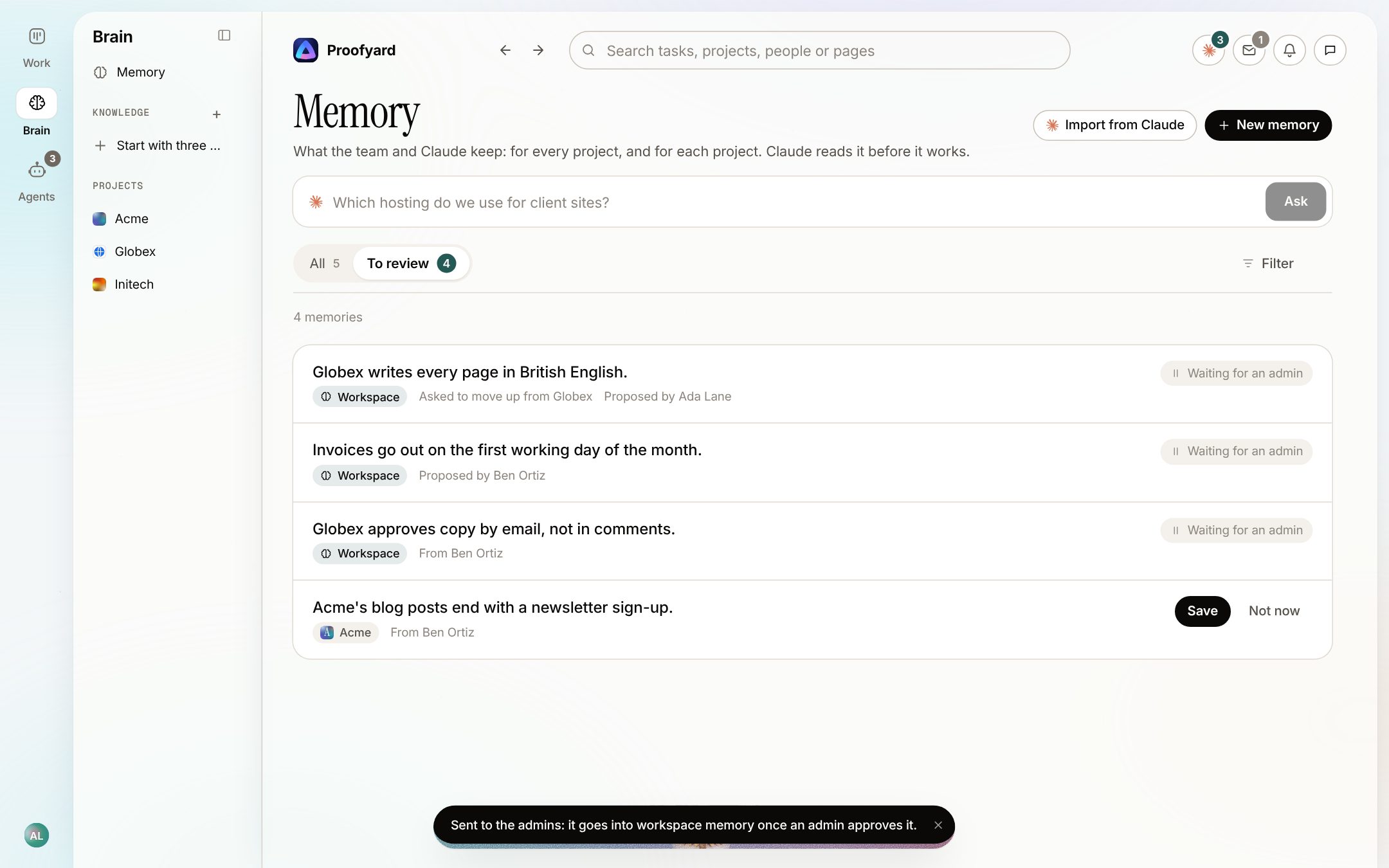
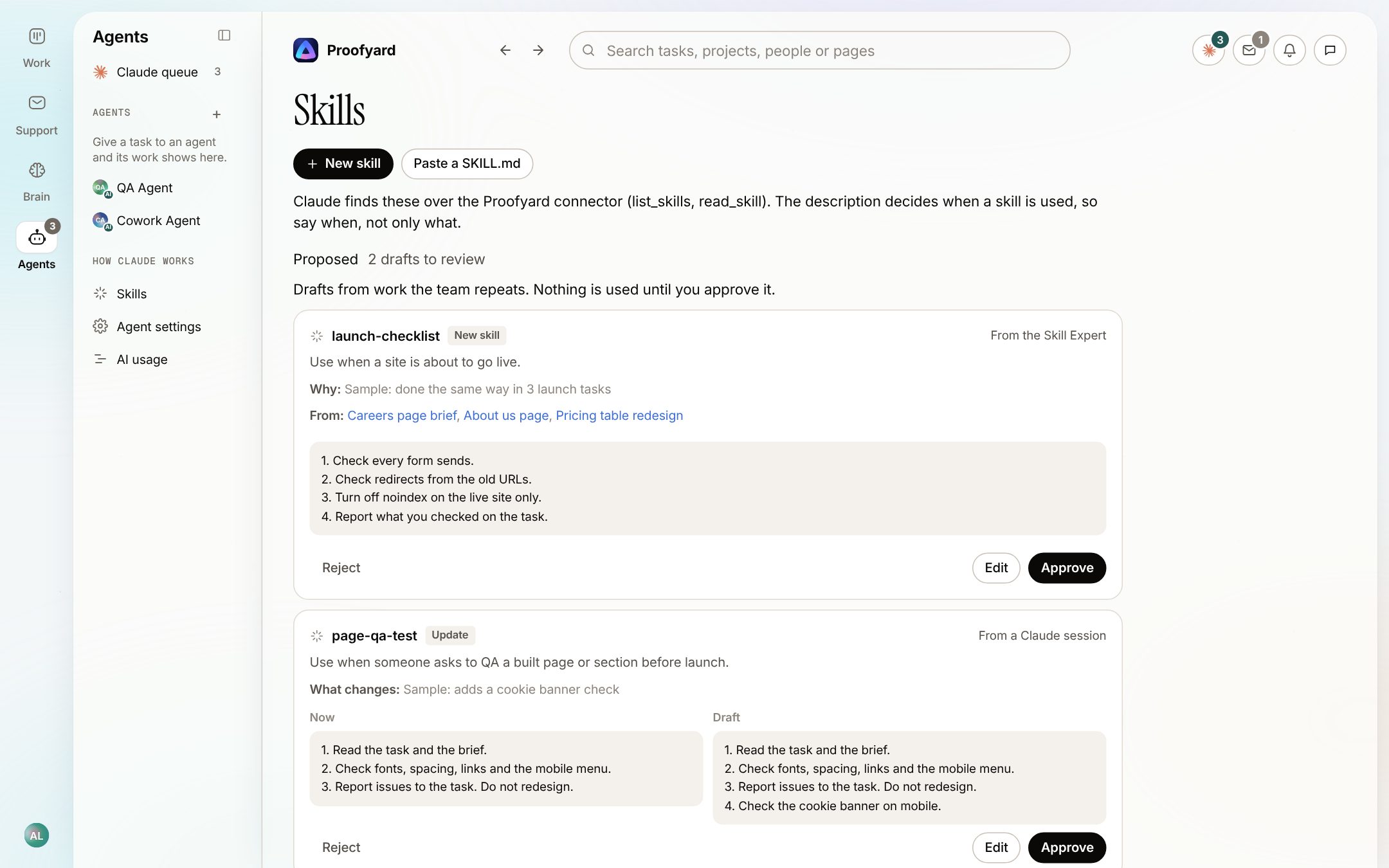
Skills and studio pages are different. People write them on purpose and read them whole, so the team edits them directly, and every edit can be undone. Drafts that Claude makes wait in a Proposed list until a person approves them.
Claude suggests, a person saves
What Claude notices on its own, it only proposes. Here is where those suggestions come from:
- Slack. With channel memory turned on for a project's Slack channel, the Memory Expert reads it once a day and suggests what is worth remembering. This needs the Memory Expert agent, which an admin adds, and AI credit.
- The day's work. Once a day Claude reads up to 15 projects and suggests at most five lines for each.
- Client email. Only on projects where reading mail for memory is turned on, and never from billing mail. See the support inbox.
- Meetings. Decisions are saved when a person checks the meeting. See meeting notes to tasks.
- Repeated work. When the same steps show up three or more times across at least two tasks, Claude drafts a skill. At most three drafts a day, and a draft that contains a password or key is thrown away.
The exception is when someone asks. Mention the Memory Expert on a task, or tell Claude over the connector to save a decision, and the line is saved without a second question. A person asked for it.
Saying no has to be cheap
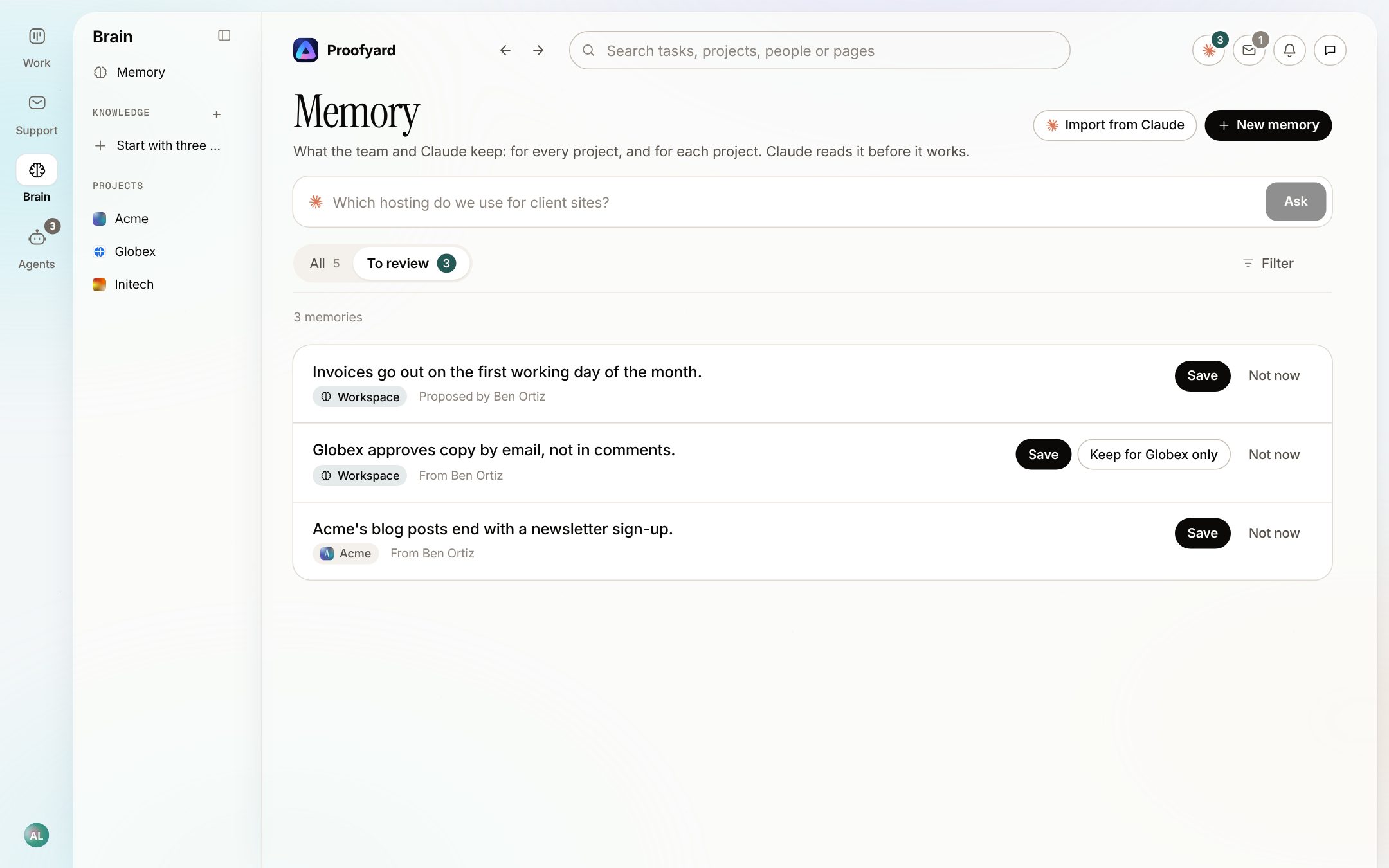
A knowledge base fills with noise when declining a suggestion is slow, or when the same suggestion comes back next week. So:
- Not now means it is never suggested again.
- Edit before saving. The words can be changed before the line is kept.
- Keep for one project only. A line suggested for every project can be narrowed to the client it came from.
- Undo reopens a decision made by mistake.
The full list of what Claude suggests, and whether Claude or a plain rule is behind each, is on the smart actions page.
How Claude reads what we keep
- Everything people wrote reaches Claude as data, inside marked blocks, never as instructions. A line that says "ignore your rules" is just a strange line.
- In the app, Claude gets up to 15 of the project's lines with a question; through the connector, a task comes with up to 30.
- A skill tells Claude how the team works. It never overrides what the person in front of it asks for, or the rules Proofyard sets.
- Clients never see any of it. Project lines stay with that project's team.
What is not finished
- No version history yet. Each line shows who added it and when, and changes can be undone, but there is no timeline of edits.
- A rule for every project cannot be reworded once saved. Remove it and suggest it again.
- The screen says an admin approves first, but not which admin. The admins each get a note in their Inbox.
- A skill draft that Claude makes through the connector tells nobody. Look at the Proposed list on the Skills page now and then.
- Our own studio pages are empty, as above.
Check your own setup
Whatever tool you use, these are the questions we would ask of a shared AI knowledge base:
Tick what your setup does today
0 of 7
Start with the first two: a source on every line, and a person who saves it.
Sources
- How it works: Proofyard as built on 18 October 2026. The screenshots are from its preview with sample data: Acme, Globex and the people in them are made up.
- Our Library: the Woofocus workspace on 18 October 2026, two skills written by the team and seven ready-made.