Feature
A client portal your clients understand
Clients see what waits for them, approve a design with the pins beside it, and follow their project in plain stages. They never see your internal notes.
Client area
Fewer "where are we?" emails, and approvals on the record
Between calls a client wants three things from you: where the project stands, what you need from them, and one clear place to say yes. When the answers live on an internal board, someone on the team writes them into an email, again and again.
In Proofyard, clients you invite get their own area. It shows what waits for them, their projects in plain stages and the updates you chose to share. Everything else on your board stays with the team, and the database enforces it, not only the screen.
- 01
What waits for them comes first
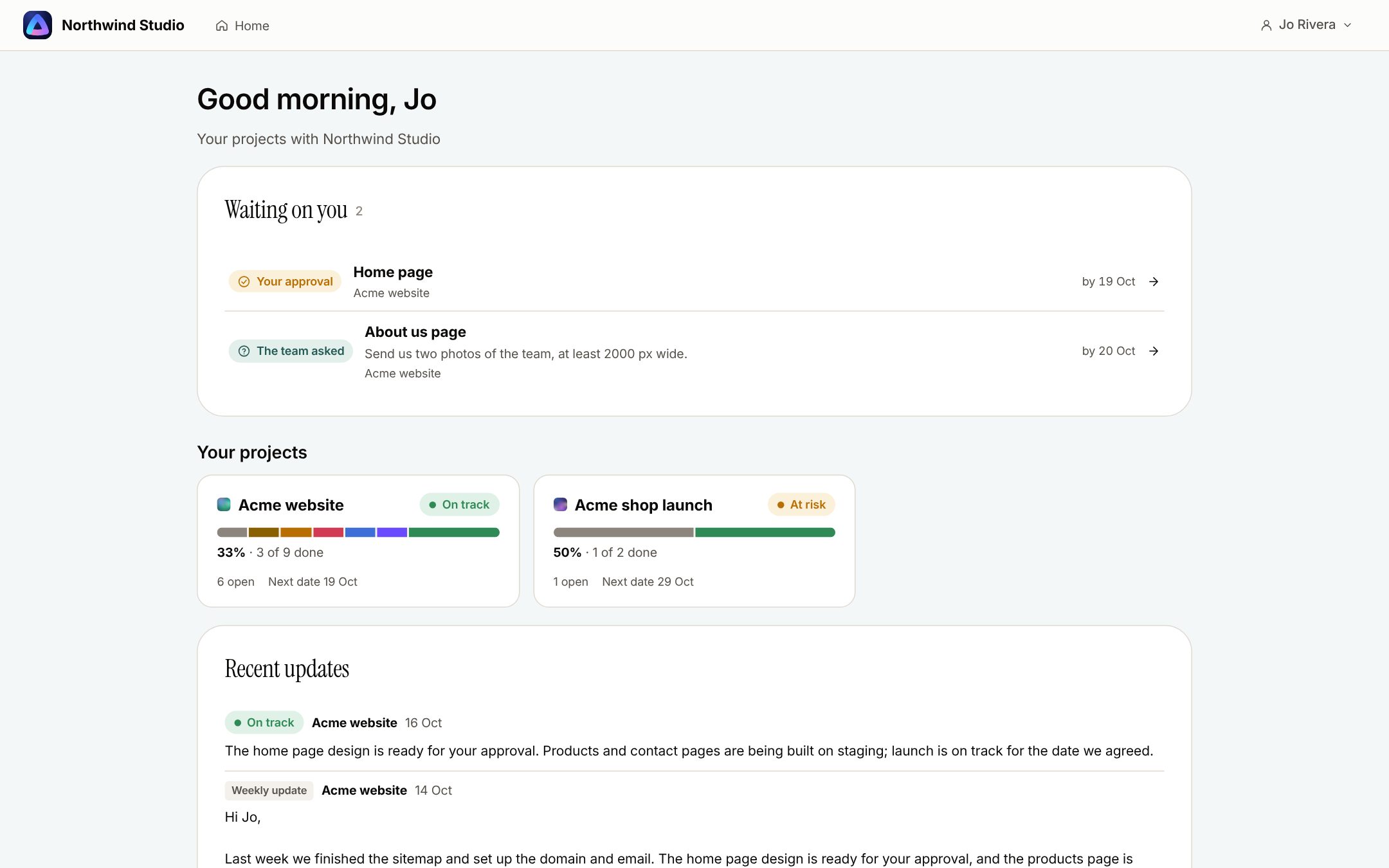
The client's home starts with Waiting on you: approvals first, then the team's questions with their dates. Below are their projects with progress and the next date, then the updates you shared.
- 02
Approve with the design beside it
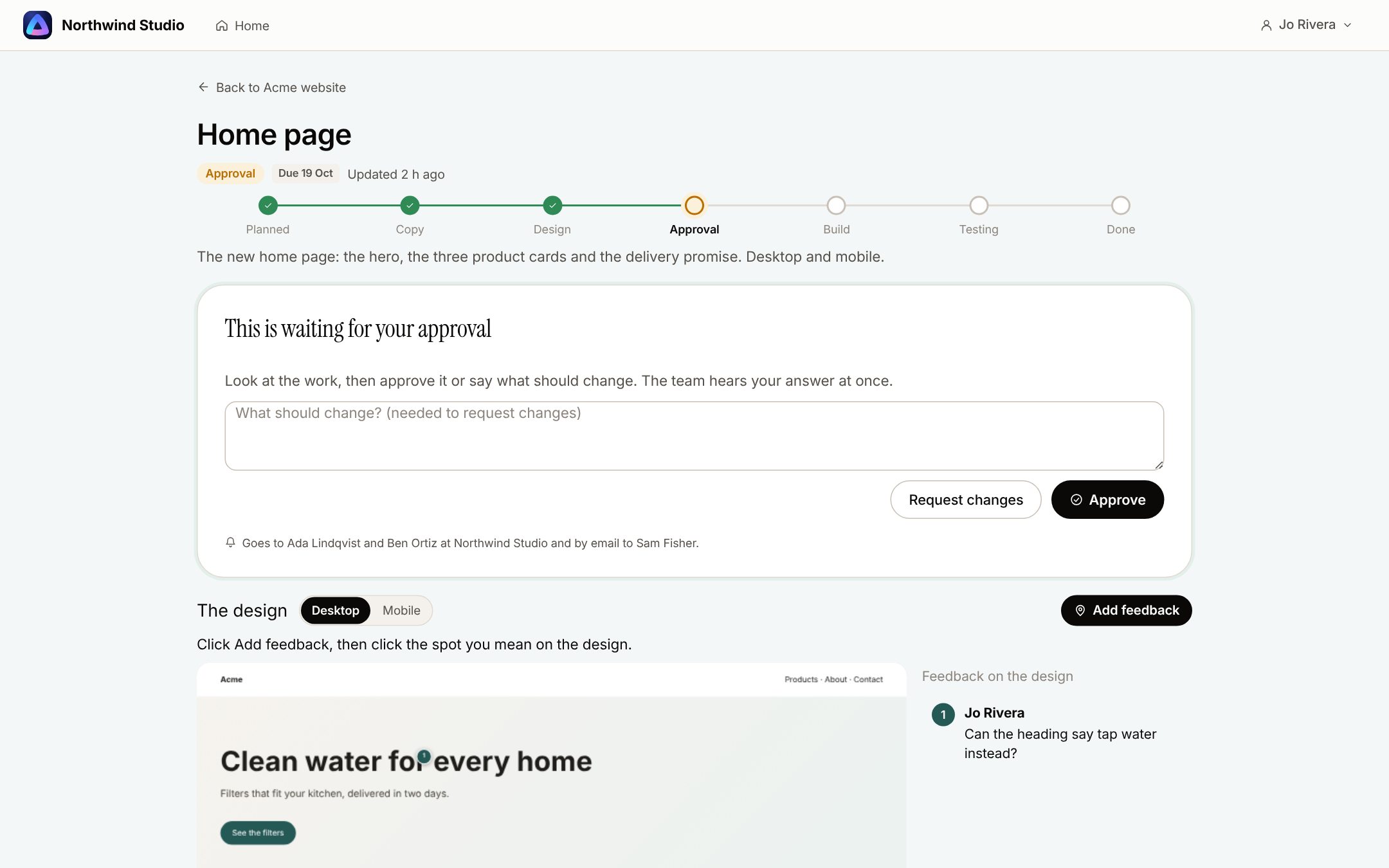
A task shows its stage, the design with its pins, and Approve or Request changes; asking for changes needs a sentence. Before they answer, the page says who will hear it. An approval is recorded with the design version and moves the task to its next phase.
- 03
Progress without your phase names
The project page lists open work by section with a stage line for each page, and folds away what is done. Ask about this project gets an answer from Claude that uses only what their board shows; Ask the team sends the question to your Inbox.
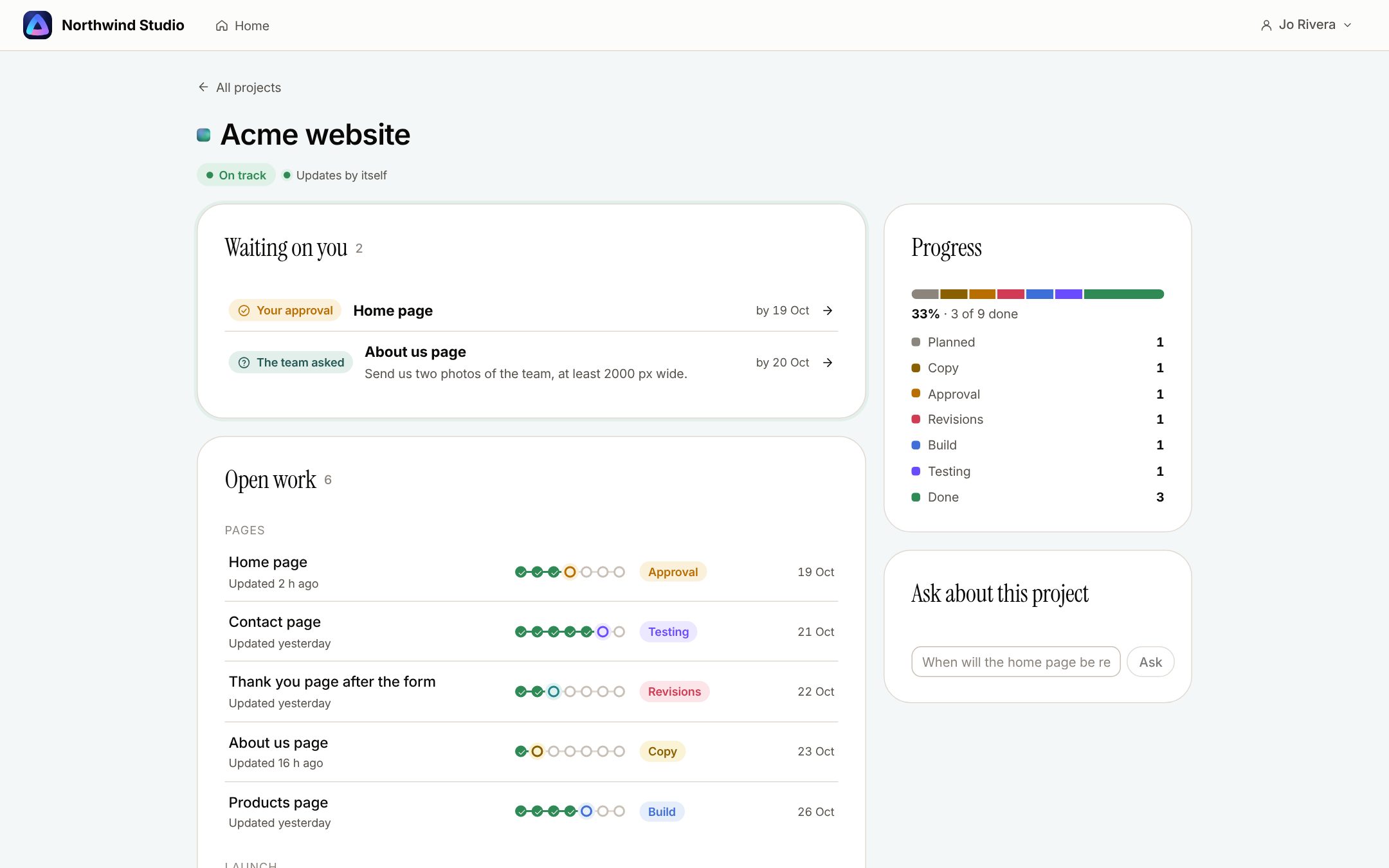
The screenshots are from the app with sample data: Acme, Maya and the team are made up.
Where agencies use it
The moments a client has to act
Design sign-off
The client approves the page they are looking at, and the record keeps which version that was.
Asking for content
Ask for photos, logins or copy by a date. It shows under Waiting on you, and each client gets one email about it.
Status updates
Share a project status update with the client in one click. Updates stay with the team until someone shares them.
A one-off reviewer
Someone who will never log in gets a review link instead: 30 days, no account, a name and email to comment or approve.
Inviting a client
Type up to 20 email addresses at once. The invitation link lasts 7 days, and if an email cannot be sent you get the links to pass on yourself.
Checking before you invite
View as client shows the area exactly as they will see it.
What it will not do
Honest limits
Clients cannot upload files from their area yet. Their replies are text.
It does not update live: the page refreshes every 30 seconds and when they come back to it.
Your own logo and colours on the client area are not built yet.
Anyone holding a review link can approve from it, so send those links only to the people who decide.
Questions
Client area
Do clients need an account?
For the client area, yes: they sign in with a link sent to their email, with no password. For a single review, a review link works without one.
What can a client never see?
Briefs, assignees, estimates, internal comments, what Claude is doing, unshared updates, your workflows and other clients' projects.
Do clients cost extra?
No. Clients and reviewers are free.
What happens after an approval?
It is recorded with the design version, the task moves to its next phase and goes to that phase's default person, and the team hears about it in their Inbox. Claude never approves on anyone's behalf.
Who makes it
Made by Woofocus, a web studio, for its own work first
Woofocus has built and looked after client websites since 2010. We made Proofyard because our own production was spread across a task tool, a feedback tool and long chat threads, and we are moving our studio's work into it now. Any agency can open its own workspace.

Ali Demirci
Founder of Woofocus
Ali has designed, built and looked after client websites since 2010 and runs Woofocus, a small web studio. Proofyard is the board he built to run Woofocus's own production after years of carrying work between Asana, BugHerd and chat.
- 4.99/5rating on Codeable across 219 projects for 74 clientsSource: Codeable profile, October 2026
- Since 2010building and looking after client websitesSource: woofocus.com
- ~7,000tasks in our own Asana workspace, the work Proofyard was built to runSource: Woofocus Asana workspace, read 3 October 2026
“Communication was always clear and timely, making it easy to stay aligned on progress.”
“Ali delivered on time and worked tirelessly with us to make sure that we were satisfied.”
Invite one client to one project
Open a workspace, add a project and look at it with View as client before you send the invitation.