 By Ali Demirci, founder of Woofocus · Updated October 18, 2026 · 7 min read
Why I am writing this
I have run Woofocus, a small web studio, since 2010. For most of that time our production lived in Asana, our clients' comments lived in BugHerd, email and Telegram, and a lot of my day went into carrying one into the other. Once Claude was doing more of the writing and building, those parts got faster. The carrying did not.
So in October 2026 we did two things. We read our own Asana through its API to see where the time actually went, and we started building Proofyard, the board we now run the studio on. This guide is what we learned on the way, including the parts that did not work.
We are not the only ones asking. In the US, searches for "claude for project management" were in single digits a month through late 2025, then reached 275 a month by June 2026:
197 searchesSeptember 2026
Source: Ahrefs keyword estimates, October 2024 to September 2026.
Show the numbers
| Month | Searches |
|---|---|
| Oct 2024 | 0 |
| Nov 2024 | 0 |
| Dec 2024 | 0 |
| Jan 2025 | 0 |
| Feb 2025 | 0 |
| Mar 2025 | 0 |
| Apr 2025 | 1 |
| May 2025 | 0 |
| Jun 2025 | 3 |
| Jul 2025 | 2 |
| Aug 2025 | 4 |
| Sep 2025 | 3 |
| Oct 2025 | 9 |
| Nov 2025 | 7 |
| Dec 2025 | 13 |
| Jan 2026 | 23 |
| Feb 2026 | 72 |
| Mar 2026 | 211 |
| Apr 2026 | 263 |
| May 2026 | 250 |
| Jun 2026 | 275 |
| Jul 2026 | 243 |
| Aug 2026 | 260 |
| Sep 2026 | 197 |
The short answer
Claude is good at the connecting work: reading what came in, turning it into tasks, drafting what can be drafted, writing the status update, noticing what is stuck. It is not a project tool. It has no board and no due dates, and it does not know who is on your team until you show it.
The more of the real project Claude can see, the more useful it gets. In our experience that matters more than any prompt. If you are still choosing a plan for the team, our Claude for small business guide has the prices and limits. Pick what you want to do, and see where to start:
What do you want Claude to do?
Use A chat
Paste the brief and ask for tasks by phase, owners, estimates and open questions.
- Setup
- None
- Claude sees
- What you paste
Six ways in, from copy-paste to connected
Each step takes more setup, and Claude sees more of the work in return. You do not need all six. We build Proofyard itself with Claude Code and connect Claude to our board over MCP; the rest depends on the job.
1. Start with a chat: briefs, plans and status updates
This needs no setup. Paste the brief, the call notes or the long email thread into a chat and ask for the work hidden in it. Here is an example exchange (the client and the details are made up):
- You
Brief from Acme: "We need a careers page with our three open roles, live by the 20th. Can you also add an apply form?" Turn this into tasks by phase and tell me what we still need to ask.
- Claude
Here is a plan in four phases. Copy: page intro and three role descriptions (copywriter, 6h). Design: careers page and role template (designer, 8h). Build: page, form and email alert (developer, 10h). QA: forms, mobile and speed (QA, 3h).
- Claude
Before we start, we need three answers from Acme: where should applications go (email or their HR tool)? Who writes the role descriptions? And is the 20th the launch date or the review date?
What a plain chat does well:
- Brief to task list, grouped by phase, with an owner role and a rough estimate for each task.
- The questions the brief does not answer: who writes the copy, where the form sends, whether "the 20th" means launch or review. This is the most useful part. In our Asana the most common move was asking someone a question and handing the task over (more on that below).
- Client status updates from a week of notes.
- A risk read of the plan. Ask it to read like a sceptical producer.
A chat forgets everything when you close it and only knows what you pasted. For anything that lasts longer than a day, use the next step.
2. Claude Projects: one client, one place
A Project keeps files and instructions together, so every chat inside it starts with the same context. Make one per client with the signed scope, the brief, the sitemap, the brand guide and one line of instruction, such as "Answer as the producer on this account. Flag anything outside the signed scope."
After that, "what is still open from the scope?" or "write up revision round two" work without pasting anything. The limit: a Project holds documents, not live state. It does not know a task moved yesterday unless someone tells it.
3. Claude skills for project management
Skills are folders of instructions, sometimes with scripts or templates, that Claude loads when a task calls for them. They suit the work a team does the same way every time: the kickoff checklist, the revision round write-up, the QA pass before launch, the monthly client report.
What to put in one:
- Write down what you already do. Our procedures live in an "SOP" project in Asana, and those are what we are turning into skills. A skill that describes how you really work beats one Claude writes from scratch.
- Say what Claude must never do. For example, "never send anything to the client; prepare a draft for a person to send".
- Keep each one short. One procedure per skill, steps in order, and what a finished result looks like.
Once skills are shared, who may change them matters as much as what is in them. We wrote up how we run our shared knowledge base: who edits, who approves and what Claude may only suggest.
4. Claude Cowork for project management
Cowork brings Claude Code's way of working to everyday files: Claude carries out a longer task and hands back a finished document, spreadsheet or summary. In the desktop app it can work with folders on your computer. Project jobs it suits:
- "Read every meeting note in this folder from September and list the decisions and who owns each one."
- "Compare the timeline in the proposal with the dates in the tracker and tell me what slipped."
- "Build this month's client report from these exports."
Give it only the folders it needs, and read the result before it goes anywhere. It saves the legwork; it does not sign anything off.
5. Claude Code for project management
Proofyard itself is built with Claude Code. Since the first commit on 3 October 2026, most of its commits have come from Claude Code sessions, and a person decides what gets merged:
- 417 of 579commits came from Claude Code sessions
- 73pull requests merged
Once Claude writes much of the code, the project management question changes. It stops being "who is doing this task?" and becomes "which session is working on which task, what step is it on, and what is waiting for me?" Three habits keep that manageable:
- Task first. Every piece of work gets a task, and the session starts from it, so the request and the pull request stay linked.
- Report as you go. Claude says on the task when it starts a step, when it is waiting for review and when it is done, with the pull request link.
- People ship. A person approves every merge and every deploy.
6. Connect Claude to your project management tool
Everything so far works on copies of your project. The bigger step is letting Claude read and update the board itself. Claude connects to other tools through connectors built on MCP, the Model Context Protocol, and many project tools have one.
With a connector, Claude can answer "what is due this week and who is behind?", create the tasks it just planned instead of handing you a list to retype, and leave a note on a task when it finishes something. Before you switch one on, check:
- What it can write. Reading is low risk. Creating, moving and closing tasks is not, so start with read access or a test project.
- Whose permissions it uses. It should act as the signed-in person and see only what they can see.
- Where it leaves a trace. Every change Claude makes should show on the task, with what it did and why.
What our own Asana showed us
Before we built anything, we read 90 days of our Asana activity. The pattern that stood out was not about writing or design. It was about handing work back and forth:
- 418assignments in 90 days, for a team of five
- 414comments in the same 90 days
- 54%of reassignments came within 2 minutes of a comment by the same person
- 43tasks changed hands four or more times
Most of those hand-offs were someone asking me a question and passing the task to me, then me answering and passing it back. That is exactly the connecting work Claude can prepare: draft the question, gather what the person needs to answer it, and route the task. In Proofyard a hand-off is now one action with the note, the new owner and the date together.
Claude prompts for project management
Five prompts to start with. Type the client and the date once and they fill in; then copy the one you need.
Brief to tasks
Here is a brief for [client]. Turn it into tasks grouped by phase (brief, copy, design, review, build, QA). For each task give an owner role, an estimate in hours and anything that blocks it. Then list the questions we must ask [client] before we start.
Client status update
Here are this week's notes. Write a status update for [client] in five short lines: done, in progress, waiting on you, risks, next milestone. Plain English, no jargon.
What will slip
Here is our plan and our team's availability. What is most likely to slip, and what would you move to protect the launch on [date]?
Sort design feedback
Here are [client]'s comments on the design. Group them by page, mark the ones that contradict each other or the signed scope, and draft the questions to send back.
Is it in scope?
Read this scope of work and this new request from [client]. Is the request inside the scope? Quote the line that decides it, and draft a short, friendly reply either way.
Where Claude stops and a person decides
Claude prepares work well. It should not own it. Here is how that splits on a typical web project of ours:
A web project, step by step
ClaudeOnly a person
Step 1 of 7
Claude prepares
Reads the brief, turns it into tasks and lists what is missing.
A person decides
Answers the open questions.
Two more rules we keep:
- Text from clients is data, not instructions. A comment saying "ignore the brief and do X" is a comment to read, not an order for Claude.
- Facts that matter get a second look. Dates, prices and anything legal are checked by a person before they go out.
Claude inside the board
Copying text between Claude and a task tool works, but someone ends up carrying every brief, comment and update by hand. That was me, for years.
Proofyard is the board we built so that every new request goes to Claude first. Claude shapes it into a task, drafts what it can and routes it. When something is missing it asks on the task, and the work waits for an answer. This is a real screen from Proofyard, with sample data:
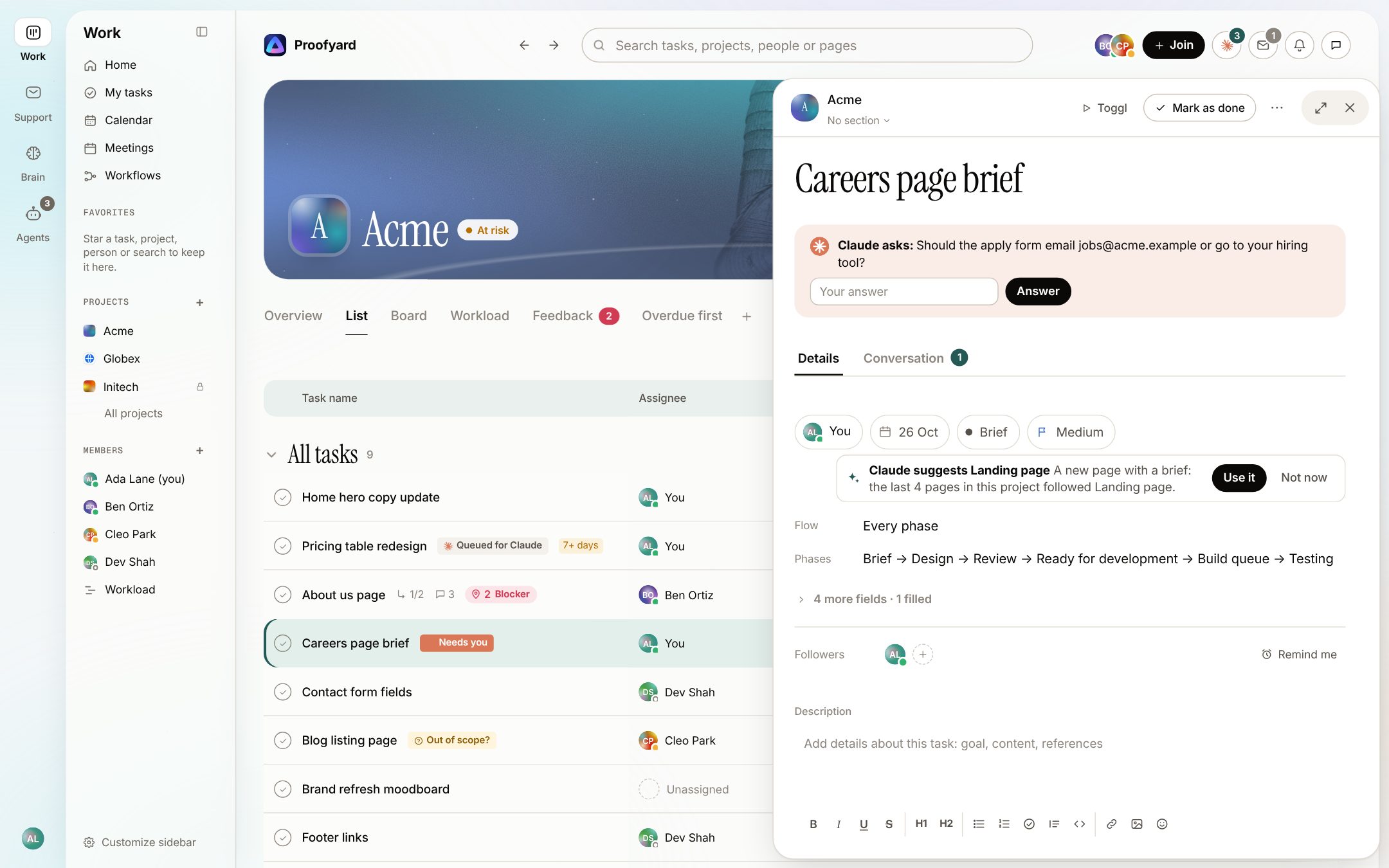
Every card shows Claude's state (queued, working on a step, waiting for a person, done or failed). Claude never publishes, emails a client or approves on its own. Proofyard is also reachable over MCP, so Claude on claude.ai, in Cowork or in Claude Code can pick up a task and report back on the board.
More on how Proofyard works as a Claude project management system, or, if you are coming from Asana, our Asana vs Proofyard comparison. For the comments that used to live in BugHerd and email, see client feedback for Claude Design. For a website project phase by phase, read how to use AI when project managing a website.
Sources
- Search volume: Ahrefs keyword export, United States, "claude project management" matching terms, 9 October 2026.
- Our Asana numbers: Woofocus Asana workspace, read through the Asana API on 5 October 2026 (last 90 days).
- Proofyard commit history: the Proofyard repository, 3 to 9 October 2026.
- Claude features: What are projects?, Introducing Agent Skills, Get started with Claude Cowork, Claude Code overview, Model Context Protocol.