 By Ali Demirci, founder of Woofocus · Updated October 17, 2026 · 6 min read
Where the time goes in a website project
The making of a website is the part everyone plans for. The time goes somewhere else: into carrying things between people. A client's comment has to become a change for the designer, an approval has to reach the developer, a date has to move when the copy is late.
When we read 90 days of our own Asana through its API in October 2026, due dates had been changed 868 times, 756 of them pushed later, by a median of 5 days. 54% of reassignments came within two minutes of the same person writing a comment, which usually meant "I asked you something, so it is yours now". None of that is design or development. All of it is project management, and most of it is the kind AI handles well.
So the useful question is not "can AI manage a website project?" It is which parts of the managing it should do, and which parts stay with a person. (If you run the studio rather than one project, our shorter piece on AI for web design agencies starts from the owner's side.)
If you already know where your projects hurt, start there:
Where do your website projects lose the most time?
Use Let AI find the gaps in the brief
A list of questions on day one beats a blocked designer in week two.
- Setup
- The brief and the scope
- Claude sees
- What the client sent
The rule we work by
AI prepares, a person decides. In practice that means:
- AI reads and drafts. Briefs, notes, comments, scopes and transcripts are text, and reading text is what AI is good at.
- AI suggests, with one click to take it. Who should do a task, when it is due, what to do next after a comment.
- A person approves, sends and publishes. Nothing reaches the client, and nothing goes live, without someone pressing the button.
Here is how that splits across a typical project:
A website project: what AI does, what a person decides
ClaudeOnly a person
Step 1 of 7
Claude prepares
Turns the brief into tasks and lists what it does not say.
A person decides
Decides which gaps to ask the client about.
Phase by phase
1. Brief and discovery
A client brief is rarely complete. The first job is to find what is missing before anyone starts.
Give AI: the brief, the sitemap if there is one, and the signed scope. Ask it to turn the brief into tasks by phase and, more usefully, to list what the brief does not say: who writes the copy, where the form sends, which pages need a mobile layout.
Keep for a person: which of those gaps you ask the client about now, and which you decide yourself.
In Proofyard, pasting a brief into a new project gives you Claude's plan, and every gap becomes an "Ask" task for you. When Claude picks up work with something missing, it asks on the task and marks it Needs you instead of guessing.
2. Planning the work
Most planning is small decisions made many times a day: who takes this, when is it due, how urgent is it.
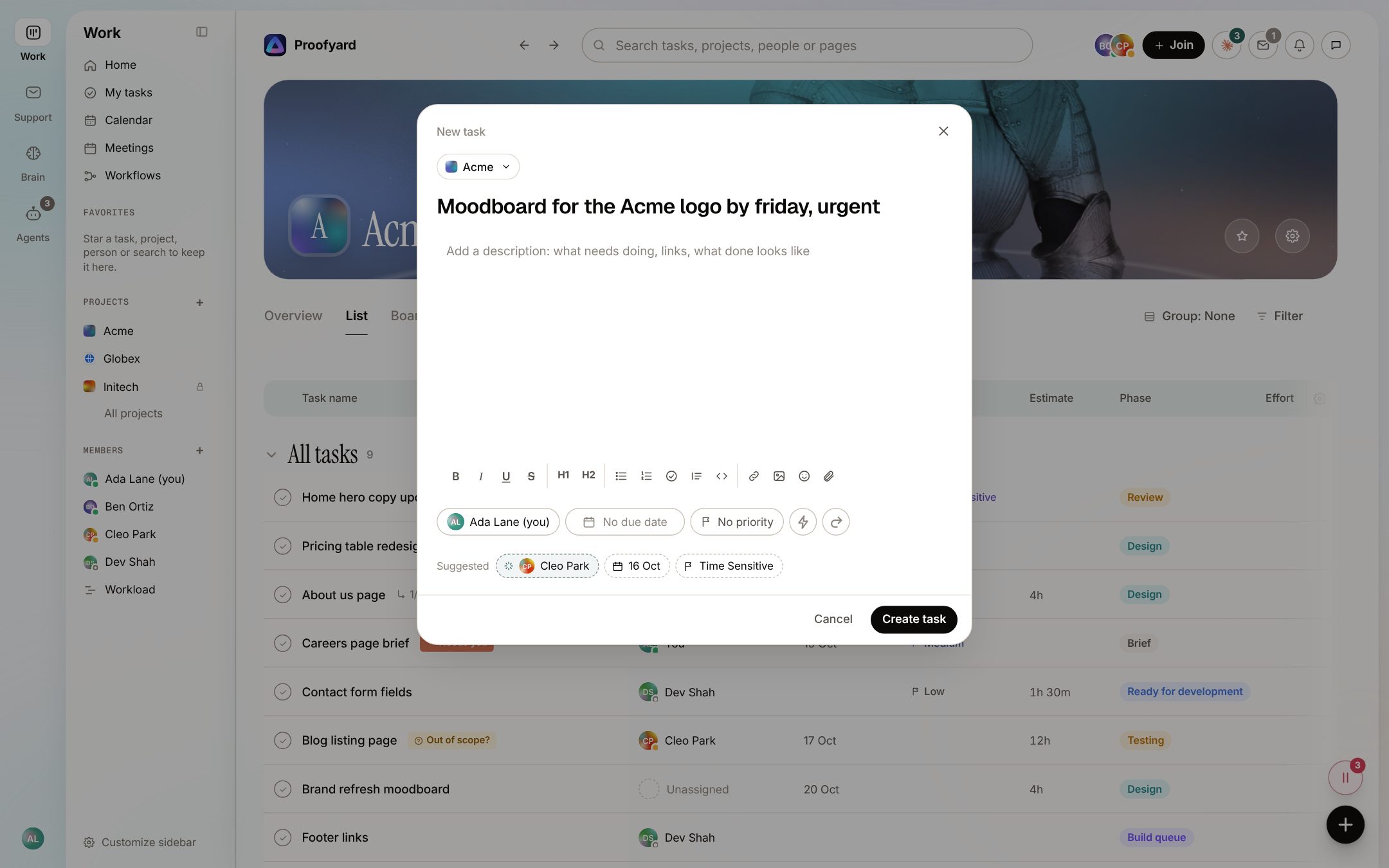
Give AI: the task in plain words and your team's roles. A good assistant suggests the person whose role fits, the day you mentioned and the priority your words imply. Check one thing: suggested dates should be working days. Ours moves a Saturday to the Friday before, because nobody on a web team wants a deadline on a weekend.
Keep for a person: the final call on each one, and anything that moves a launch date.
This is where smart actions do most of their work in Proofyard: a new task fills in who, when and how important from its words, and stops suggesting for any field you set yourself.
3. Content and copy
Give AI: the first draft of each page, section by section, with the brief and a few lines of the client's own writing for voice.
Keep for a person: facts, prices, names and claims. AI writes confident sentences about things it does not know, and a client will notice a wrong opening time faster than a weak headline.
4. Design
With Claude Design, a first version of a page can exist the same afternoon as the brief. That changes project management more than it changes design: there are more versions, sooner, and each one collects feedback.
Give AI: the first boards, and a summary of what changed between versions.
Keep for a person: the direction. Choosing between two layouts is a judgement about the client, not a reading task.
5. Feedback and revisions
This is the phase that used to eat our weeks. Before we built our own board, client comments lived in BugHerd, email and chat, and someone had to collect them, work out which version they were about and pass them on.
Give AI: every note with its context: the page, the element, a screenshot and the device. Then ask it to group the notes by page, flag the ones that contradict each other or the scope, and draft the questions to send back.
Keep for a person: which notes to act on, and every reply the client reads.
In Proofyard, clients pin notes on the Claude Design board from a review link, or on the staging site through a small script, with no account. The notes land on one board, and Send to Claude hands them to Claude Code with screenshots. More on client feedback for Claude Design.
6. Scope and change requests
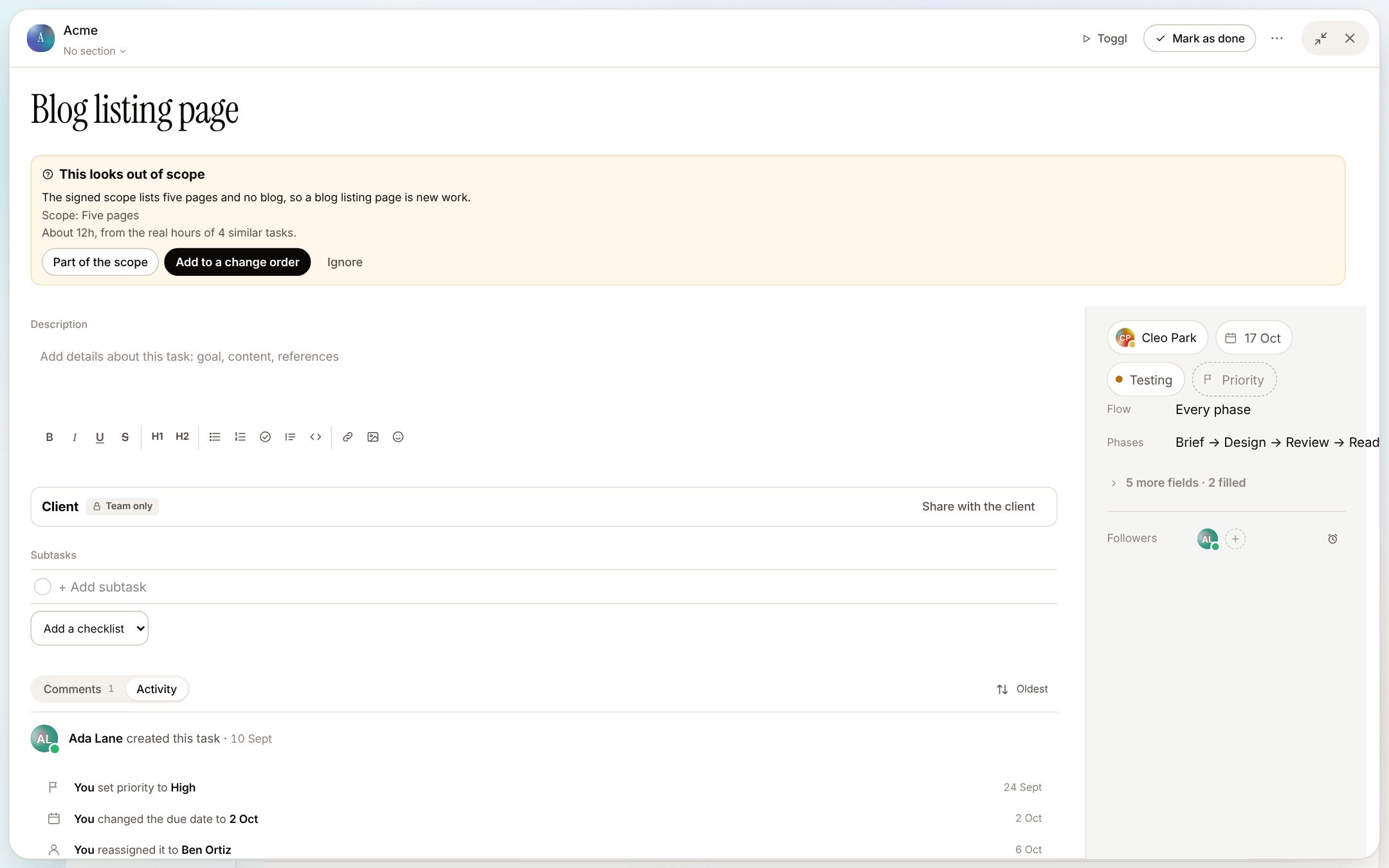
"Can we also add a blog?" arrives around week three of most of our projects.
Give AI: the signed scope and the new request. Ask whether the request is inside the scope, and to quote the line that decides it.
Keep for a person: the answer to the client, and the price of a change order.
Proofyard checks each new task against the agreed scope and flags work that looks new, with an estimate from similar tasks. Part of the scope, Add to a change order or Ignore is a person's choice, and the change order Claude drafts is sent by a person.
7. Meetings and status updates
Give AI: the notes or transcript of every client call, and last week's finished work. It is good at finding promises with a name and a date in a messy transcript, and at writing a short weekly update.
Keep for a person: checking the list before anything becomes a task, and reading the update before it is sent. We wrote a whole guide on turning meeting notes into tasks.
8. Build, QA and launch
Give AI: the checks that are lists: links, forms, meta descriptions, image sizes, a page on a phone. An agent can run them and report what passed.
Keep for a person: going live. A launch is a decision with a client on the other end, and it should always be someone's click.
Prompts to copy
If you are not using a board with AI built in, a chat assistant can do much of the reading part. Fill in the fields and copy:
Find what the brief leaves out
Here is [Acme]'s brief for [a 6-page WordPress site]. Turn it into tasks by phase (brief, copy, design, review, build, QA). Then list everything the brief does not say that we need before we start, as questions to ask [Acme]. Brief: """ (paste the brief) """
Sort a round of client feedback
Here are [Acme]'s comments on the design of [a 6-page WordPress site]. Group them by page. Mark any that contradict each other, and any that look outside the scope below. Draft the questions we should send back. Do not write a reply to the client. Scope: """ (paste the scope) """ Comments: """ (paste the comments) """
Is this request in scope?
Read this scope of work for [a 6-page WordPress site] and this new request from [Acme]. Is the request inside the scope? Quote the line that decides it. If it is outside, estimate the extra work in hours and say what you based the estimate on.
What will slip before launch
Here is our task list for [a 6-page WordPress site] with owners and due dates, and our team's days off. The launch is [Friday 27 November]. What is most likely to slip, and what would you move to protect the launch? Only suggest working days, Monday to Friday.
What a chat assistant cannot do is remember the project between conversations or follow up on anything. You copy its answers into your task tool yourself, and the follow-up is still yours.
Before you hand a website project to AI
Tick what your setup does:
Before you hand a website project to AI
0 of 8
Tick what your setup does today.
What we would not hand to AI
Some things stay with a person on purpose:
- Writing to the client. Even a good draft goes out under your name. Ours are always read and sent by a person.
- Approving work. An approval is a promise to the client. Claude in Proofyard cannot approve, by design: the client does it in their client area or from a review link.
- Deciding priorities between clients. AI can rank one person's day well. Choosing which client waits is a business decision.
- Anything with a password in it. Logins belong in a credentials store, not in a prompt. Proofyard offers to move a password out of a task when it sees one.
Sources
- Our own numbers: Woofocus Asana workspace, last 90 days, read through the Asana API on 5 October 2026.
- How Proofyard works: the app as built on 14 October 2026; the screenshots are from its preview with sample data (Acme and the people in them are made up).