 By Ali Demirci, founder of Woofocus · October 12, 2026 · 4 min read
Why promises get lost after a call
A call ends, everyone says thanks, and the notes go into a doc or a chat thread. Somebody is meant to go back through them and turn each promise into a task. That somebody is usually the person who ran the call, and they have the next call in ten minutes.
What gets lost is rarely the big decision. It is the small promise with a date: the sitemap by Friday, the logo files from the client, the reminder about the signed proposal. Nobody wrote it down as a task, so nobody is reminded, and it comes back two weeks later as a delay.
So the job is narrow: take the notes, find every promise, and give each one an owner and a date in the place where the team actually works.
What a promise needs before it is a task
A line in the notes is not a task yet. It becomes one when it has these:
| Part | Example | Why it matters |
|---|---|---|
| What | Send the sitemap | The task title |
| Who | Ben | Someone who will be reminded |
| By when | Friday 16 October | A date the board can check |
| Where it came from | "Ben: sitemap by Friday" | So anyone can check what was really said |
Decisions are different. "Webflow, not WordPress" is not anyone's task; it is something the team should be able to find later. Open questions are different again: "who owns the logo files?" needs an answer before it can be anyone's work.
Three ways to do it
Pick the one that sounds like your team; each links to the part of this guide that covers it.
How does your team handle notes today?
Use By hand, straight after the call
Ten minutes after each call is enough, if it really happens every time.
- Setup
- None
- Claude sees
- What you write down
By hand: a ten-minute habit
If you have a few calls a week, doing it by hand works, as long as it happens straight after the call:
- Go through the notes once, only for verbs with a person. "Ben sends", "we'll ask", "Zoe writes". Each is a candidate task.
- Give every one an owner and a date. If the call did not set a date, set one now and say so in the task.
- Write decisions somewhere findable. A project note or a decisions list, not the task list.
- List the open questions with a person to chase each. Otherwise they stay open forever.
- Paste the original line into the task. When someone asks "did we say Friday?", the answer is right there.
The weak point is step zero: doing it at all on a busy day.
With AI: what to check before you trust it
AI is good at the reading part: finding the promises, the names and the dates in a messy transcript. It is not reliable at knowing who "Ben" is in your team, or whether "next week" meant the week of the call or the week after. Whatever tool you use, these are the questions to ask:
Before you trust a meeting-to-tasks tool
0 of 8
Tick what the tool does. Try it on one real meeting from last week.
If you only use a chat assistant, you can still do the reading part with a prompt. Fill in the fields and copy it:
Pull the promises out of meeting notes
Below are notes from a meeting held on [Monday 12 October 2026]. Our team is: [Ali, Ben Ortiz, Zoe Kim]. List: 1. Promises: what, who (only a name from the team list, otherwise write the name as said and mark it), and by when (only if a date or day was said; turn days into dates from the meeting day). 2. Decisions. 3. Questions still open. Quote the line each item came from. Do not add anything that was not said. Notes: """ (paste the notes here) """
You then copy the result into your task tool yourself, and nothing follows up on it unless you set reminders.
How the Meetings page turns a call into tasks
Proofyard has a Meetings page that does the whole loop. The screenshots below are from the app with sample data: a made-up client called Acme and made-up people.
1. Paste the notes. Your own notes, a transcript or the summary your call recorder wrote. Pick the project and the day the meeting was held.
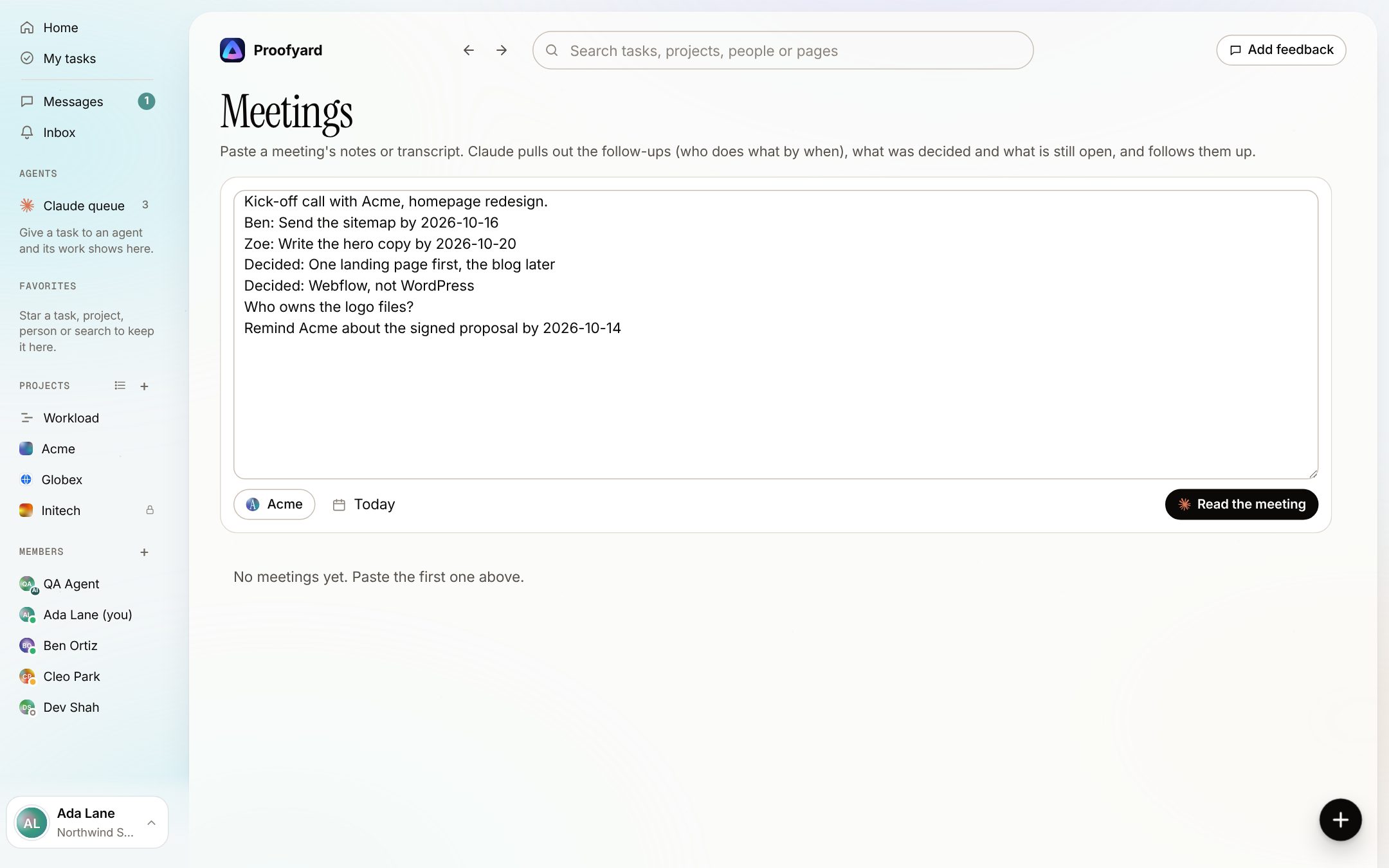
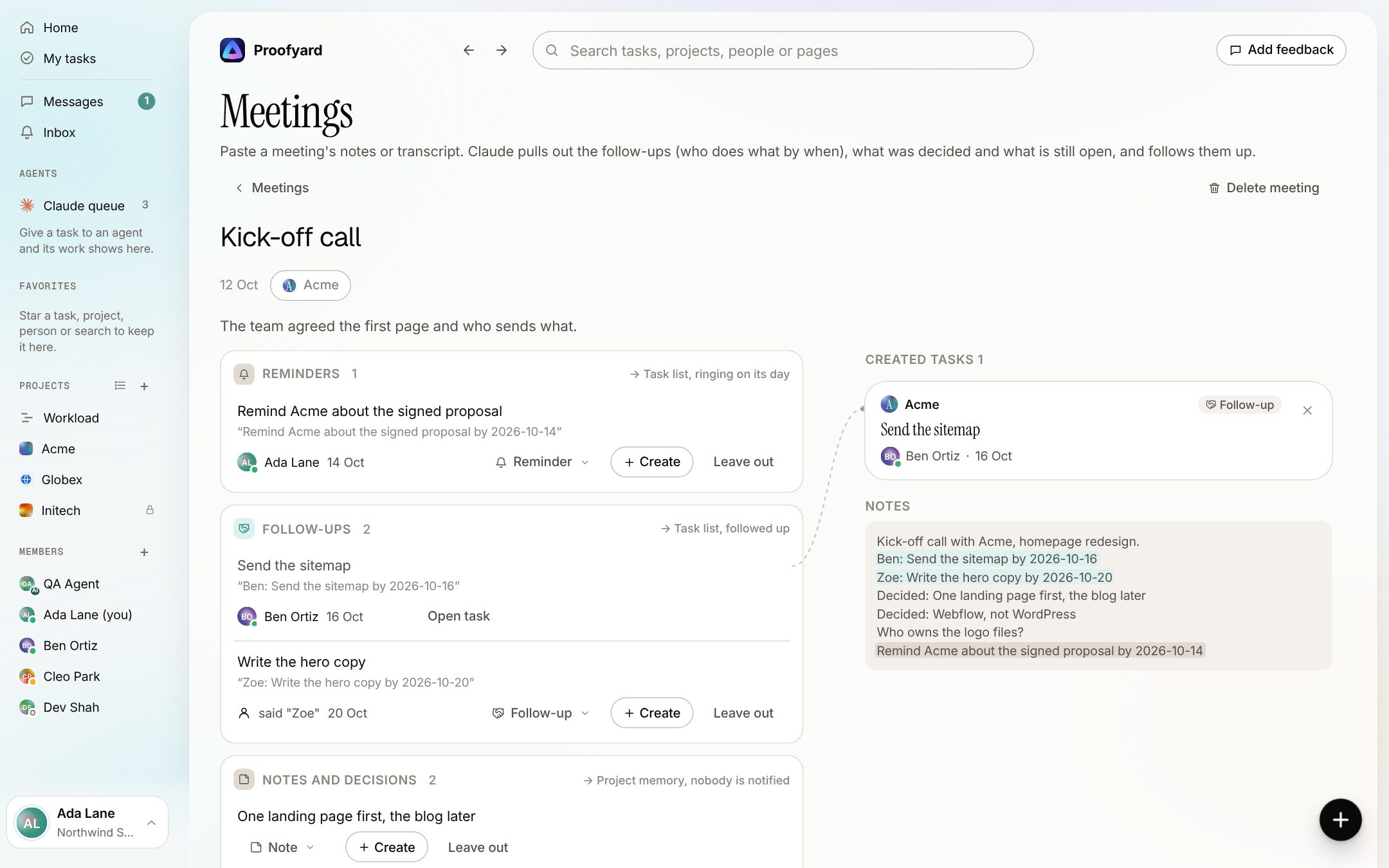
2. Check what Claude read out. Claude lists the follow-ups (who does what by when), reminders, notes and decisions, and questions still open. Each item shows the line it came from, and the notes sit beside the list with those lines marked. A name nobody in the team has stays as it was said ("said Zoe") for you to pick. You can change who or when, change an item's type, leave it out, or create it straight away: it appears on the right as a task card, tied to its line by a thin curve.
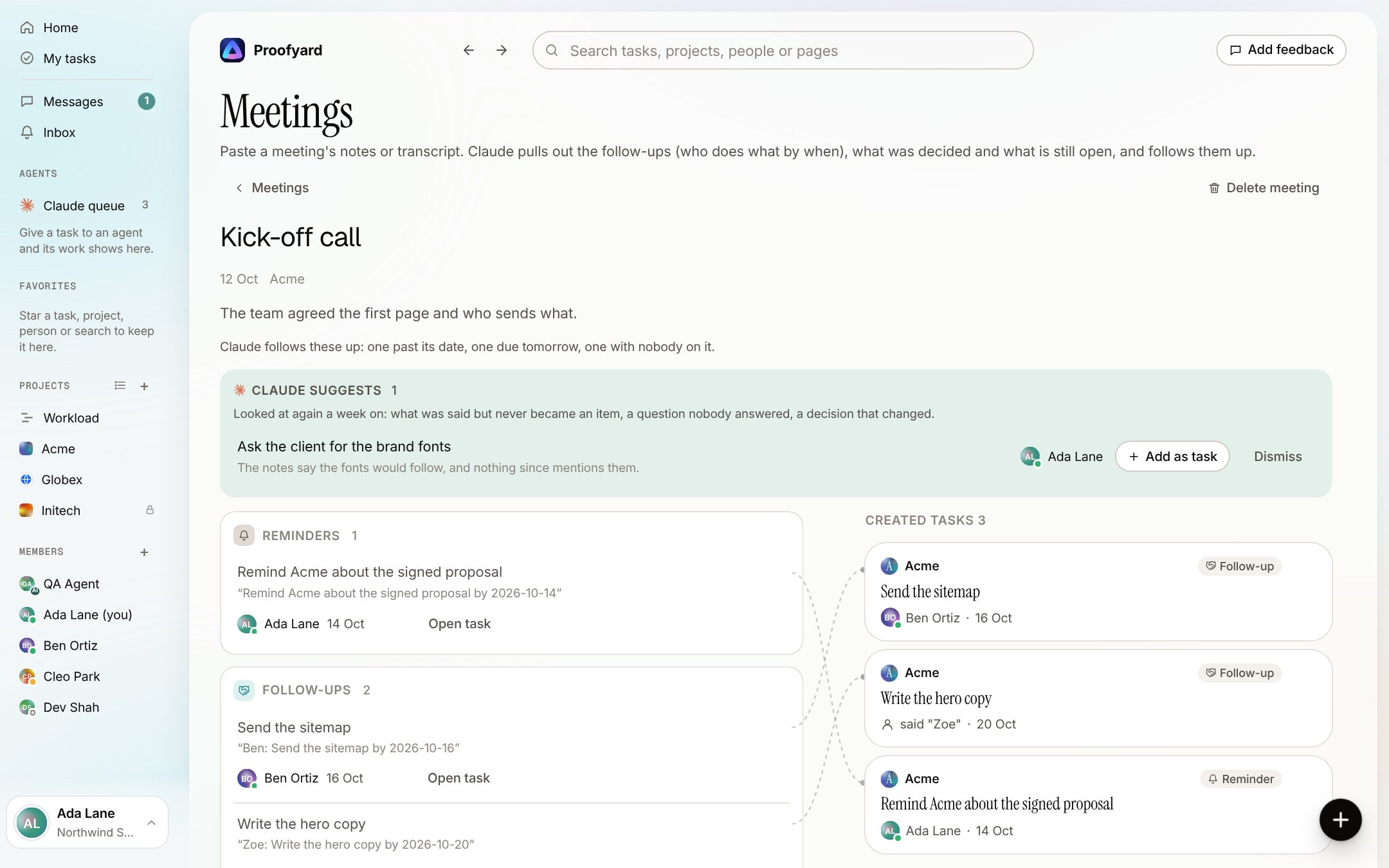
3. Create the rest, then let it follow up. What is left becomes tasks in the project with their owner, date and the words they came from. Decisions go to the project's memory, where nobody is notified. Each created task can be taken back. After that, once a day, the owner hears about a follow-up that is late or due tomorrow, and whoever added the meeting hears about one with nobody on it. A week later Claude looks again and suggests what was said but never became a task.
What it does not do, on purpose: it never makes a task until a person creates it, it never writes to the client, and it does not join or record calls. It reads the text you give it. Clients in the workspace never see meetings.
There is more on the meeting notes to tasks page, including where agencies use it and the full FAQ.
Writing notes that turn into good tasks
Whatever reads your notes, a person or AI, these small habits help:
- Say the name with the promise. "Ben: sitemap by Friday" reads better than "sitemap to follow".
- Say dates as dates. "Friday 16th" survives; "end of next week" needs a guess.
- Mark decisions. Starting a line with "Decided:" makes it easy to tell a decision from a task.
- End questions with a question mark. It sounds obvious, but it is how an open question is told apart from a statement.
Sources
- How the Meetings page works: the Proofyard feature as built on 12 October 2026, with screenshots taken that day from the app's preview with sample data.
- The example notes in this article are made up for the example.