Feature
Team chat next to the work
A channel for the whole team and one for each project, direct messages, threads and reactions. A mention says who it reaches before you send it.
Messages
Talk about the project where the project is
Most studios run their chat in one app and their projects in another. A question about the Acme home page gets answered in a chat thread, and a week later nobody can find it from the task. Messages was out of the board for a while; it came back on 22 October 2026 with its own Inbox.
Messages sits on the rail right under Work. Every workspace starts with a channel for the whole team and one for each project. You add your own channels, public or private, write direct messages to one person or a small group, and answer in threads. It is for your team: clients talk to you from their own area and on tasks, never here.
- 01
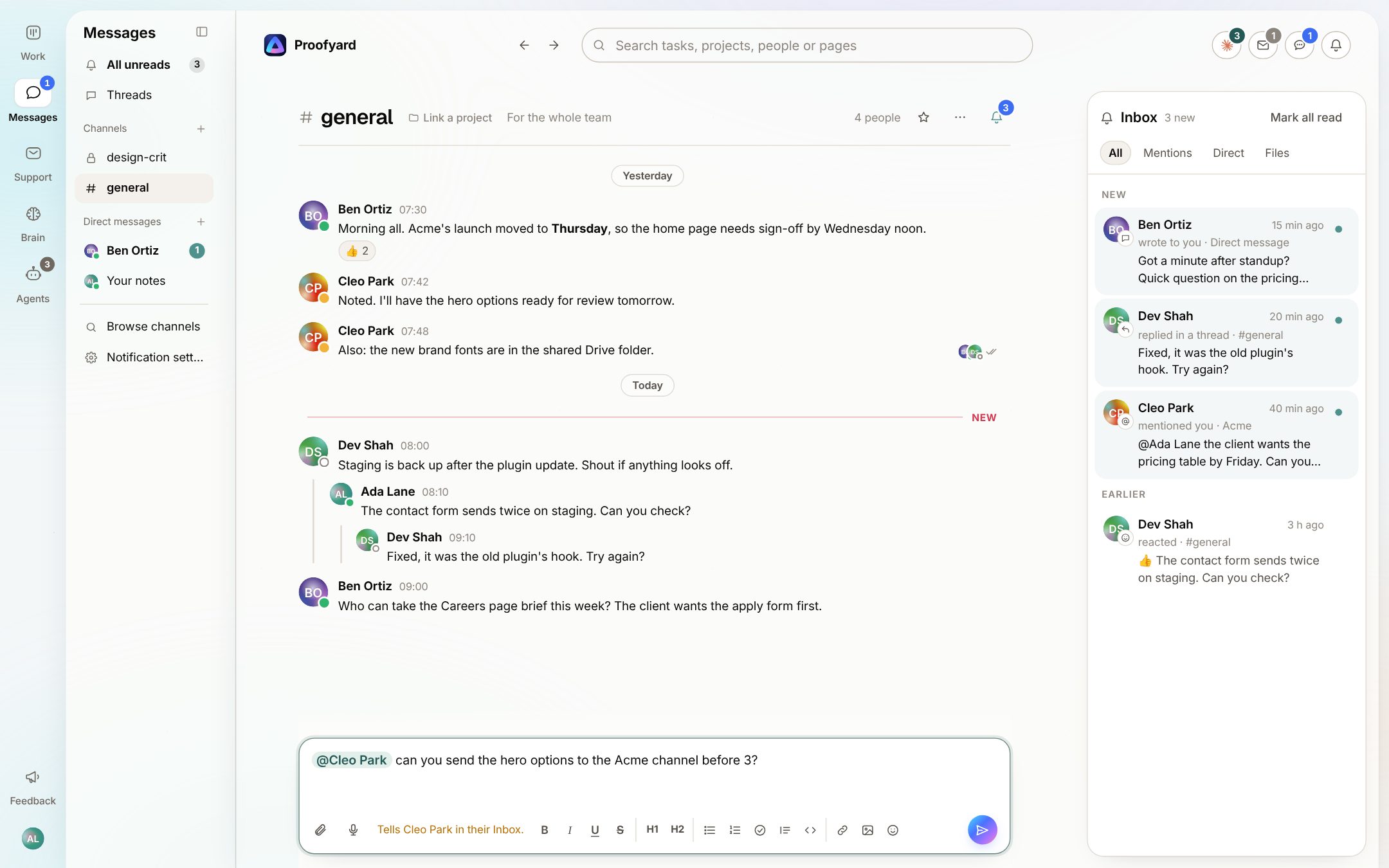
Channels, and who a message reaches
Type @ and a name, a group such as @design, or @all for the channel. Before you press Send, the line under the box says who is told, for example Tells Cleo Park in their Inbox, or that nobody is. In a channel of more than ten people, only an admin can notify everyone.
- 02
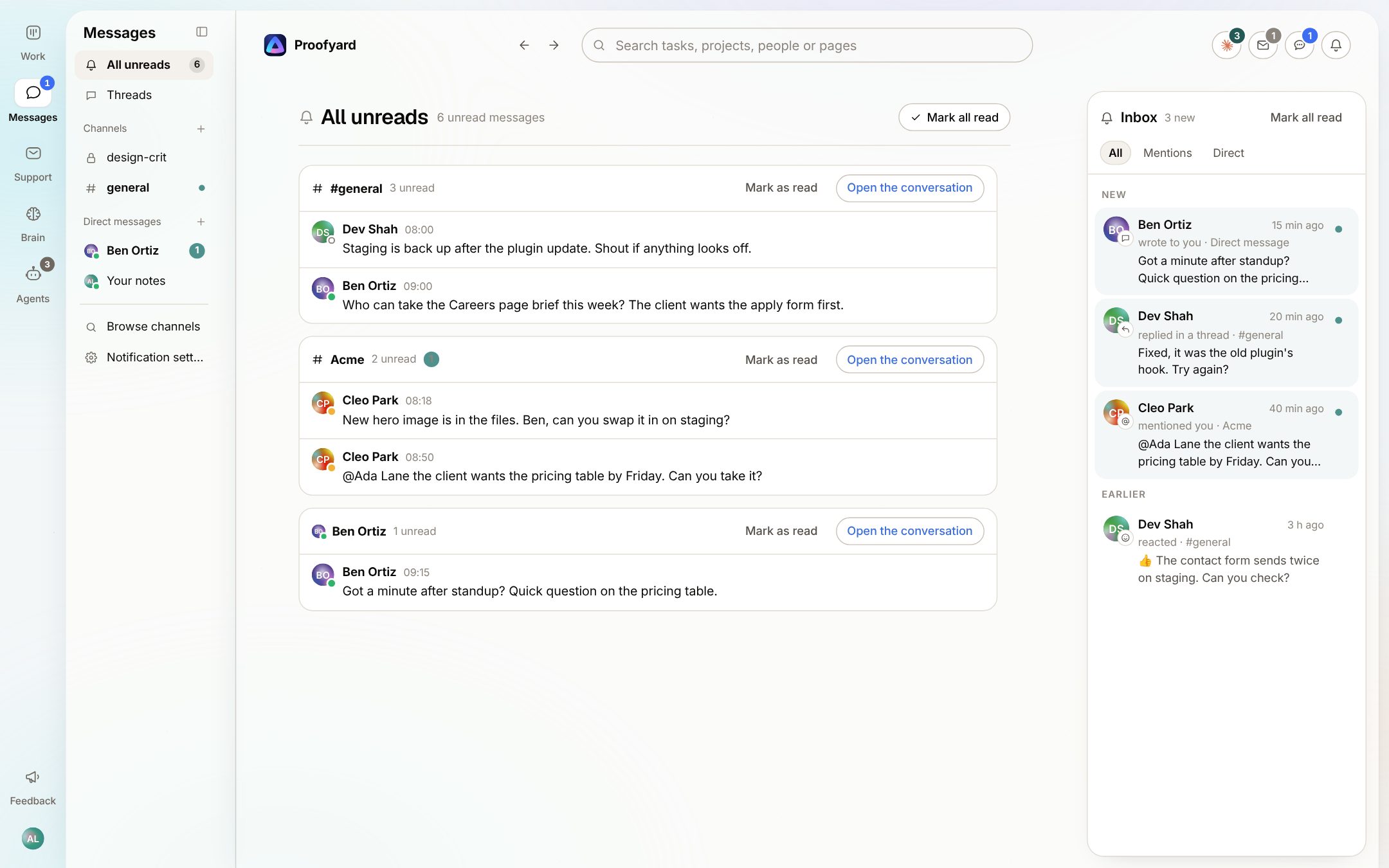
An Inbox just for messages
On the right of a conversation, the Inbox lists direct messages, mentions of you, replies in your threads and reactions to your messages, newest first, with All, Mentions and Direct. Done and Mark all read both have Undo. All unreads shows what is new channel by channel, and none of it crowds the main Inbox.
- 03
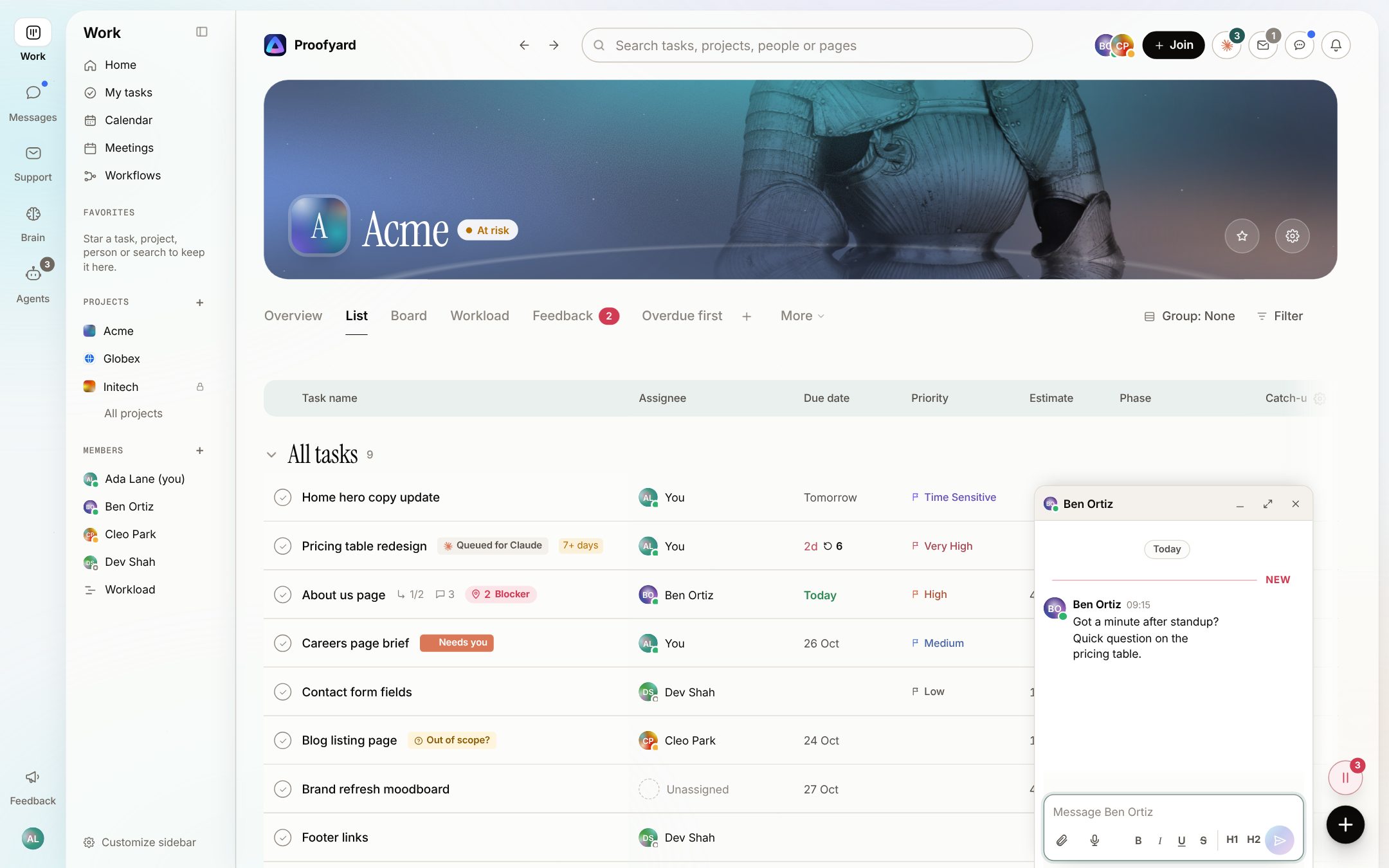
Answer without leaving the task
Open a conversation from the side panel while you are on a project and it opens in a small window on the bottom edge. Minimize it to a bar, keep a few side by side, or use Open in Messages for the full page.
The screenshots are from the app with sample data: Acme, Maya and the team are made up.
Where agencies use it
The talk that used to live in another app
A project's own channel
Each project has a channel. Everyone who joined the project gets its messages in their inbox, and the project's Messages tab says who that is.
Channels about a client
A new channel can be linked to the project it is about. The channel's head names the project, and the project lists the channels about it.
Quick questions
A direct message to one person, or a group of up to eight people with you. Your notes is a conversation only you see, for links and drafts.
Design crit
A private channel for reviews before anything goes to a client. Only the people in it can see or find it.
Files and voice notes
Attach a file up to 1 MB or record a voice message. The Files tab lists what was shared in the conversation, newest first, and takes you to the message it came with.
Decisions worth keeping
If the Memory Expert agent is on, it reads project channels and public channels linked to a project. What it would keep waits under the message with Save to memory and Not now. A person decides.
What it will not do
Honest limits
Conversations from before Messages was taken out are gone. They were deleted then and did not come back.
Files over 1 MB do not go in a message. Put them on a task, where they are kept in Google Drive, and share the task or a Drive link.
Claude does not write in Messages. Over the connector and in the Claude panel it can read your channels and direct messages as you, and it never marks anything read. Naming an agent in a message does not start it; agents start from task comments.
Private channels and direct messages are never read for memory, and an admin viewing the app as a member does not see that member's direct messages.
Questions
Messages
Do clients see Messages?
No. Direct messages are for the team only, and clients do not see channels. A client writes from their own area or on a task they were added to.
How do I stop a busy channel from pinging me?
Each channel has Notify me about: All messages, Mentions only or Nothing. You can also mute, star or hide a conversation. A hidden one comes back when someone writes.
Can I get messages on my phone?
Yes, once you turn on notifications. A message that names you, or a direct message, reaches your phone; something new in a channel shows as a dot, unless you set that channel to All messages.
Can Claude answer in a channel?
No. Claude can read Messages when you ask it to, over the connector or in the Claude panel, but it does not post there, and it never sends anything to a client on its own.
Can I bring our old Slack history in?
No, there is no import. Slack can still be connected for other things, such as making a task from a Slack message.
Who makes it
Made by Woofocus, a web studio, for its own work first
Woofocus has built and looked after client websites since 2010. We made Proofyard because our own production was spread across a task tool, a feedback tool and long chat threads, and we are moving our studio's work into it now. Any agency can open its own workspace.

Ali Demirci
Founder of Woofocus
Ali has designed, built and looked after client websites since 2010 and runs Woofocus, a small web studio. Proofyard is the board he built to run Woofocus's own production after years of carrying work between Asana, BugHerd and chat.
- 4.99/5rating on Codeable across 219 projects for 74 clientsSource: Codeable profile, October 2026
- Since 2010building and looking after client websitesSource: woofocus.com
- ~7,000tasks in our own Asana workspace, the work Proofyard was built to runSource: Woofocus Asana workspace, read 3 October 2026
“Communication was always clear and timely, making it easy to stay aligned on progress.”
“Ali delivered on time and worked tirelessly with us to make sure that we were satisfied.”
Open the project channel
Start a workspace, add a project and write the first message in its channel. The line under the box tells you who it reaches.