Feature
A project calendar for agencies, next to your meetings
Due days, milestones that wait on someone, meetings and reminders by week or month. Drag a task to move its due day, with Undo.
Calendar
The work and the meetings on one week
Most agency calendars live in two places. Due dates sit on the board, client calls sit in Google or iCloud, and on a Monday morning someone holds both in their head to work out what is actually possible this week.
The Calendar puts them side by side. Due days, the milestones that wait on a client's answer or a check back, your reminders and the meetings from the calendars you already use, by week with hours or by month. Every project at once, or one.
- 01
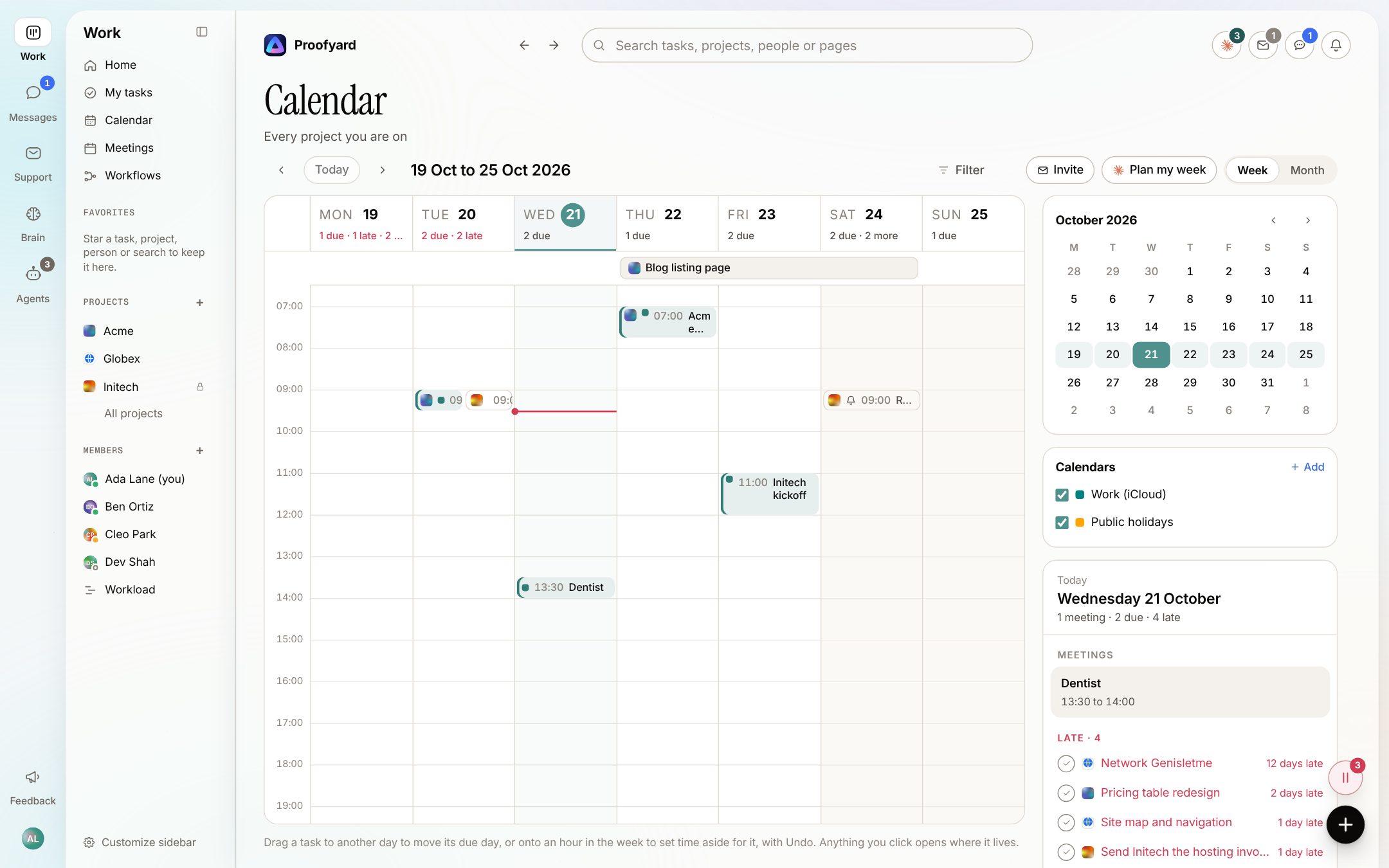
The week by the hour
Meetings sit at their time and as long as they last, side by side when they overlap. Due days and anything without an hour stay in a row at the top, and a red line marks the time now. Each day's head says how much is due and late. Drag a task to another day to move its due day, with Undo.
- 02
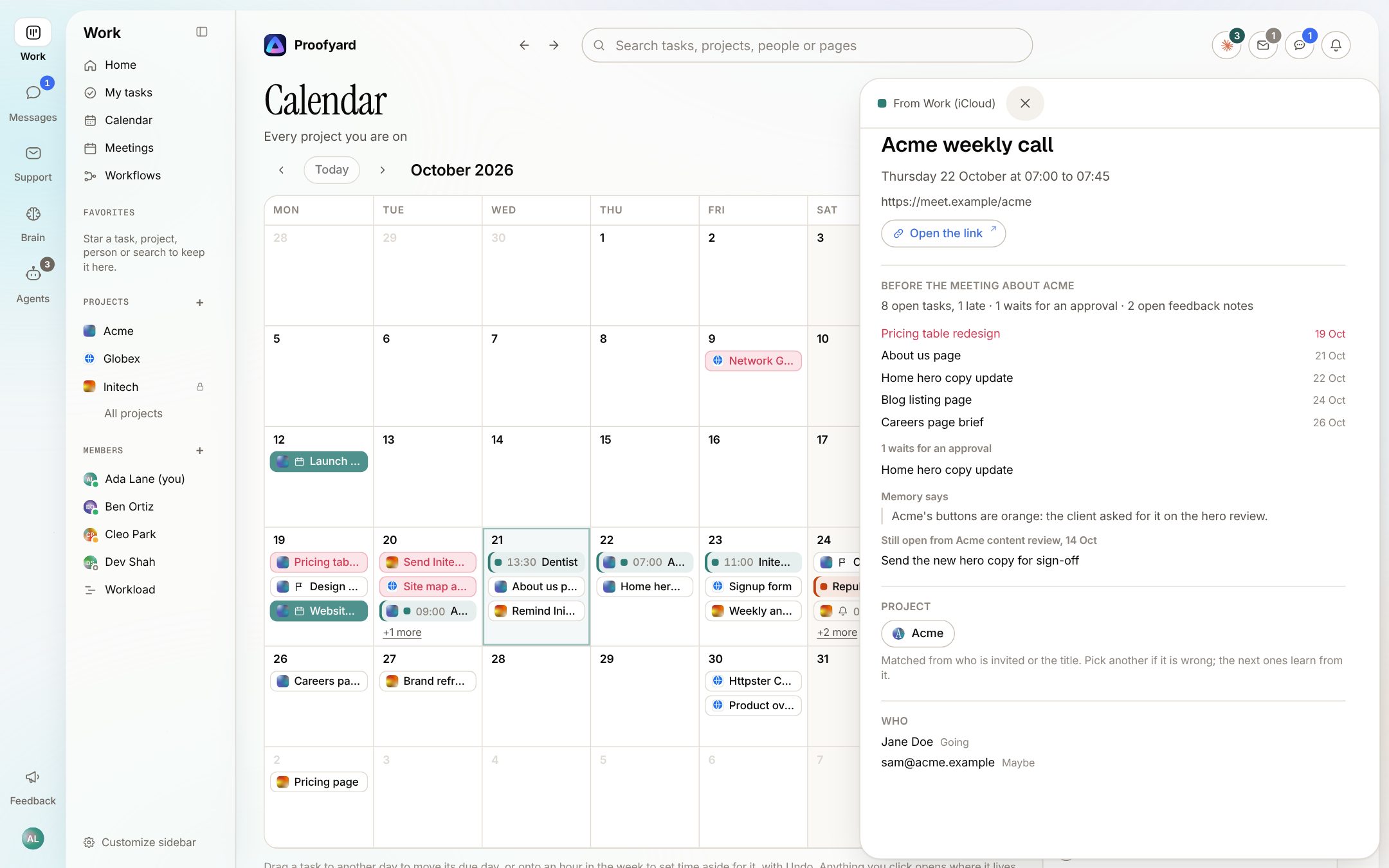
A prep note before the client call
A meeting that is about a project opens in the side drawer with a prep note: open and late tasks, what waits for an approval, open feedback notes, what memory says about the client and what is still open from the last meeting. The project is matched from who is invited or the title, and you can pick another.
- 03
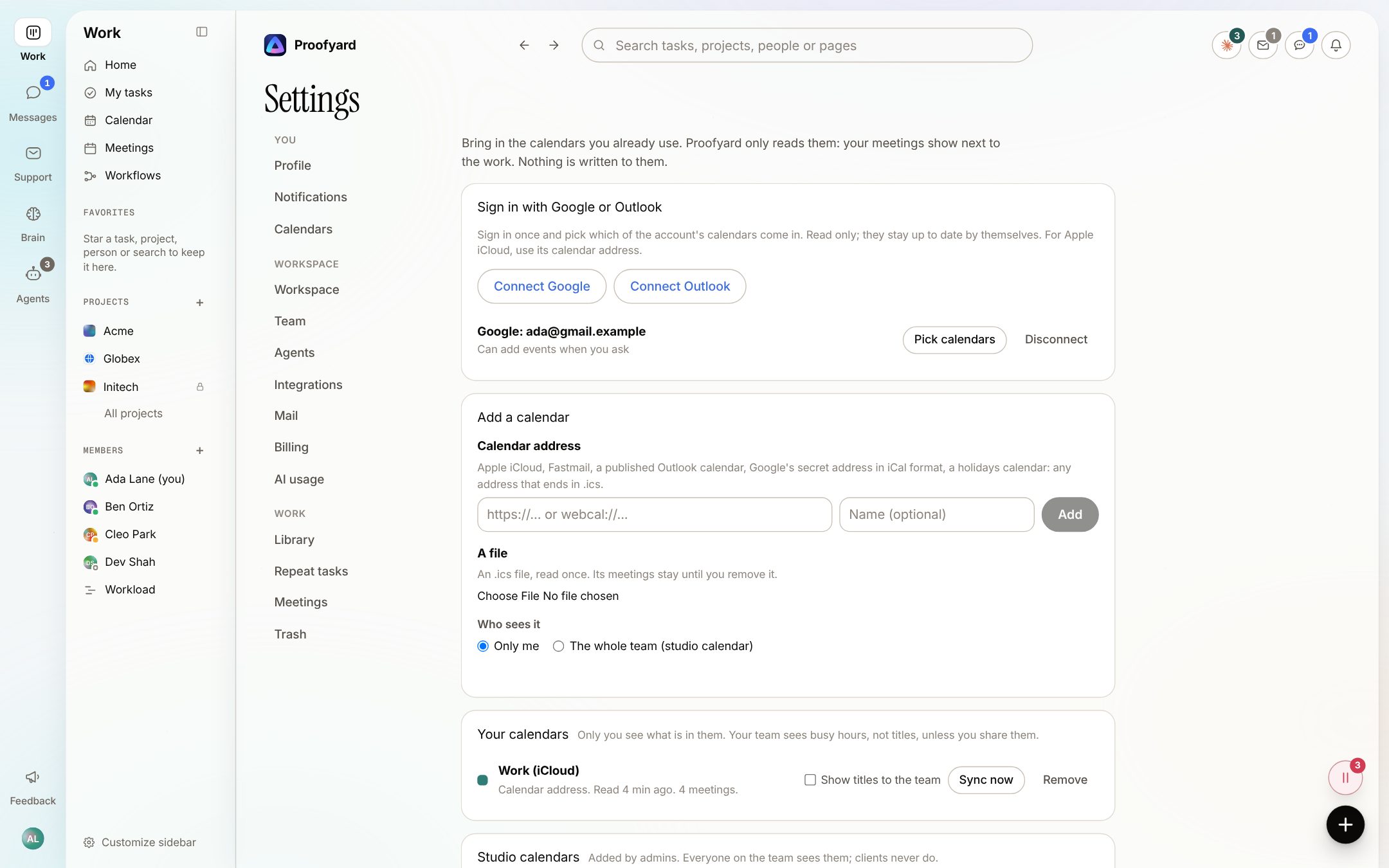
Your other calendars, read only
In Settings, Calendars, sign in with Google or Outlook and pick which calendars come in, or paste a calendar address, or drop an .ics file. Only you see what is in yours; your team sees busy hours unless you tick Show titles to the team. Admins can add a studio calendar for everyone.
The screenshots are from the app with sample data: Acme, Maya and the team are made up.
Where agencies use it
The weeks it helps with
Monday planning
Open the week, see which days are already full of calls, and drag the tasks that will not fit onto a quieter day. Each move can be undone.
Waiting on the client
A client's answer that is due or a check back you set shows on its day, so a stalled approval does not hide inside a task.
One project's dates
A project has its own Calendar view, with its milestones and the meetings matched to it. Handy before a status call.
Your own day
My tasks switches between List and Calendar. Click a day's head and the panel on the right lists its meetings, what is late, what is due by project, what waits on someone and your reminders.
After the call
When a meeting about a project has ended, Home asks for its notes: Add notes opens the paste box with the project and day filled in, or No notes puts it away, with Undo.
Studio days off
An admin adds a holidays calendar or a studio calendar once, and everyone on the team sees it. Clients never do.
What it will not do
Honest limits
Apple iCloud comes in by its calendar address only; there is no iCloud sign-in. A dropped .ics file is read once, so add it again to read a newer one.
Matching a meeting to a project follows rules (a client's contact or domain among the guests, a name in the title). When it could be two projects it stays unmatched, and a person picks.
Other calendars are read only. Sending an invite from the calendar needs a connected Google or Outlook account with Allow adding events turned on, and it only goes when you press the button.
Only admins add studio calendars, and a calendar address or file larger than 5 MB is refused.
Questions
Calendar
Can my team read my private meetings?
No. Only you see the titles in your calendars. Your team sees busy hours, unless you tick Show titles to the team for that calendar.
Does it write anything to Google or Outlook?
Not unless you allow it. Connected calendars are read only by default. With Allow adding events turned on, an invite or a copy of a time block goes there only when you press the button.
Which calendars can I bring in?
Google and Outlook by signing in, and any address that ends in .ics: Apple iCloud, Fastmail, a published Outlook calendar, Google's secret address or a holidays calendar. You can also drop an .ics file.
What happens when I drag a task to another day?
Its due day moves to that day and the screen offers Undo. In the week you can also drop it on an hour to set time aside for it.
Does Claude contact the client about a meeting?
No. Claude writes the prep note and reads notes you paste after the call. Invites and anything sent to a client go only when a person sends them.
Who makes it
Made by Woofocus, a web studio, for its own work first
Woofocus has built and looked after client websites since 2010. We made Proofyard because our own production was spread across a task tool, a feedback tool and long chat threads, and we are moving our studio's work into it now. Any agency can open its own workspace.

Ali Demirci
Founder of Woofocus
Ali has designed, built and looked after client websites since 2010 and runs Woofocus, a small web studio. Proofyard is the board he built to run Woofocus's own production after years of carrying work between Asana, BugHerd and chat.
- 4.99/5rating on Codeable across 219 projects for 74 clientsSource: Codeable profile, October 2026
- Since 2010building and looking after client websitesSource: woofocus.com
- ~7,000tasks in our own Asana workspace, the work Proofyard was built to runSource: Woofocus Asana workspace, read 3 October 2026
“Communication was always clear and timely, making it easy to stay aligned on progress.”
“Ali delivered on time and worked tirelessly with us to make sure that we were satisfied.”
Add one calendar and look at your week
Open a workspace, connect the calendar you use most in Settings, Calendars, and open the Calendar from the sidebar.