Feature
Workflow automation for agency tasks
Flows give each kind of work only the phases it needs, and project rules do the next step when something happens to a task. Every run can be taken back.
Flows and rules
A small fix should not wait in Design and Review
Most agency boards have one set of columns for everything. A landing page goes through brief, copy, design, review, build and testing; a broken footer link goes through build and testing, but it still sits in the same columns, and someone drags it past four of them by hand.
On the board, a task follows a flow: the phases its kind of work needs. Claude suggests the flow when the task is made, and a person keeps it or picks another. Project rules then do the routine next step, such as moving a task back to design when the client asks for changes, and each run is listed with Undo.
- 01
One flow for each kind of work
Library, Flows keeps the phases each kind of work goes through, such as Landing page or Small fix (Ready for development, Testing). For a new task Claude suggests a flow from the task, its section and the flows of the tasks before it. You keep it or pick another; a section or a project can also name the flow its new tasks take.
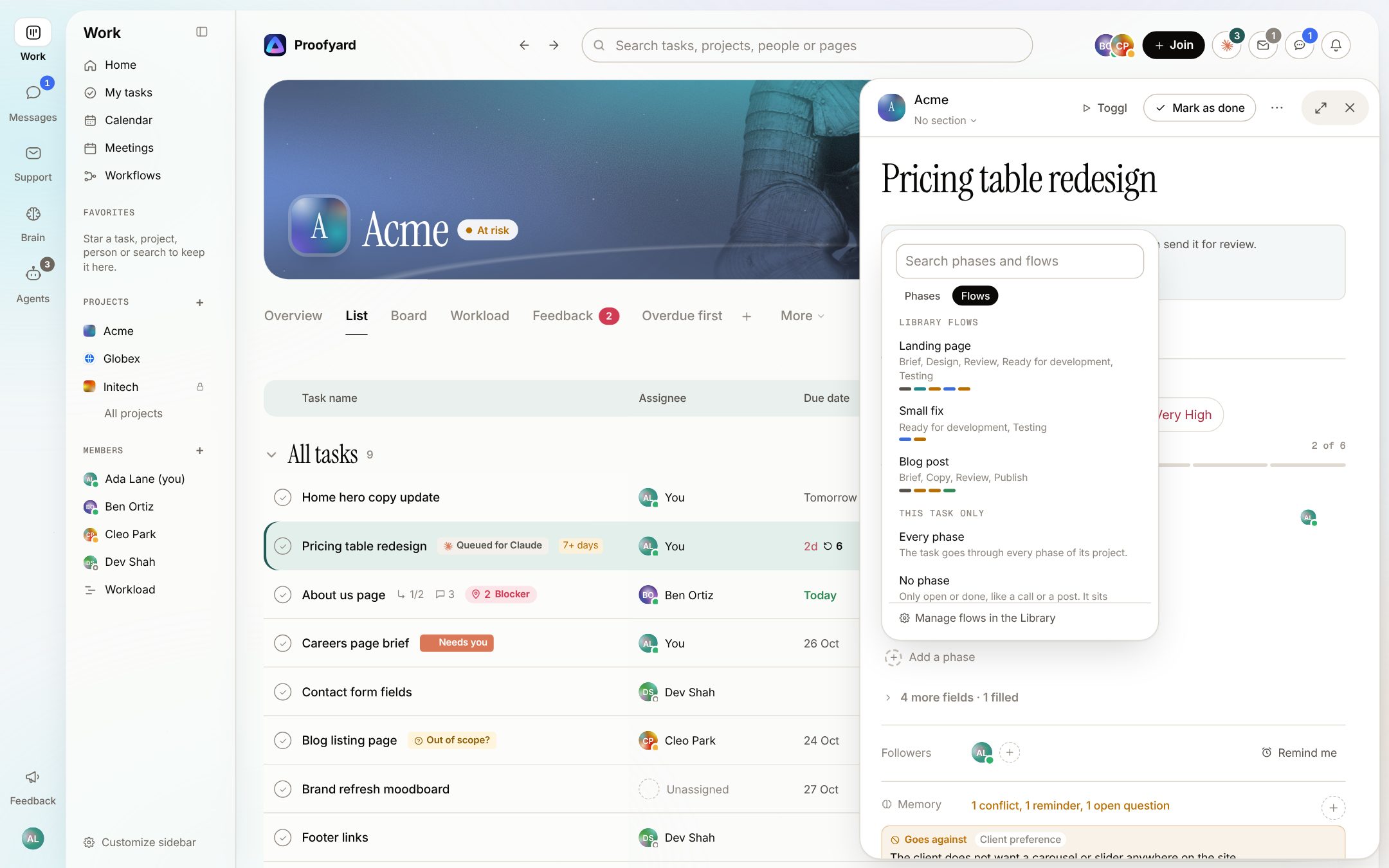
- 02
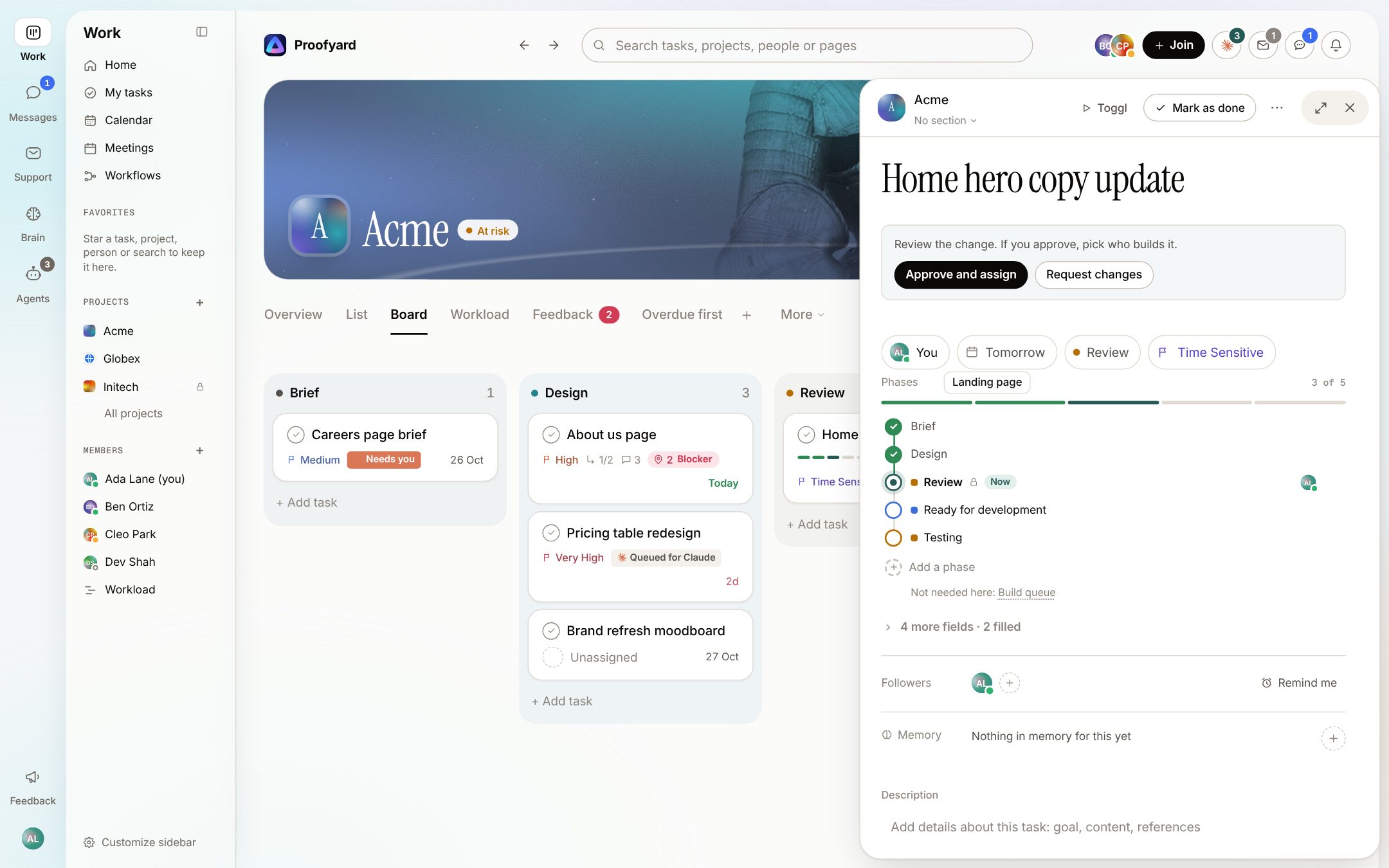
The task's phases as a track
In the task's side column the phases read top to bottom: done ones ticked, the current one marked Now with who has it, the ones ahead in their colour. Add a phase puts back one the task skips or brings one from the Library. When a comment says the work needs a step the task lacks, Claude offers that phase in the track, with Add and No. An approval phase stays on the task.
- 03
Rules that do the next step
In Project settings, Rules, start from a suggestion made with the project's own phases or write your own: When, Only if, Then. Try it shows which tasks a rule would run on without changing anything. Recent runs lists what each rule did, with Undo.
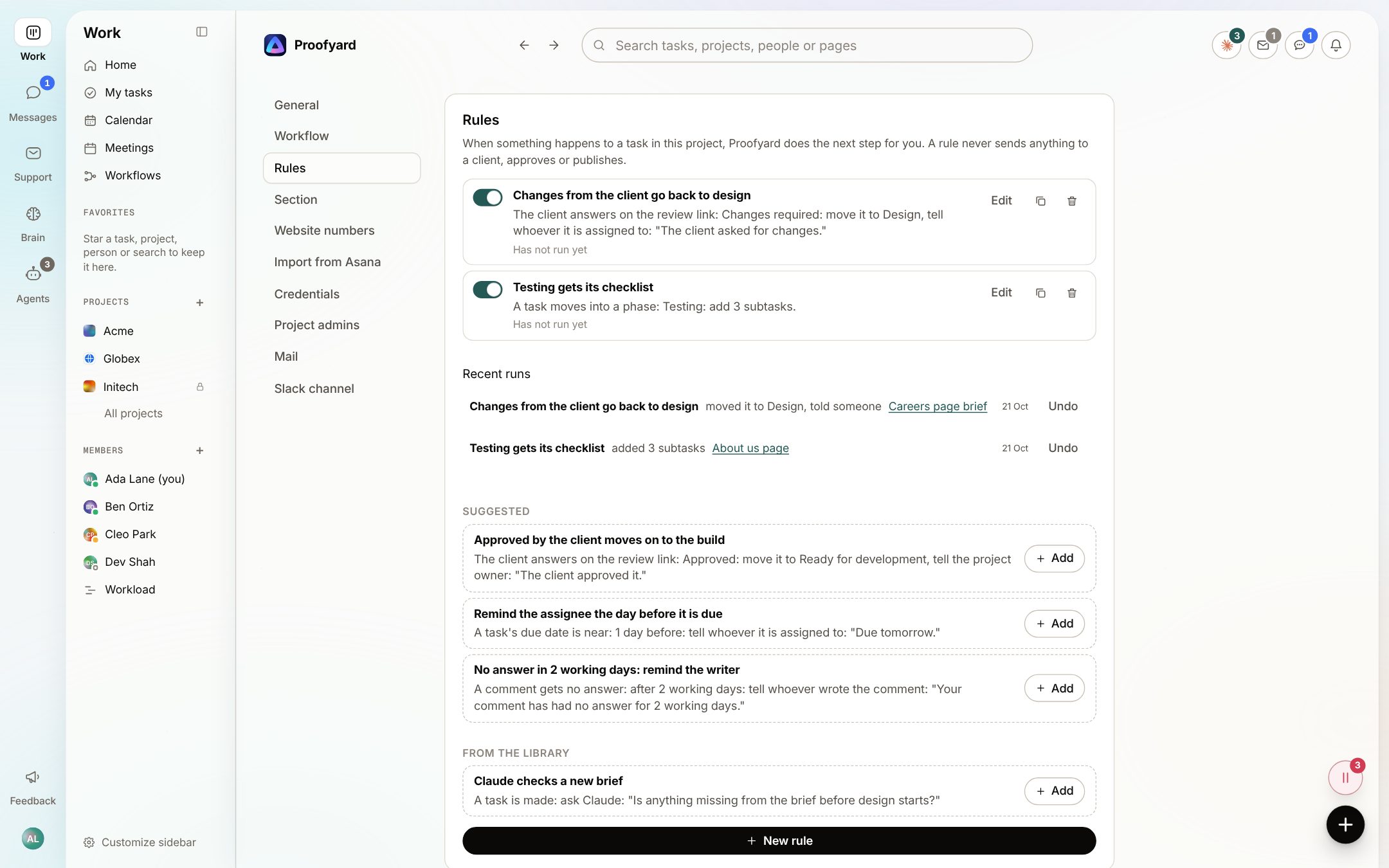
The screenshots are from the app with sample data: Acme, Maya and the team are made up.
Where agencies use it
The steps nobody should do by hand
Client asked for changes
When the client answers Changes required on the review link, move the task back to Design and tell whoever has it.
Approved, on to the build
When the client approves, move the task to the build phase and tell the project owner. The client's answer is theirs; the rule only does what comes after.
A checklist for testing
When a task moves into Testing, add the same subtasks every time, such as checking it on a phone, the forms and the links.
Comments that wait
When a comment has had no answer for 1 to 7 working days, remind whoever wrote it, or someone else.
A brief Claude reads first
When a task is made, ask Claude a question like "Is anything missing from the brief before design starts?". The answer is a note only the team sees, and it changes nothing else.
One rule, every project
Save to the library keeps a good rule for the whole workspace. Other projects add it from From the library, fitted to their own phases and sections.
What it will not do
Honest limits
A rule never sends anything to a client, approves or publishes. It moves, assigns, adds and tells people on the team, and a person still makes those calls.
Undo puts back the task's fields and removes the subtasks and notes a rule added, but a message a rule already put in someone's Inbox stays there.
Admins and the project owner change a project's rules. Others on the team can see the runs and take them back.
A library rule is not added to a project that lacks one of its phases or sections. It says which one is missing, and you write that rule with the project's own.
Questions
Flows and rules
What can start a rule?
A task moving into a phase, being put in a section or being made; the client answering on the review link; a due date coming near; a comment, feedback or a file; a schedule, every day or one weekday; or a comment with no answer after some working days.
What can a rule do?
Move the task to a phase, assign it, set its priority, add subtasks, tell someone in their Inbox, make it a follow-up, comment for the team, hand it to an agent, fill in a field or ask Claude about it. A rule can also check the task's priority or assignee first.
Can Claude change a task's flow on its own?
No. Claude suggests a flow or a phase, with why, and a person picks it with Use these phases or Add. Claude never takes an approval phase off.
What happens to tasks already under way when I edit a flow?
They keep their steps. A change reaches new tasks and tasks that take the flow again.
Can I check a rule before switching it on?
Yes. Try it lists the tasks in the project it would run on now, and nothing is changed.
Who makes it
Made by Woofocus, a web studio, for its own work first
Woofocus has built and looked after client websites since 2010. We made Proofyard because our own production was spread across a task tool, a feedback tool and long chat threads, and we are moving our studio's work into it now. Any agency can open its own workspace.

Ali Demirci
Founder of Woofocus
Ali has designed, built and looked after client websites since 2010 and runs Woofocus, a small web studio. Proofyard is the board he built to run Woofocus's own production after years of carrying work between Asana, BugHerd and chat.
- 4.99/5rating on Codeable across 219 projects for 74 clientsSource: Codeable profile, October 2026
- Since 2010building and looking after client websitesSource: woofocus.com
- ~7,000tasks in our own Asana workspace, the work Proofyard was built to runSource: Woofocus Asana workspace, read 3 October 2026
“Communication was always clear and timely, making it easy to stay aligned on progress.”
“Ali delivered on time and worked tirelessly with us to make sure that we were satisfied.”
Set up one flow and one rule
Make a Small fix flow in Library, Flows, then add Changes from the client go back to design from a project's suggested rules.