Feature
Website numbers on every client project
Connect Google once, pick each project's GA4 property and Search Console site, and its Overview shows the last 28 days against the 28 before.
Website numbers
The site's numbers next to the work on it
Most agency reporting starts with someone opening GA4 in one tab and Search Console in another, picking a date range and copying numbers into a slide. Then the same person opens the board to see what the team is doing about it. The two never sit on one page.
Here a project can read its own website numbers. An admin connects the studio's Google account once, read only, and each project picks its GA4 property and Search Console site. A daily job reads the days, and the project's Overview sums the last 28 days against the 28 before, with the dates and the source written under every block.
- 01
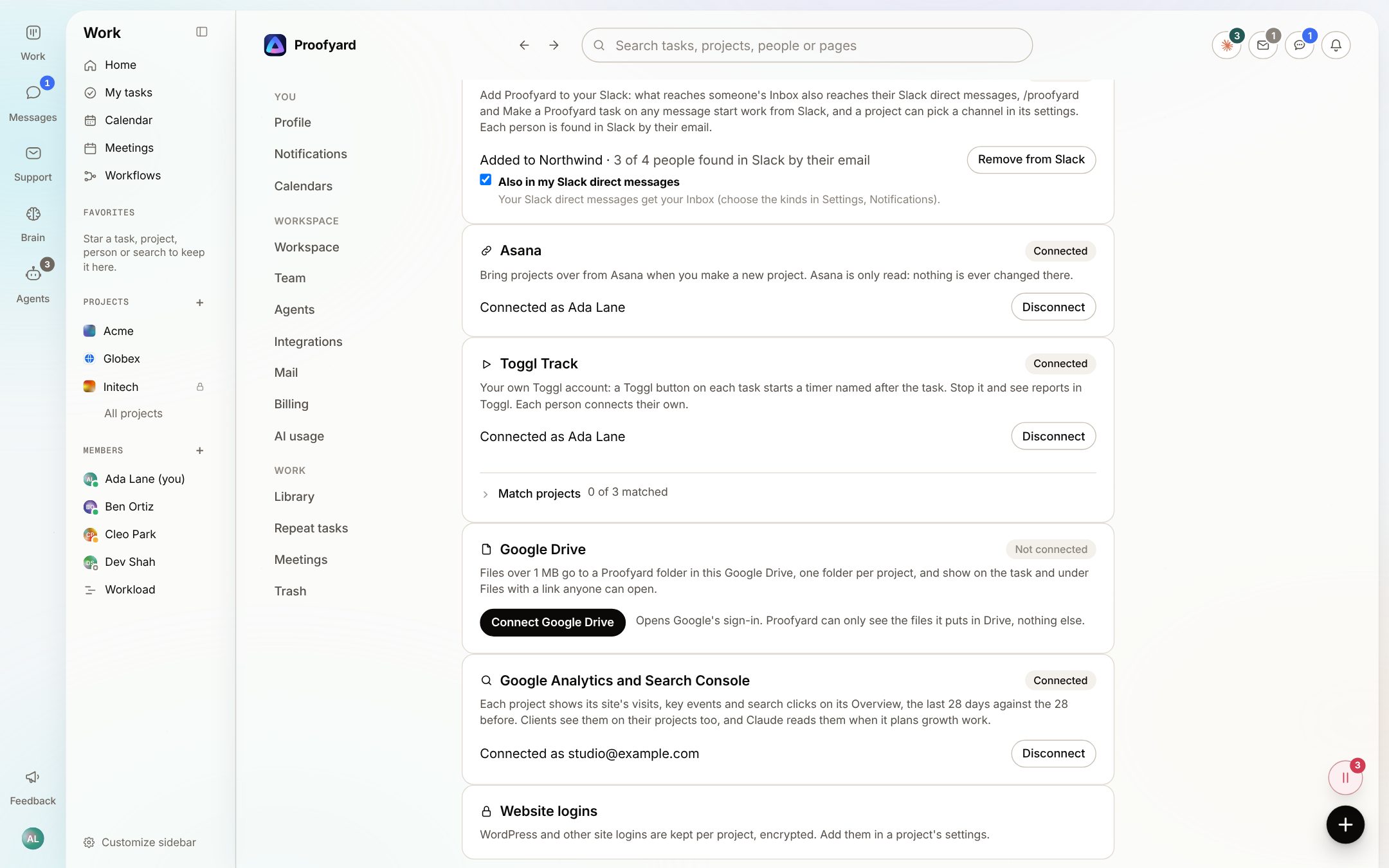
Connect Google once, read only
In Settings, Integrations, an admin presses Connect Google and signs in on Google's own screen. The board asks only to read GA4 reports and Search Console data; nothing is changed in Google. Disconnect keeps the numbers already read and stops new days coming in.
- 02
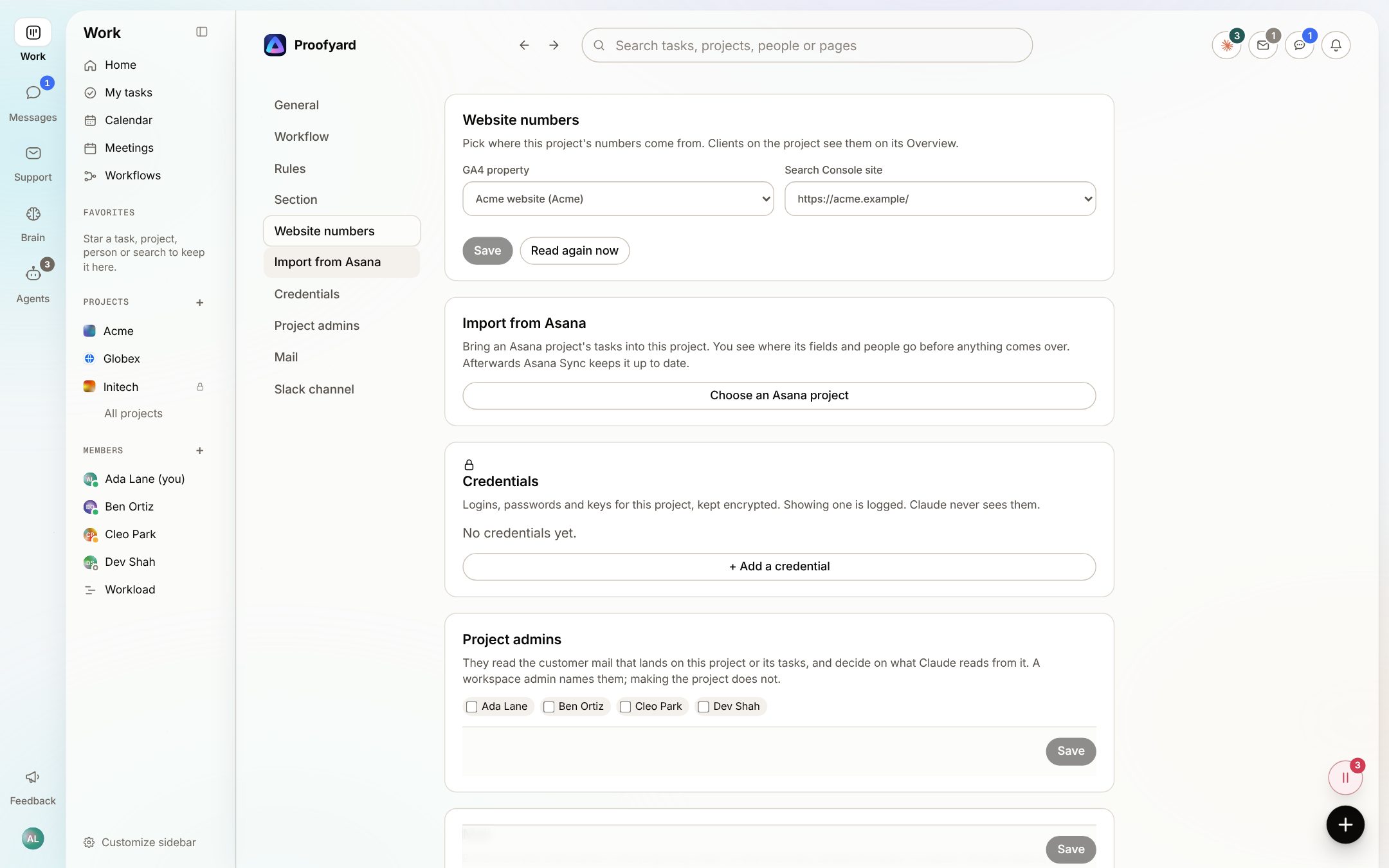
Pick the property and site for each project
In the project's settings, under Website numbers, choose a GA4 property and a Search Console site from what the connected account can see. Either one is enough. Saving reads the last 56 days at once, then every night; Read again now fetches the latest days by hand, and Undo puts the old choice back.
- 03
Read it on the Overview
The Website card shows Visits, Visitors and Key events, then Search clicks, Search impressions and Average position, each with its change against the 28 days before. Below them: top sources, top landing pages, top searches and pages losing search clicks. Each block ends with its source and days, such as Search Console, Wed 23 Sept to Tue 20 Oct.
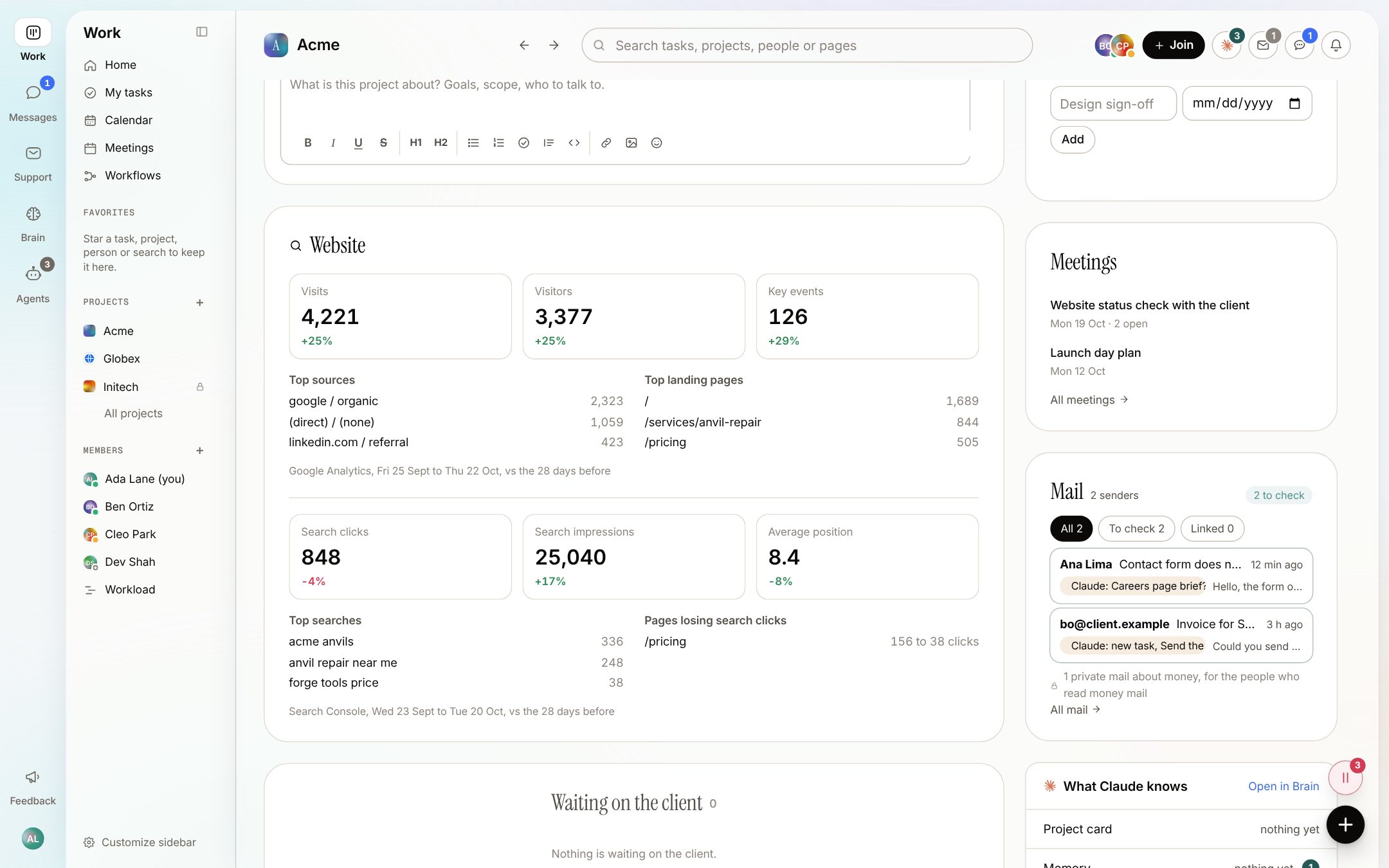
The screenshots are from the app with sample data: Acme, Maya and the team are made up.
Where agencies use it
When the numbers need to be at hand
Before a client call
Open the project's Overview and the last four weeks are there with their dates, next to the status update and the open work. No export, no screenshot of a GA4 report.
After a launch
Check whether visits and key events moved after the new site went live, against the 28 days before. Search Console runs about two days behind, so its dates say so.
Spotting a page that slipped
Pages losing search clicks lists pages whose clicks from search dropped by at least 5 and by more than a fifth. It is a place to start looking, not a diagnosis.
Planning growth work
When someone presses Draft with Claude on a project's Growth page, Claude gets the real numbers with their source and dates. A person reads the draft and keeps only what fits.
Care and SEO retainers
Each project on a retainer keeps its own property and site, so the numbers for one client never mix with another's.
A site with only Search Console
Not every client gives you GA4 access. Link only the Search Console site and the card shows the search half.
What it will not do
Honest limits
It is not a full analytics tool. You get one fixed window, the last 28 days against the 28 before, and the top five of each list. For anything else, open GA4 or Search Console.
Clients do not see the Website card in their client area yet. For now, share the numbers in a status update.
Only an admin connects Google, and Google itself has to be set up for the app: someone adds the Google keys and turns on the Analytics Data, Analytics Admin and Search Console APIs. If Google refuses, the settings say why.
Days are kept for about 16 months, as GA4 does by default; older days are removed.
Questions
Website numbers
Can the board change anything in Google Analytics or Search Console?
No. It asks Google for read-only access to GA4 reports and Search Console data, and nothing is ever written back.
How fresh are the numbers?
A daily job reads them every night and reads the last five days again, because Google revises recent days. Read again now in the project's settings fetches them at once.
What if our Google account cannot see a client's property?
The settings say so: the account cannot read that property or site, so give it Viewer access in Google or pick another. A property you linked earlier stays listed even if the account loses access, so it is never dropped quietly.
Does Claude act on the numbers by itself?
No. Claude reads them when it works on the project and when it drafts a Growth page. Nothing it drafts is kept until a person saves it, and it never sends a report to a client.
Who can link a project to a property?
Workspace members with full access, in the project's settings. Connecting the Google account itself is for an admin.
Who makes it
Made by Woofocus, a web studio, for its own work first
Woofocus has built and looked after client websites since 2010. We made Proofyard because our own production was spread across a task tool, a feedback tool and long chat threads, and we are moving our studio's work into it now. Any agency can open its own workspace.

Ali Demirci
Founder of Woofocus
Ali has designed, built and looked after client websites since 2010 and runs Woofocus, a small web studio. Proofyard is the board he built to run Woofocus's own production after years of carrying work between Asana, BugHerd and chat.
- 4.99/5rating on Codeable across 219 projects for 74 clientsSource: Codeable profile, October 2026
- Since 2010building and looking after client websitesSource: woofocus.com
- ~7,000tasks in our own Asana workspace, the work Proofyard was built to runSource: Woofocus Asana workspace, read 3 October 2026
“Communication was always clear and timely, making it easy to stay aligned on progress.”
“Ali delivered on time and worked tirelessly with us to make sure that we were satisfied.”
Link one client's site
Connect Google in Settings, Integrations, pick one project's GA4 property and Search Console site, and open its Overview.