ClickUp vs Proofyard

A ClickUp alternative for agencies

ClickUp tries to be one app for all work: tasks, docs, chat, whiteboards, goals and dashboards, with AI sold on top. Proofyard is narrower: a production board where a client site goes from brief to launch in phases, the client approves in their own area, notes are pinned on designs and live sites, and Claude works the board while a person decides.

Free for 14 days, no credit card needed.

By Ali Demirci, Woofocus. ClickUp's pages read on 24 October 2026.

The short answer

Which one fits your agency

Pick ClickUp if you want one tool for every team in the company, not only client production: docs, chat, whiteboards, goals, dashboards and Gantt charts, 1,000+ integrations, a public API, importers from Asana, monday, Jira and Trello, and apps for phones and desktops. Its Unlimited plan, at $7 a user a month billed yearly, is cheaper than ours if you do not need its AI.

Pick Proofyard if most of your work is client websites and you want the agency steps in the tool itself: phases from brief to launch, approvals that clients give in their own area with the design beside them, notes pinned on Claude Design boards and live sites, and Claude doing the connecting work while a person approves. Claude's credits are in the seat price, and clients are free.

We have not run Woofocus's client work in ClickUp. What follows about ClickUp comes from its pricing page, help centre and other pages of its own, read on the date above; each one is listed at the end. ClickUp is moving some workspaces to new plans while we write, so we say which price list we used and why.

At a glance

ClickUp and Proofyard, feature by feature

From ClickUp's own pages, read on the date above, and from our app as it is today. Plan names are the ones ClickUp's pricing page showed us: Free Forever, Unlimited, Business and Enterprise. Marks are short; the note beside each says what we mean.

28 features

FeatureClickUpProofyard
Planning the work
Phases that follow how a site is builtCustom statuses you set up yourself, on every planA workflow per project, with a person, a checklist and a gate on each phase
List and board viewsYesYes
Calendar, timeline and GanttCalendar on every plan; unlimited Gantt charts from Unlimited, unlimited Timeline views on BusinessA Calendar by week or month, beside your other calendars; no timeline or Gantt
Docs and wikisCollaborative Docs on every planFlat studio pages that Claude can read; no nesting
Workload by personResource Management from Unlimited; portfolio workload on BusinessA timeline per person, project or client, with capacity and Rebalance
Time trackingNative time tracking from UnlimitedA Toggl Track button on a task; no built-in timer
Rules and automations5,000 automations a month on BusinessRules per project or from the workspace library, each run with Undo
FormsOne form on Free Forever; unlimited from UnlimitedNo form builder; requests go to Claude, and site visitors use the feedback widget
Goals and portfoliosFrom UnlimitedNo
Working with clients
A client sees only their own workGuests see only what is shared with them: view, comment, edit or full editA client area shows only what you share
Free seats for clientsView-only guests are free. Guests who comment or edit use guest seats (5 for a one-user Workspace and 2 more per paid user on Unlimited, 10 and 5 on Business), then cost a member's priceClients, reviewers and site visitors are free
The client approves a designProofing comments can be assigned and resolved; we found no client approval step on the pages we readApprove or Request changes in the client area or a review link, kept with the design version
A client portalGuests and sharing; no separate client portal on the pages we readClients added to a project see the tasks you make visible to them; anyone can review from a link, without an account, for 30 days
Design and site feedback
Comments pinned on designsProofing on images, videos and PDFs: 100 uses on Free Forever and Unlimited, unlimited on Business; guests can use itPinned comments on Claude Design boards, from a review link
Pin a note on a live siteProofing covers images, videos and PDFs onlyOne script tag; each note keeps the page, device and a screenshot
Team
Team chatClickUp Chat from Unlimited; guests can join channels they are invited toA channel for the team and for each project, direct messages and threads
AI and tools
AI in the planTrial access without an add-on; Brain AI is $9 a member a month billed yearly, for every member3,000 credits per team member a month, pooled, in the seat price
A choice of AI modelsClaude, GPT, Gemini and more, one click to switchClaude only
AI agentsSuper Agents and Autopilot Agents, paid in AI Super CreditsAgent teammates with a role, skills, instructions and a named supervisor
A person signs off before a client sees anythingUp to how you set up permissions and automationsA rule of the product: Claude never publishes, emails a client or approves
MCP serverOn every plan; without Everything AI, 300 calls a day on Unlimited and 1,000 on Businessclaude.ai, Claude Code and Cowork
Public APIA REST API (v2)MCP is the only programmatic door
Import from other toolsAsana, monday, Jira, Trello, Basecamp, Todoist, Wrike, Confluence and moreAsana, one project at a time; BugHerd's CSV for feedback
Integrations1,000+, per its integrations pageA few: Claude, Slack, Asana, Google Drive, Toggl Track, and Gmail for Support
Hosting and security
Single sign-onGoogle SSO on Business; SAML and SCIM on EnterpriseNo
Compliance reportsSOC 2 Type 2 and ISO 27001, per its security pageNot yet; our first line of code was written on 3 October 2026
Where the data livesOn AWS; Enterprise can pick Ireland, Australia, Singapore or the USFrankfurt, EU
Mobile and desktop appsiOS, Android, Mac and WindowsInstalls from the browser as an app, with notifications; not in the app stores

The AI, side by side

How the AI works in each

Both tools have AI agents and an MCP server, so "has AI" tells you little. The differences are in what you pay for it, who it is bought for and what it may do on its own.

ClickUp

Brain, as an add-on
On the plans the pricing page showed us, ClickUp's AI is sold on top: Brain AI at $9 a member a month billed yearly ($14 monthly), or Everything AI at $28 ($33). ClickUp's help centre says an add-on is bought for every member of the Workspace.
AI Super Credits
Super Agents, AI Fields, AI Assign and Prioritize, Autopilot Agents and image generation use credits: Brain AI adds 1,500 per user a month and Everything AI 5,000. More cost $10 for 10,000, bought monthly, and they do not roll over.
Many models
Brain lets you switch between Claude, GPT, Gemini and other models with one click.
MCP
An MCP server on every plan, with OAuth. Without Everything AI it has a daily cap for the whole Workspace: 300 calls on Unlimited and 1,000 on Business, and reading a task counts.
Plans that are changing
ClickUp's help centre says some workspaces now see new plans that include more AI. The pricing page's code carries that list too, Core at $9 and Business at $17 a user a month billed yearly with AI credits included, but our browser was shown the older list, so this page uses that one.
Proofyard

Claude first
Every new request starts with Claude: type it, paste a brief or drop a link, and Claude drafts the tasks, routes them and asks on the task about anything missing.
Claude's state on every card
Queued, working on a step, waiting for a person, done or failed, on every card, row and task pane, as it happens.
Agents with an owner
Agent teammates get a role, skills, instructions and a named person who supervises them. What an agent makes is a draft until that person approves it, and Pause stops it at once.
How it is billed
Claude's work is counted at what it costs at Anthropic's list price: one credit is a tenth of a cent. Each team member adds 3,000 credits a month to one pool, and the AI usage page shows who used what. If the pool runs out, Claude rests until the next month and the board keeps working. More credits are not on sale yet.
MCP
A connector for claude.ai, Claude Code and Cowork, so you can pick up work, answer Claude's questions and hand in drafts from a Claude chat. That work runs on your own Claude plan.

How the AI is billed

ClickUpProofyard
What you pay forAn add-on per member for Brain, and AI Super Credits for agents, AI fields and AI automationsNothing on top: credits come with each seat, counted at Claude's real cost (1,000 credits are $1)
Included each monthWith Brain AI: fair use of Brain with standard models, and 1,500 credits per user. Without an add-on: trial access3,000 credits per team member, pooled
Buying more$10 for 10,000 AI Super Credits, monthly; unused ones do not roll overNot on sale yet; write to us if your team runs out
Who it is bought forEvery member of the WorkspaceEvery team member's seat includes it

Who decides

The line Claude does not cross

Claude never publishes a site, emails a client or approves anything on its own. It prepares; a person decides. In ClickUp, what its agents and automations may do is up to how you set them up.

Pricing

What a year costs, at list price

On the plans ClickUp's pricing page showed us, Unlimited costs $7 a user a month billed yearly and Business $12, and every member of the Workspace is billed. Business costs the same per seat as Proofyard, $12 billed yearly; the difference is the AI, which ClickUp sells as an add-on for every member and Proofyard includes in the seat.

TeamClickUp UnlimitedClickUp BusinessBusiness with Brain AIProofyard
3 people$252$432$756$432
5 people$420$720$1,260$720
8 people$672$1,152$2,016$1,152
10 people$840$1,440$2,520$1,440
15 people$1,260$2,160$3,780$2,160
25 people$2,100$3,600$6,300$3,600
  • ClickUp: Free Forever, Unlimited $7 a user a month billed yearly ($10 monthly), Business $12 ($19 monthly), Enterprise by quote. Brain AI adds $9 a member ($14 monthly) and Everything AI $28 ($33).
  • Five people on ClickUp Business with Brain AI pay $1,260 a year at list price, against $720 for Proofyard.
  • ClickUp's pricing page also carries a second list in its code that our browser did not show: Core at $9 and Business at $17 a user a month billed yearly, with AI credits included. Check which one you are offered before you compare.
  • Proofyard has no free plan: 14 days free with no card, then one price per team member. Support, our client email inbox, is in early access and not in the plan yet.

What is different

Where the agency work goes

  1. 01

    Phases that follow how a site is built

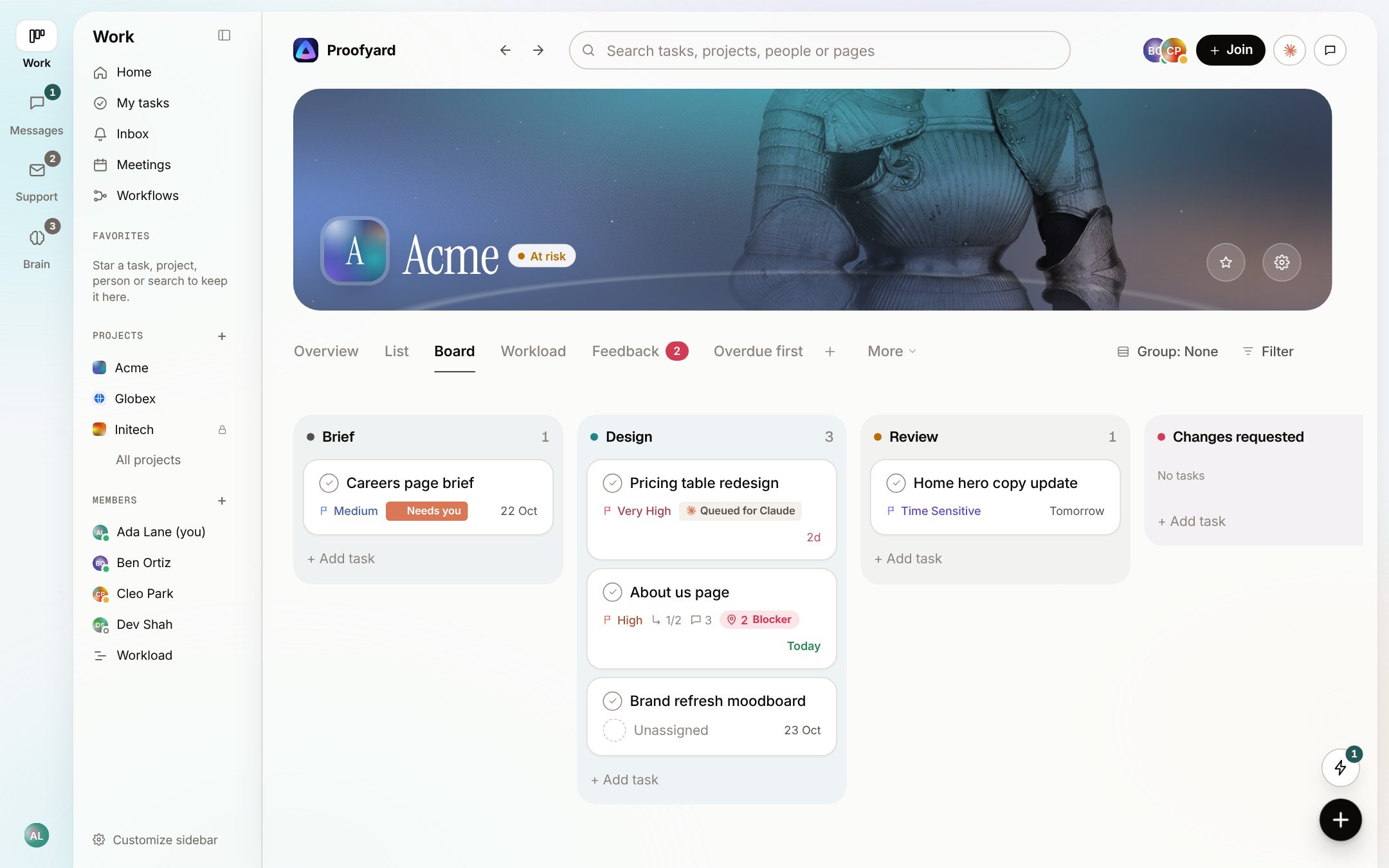
    Each project runs in phases from brief to launch: brief, copy, design, approval, changes, build, testing. A phase can carry a default person, a checklist and a gate, such as an approval before the build starts. In ClickUp you build this yourself from Spaces, Lists and custom statuses, which is flexible and also something someone has to set up and keep tidy.

    See the feature
    The Acme board with columns Brief, Design, Review and Changes requested, and cards showing priority, dates and Claude's state
  2. 02

    The client approves, and it is on record

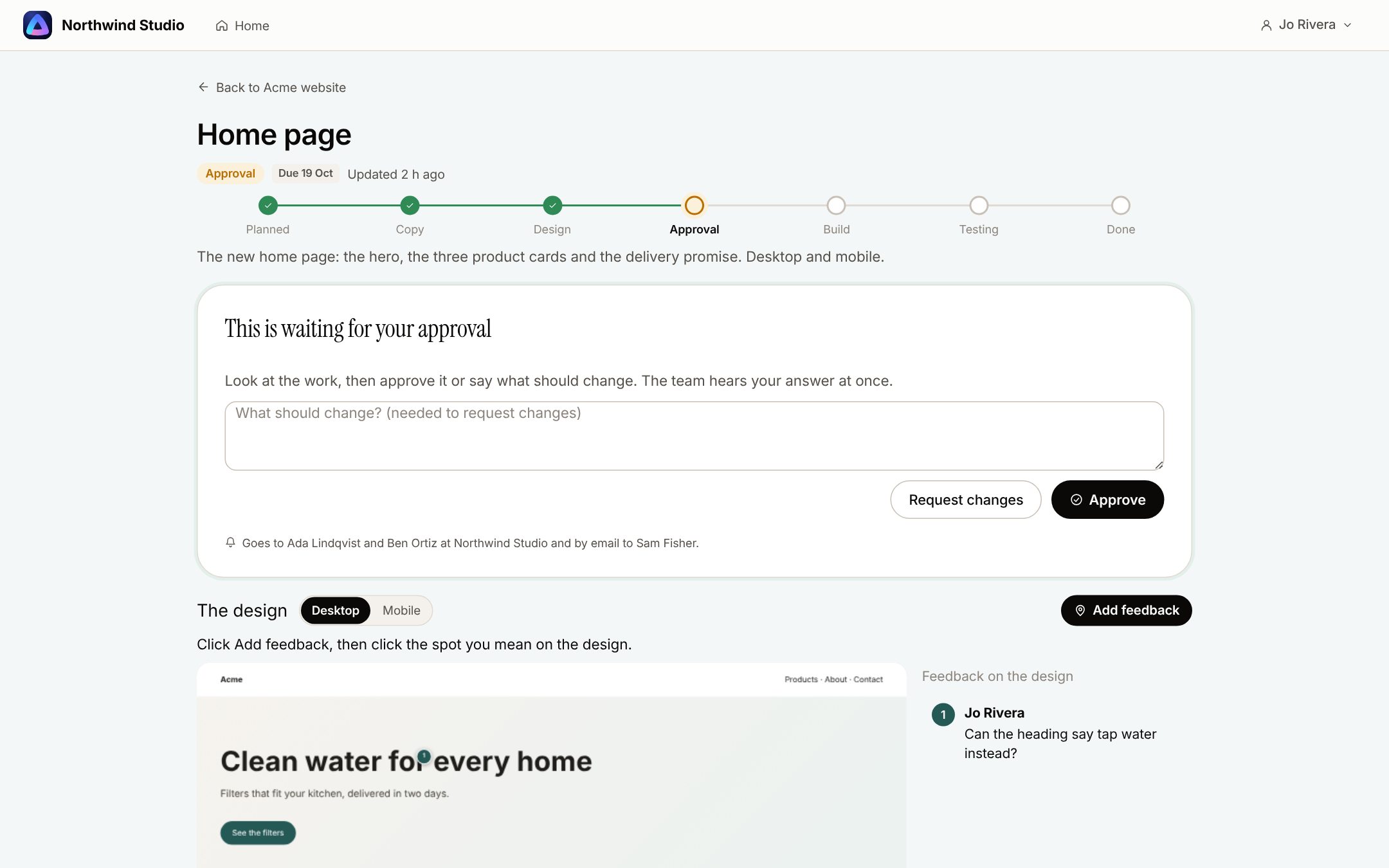
    A client sees what waits for them with the design beside it, and presses Approve or Request changes. The answer is recorded with the design version and moves the task to its next phase. In ClickUp a guest can leave and resolve proofing comments; we found no step where the client approves and the work moves on.

    See the feature
    A home page waiting for the client's approval, with its stage line, Request changes and Approve, a note saying who hears the answer, and the design with a pinned comment
  3. 03

    Notes pinned on designs and live sites

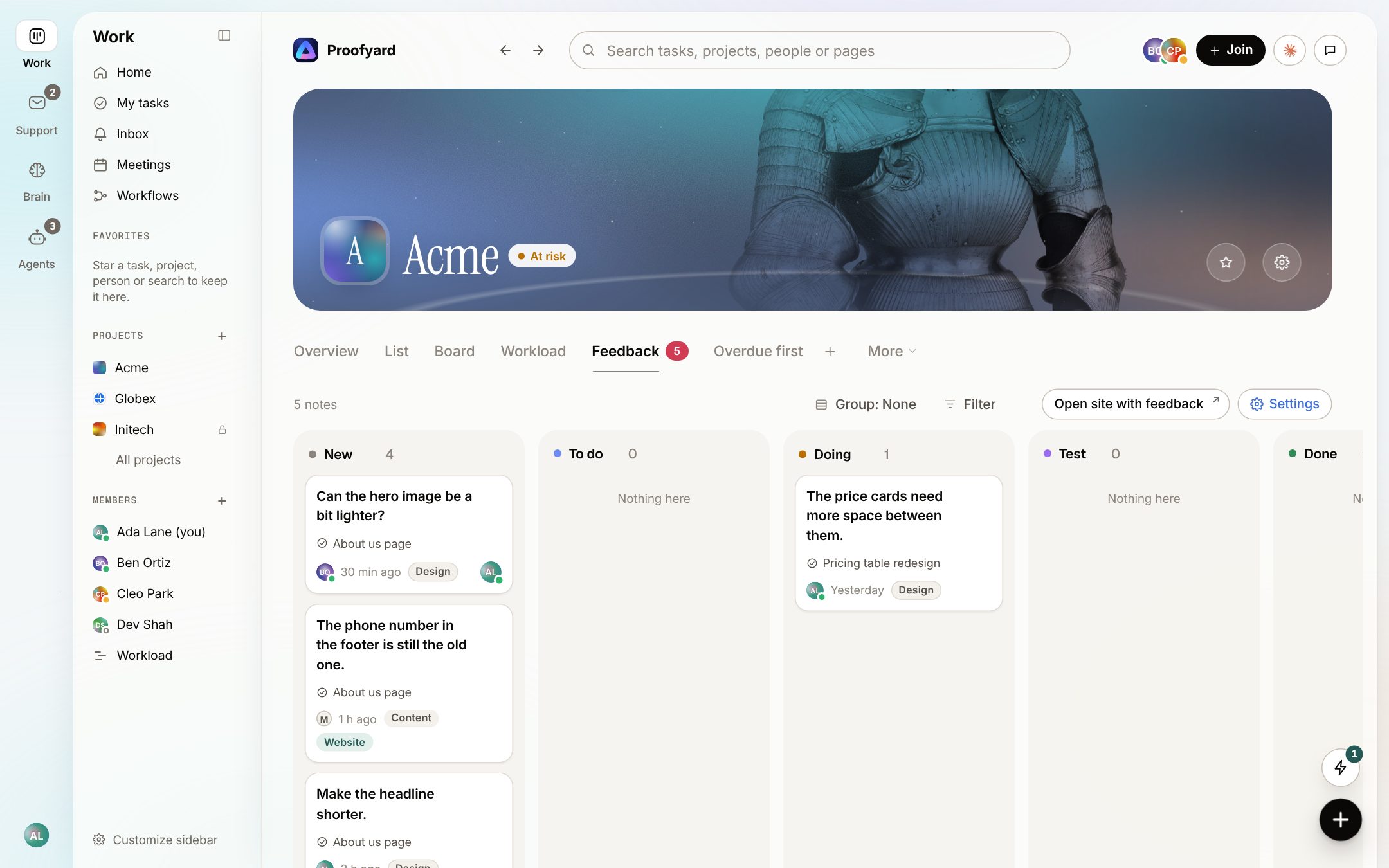
    Clients pin notes on Claude Design boards from a review link, and on the staging or live site through one script tag. Each note keeps the page, the device and a screenshot, and lands on the project's Feedback board. ClickUp's proofing works on images, videos and PDFs attached to a task, not on a live site.

    See the feature
    The Feedback board of a project with notes in New, To do, Doing, Test and Done, each showing the page it was left on
  4. 04

    Claude works the board; a person decides

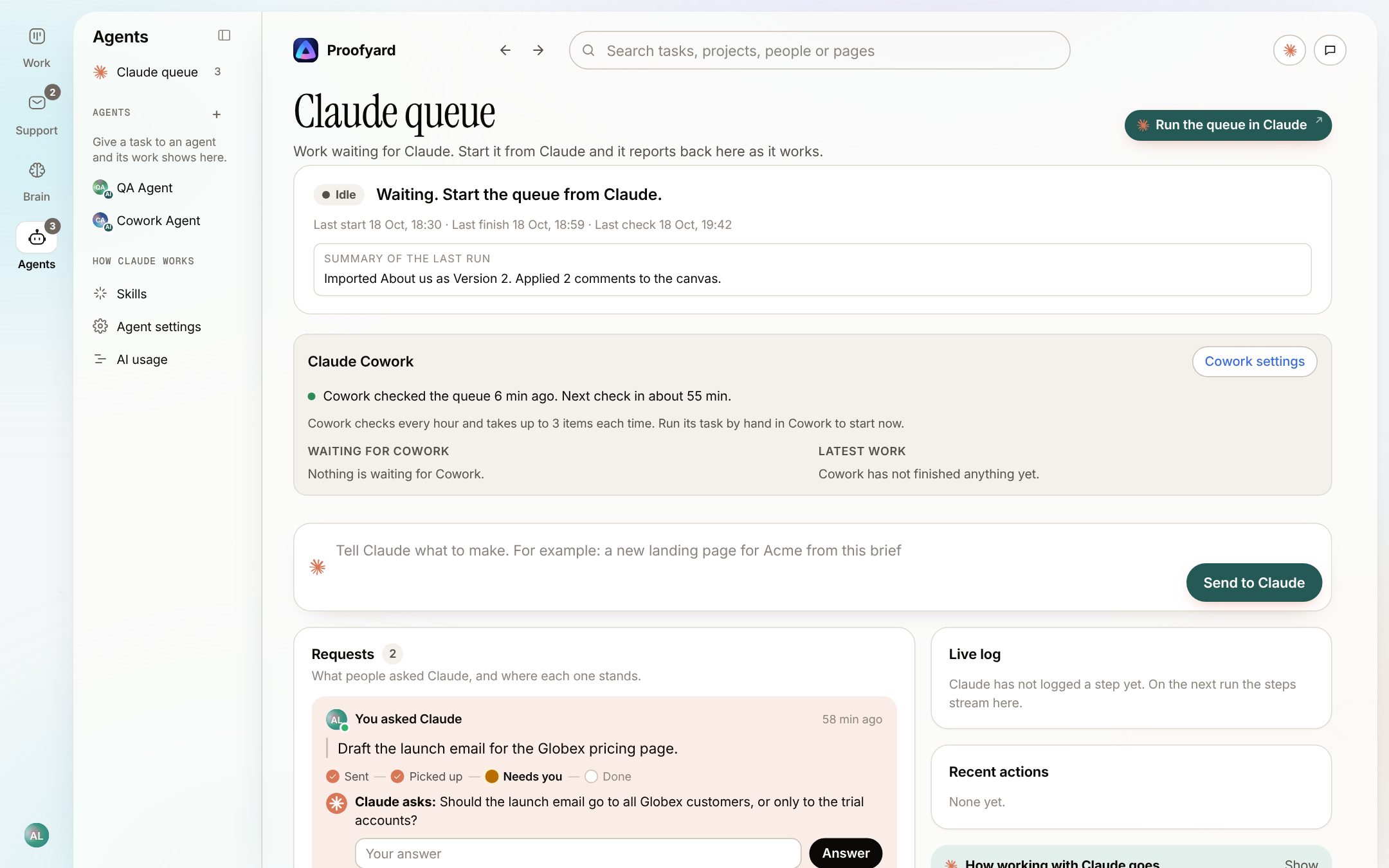
    Claude suggests who, when and how urgent, drafts what it can and works the queue people hand it, through a connector from claude.ai, Claude Code or Cowork. It never approves, publishes or emails a client. ClickUp has a lot of AI too, listed below the screenshot.

    See the feature
    The Claude queue: Cowork checked the queue a few minutes ago, a box to tell Claude what to make, and a request where Claude asks a person a question

In ClickUp

  • Brain answers from your Workspace and can switch between Claude, GPT, Gemini and other models.
  • Super Agents and Autopilot Agents run on AI Super Credits, which come with the AI add-ons and can be bought in $10 blocks.
  • Proofing pins comments on images, videos and PDFs, and guests can use it.
  • Chat, Docs, whiteboards and goals sit in the same app as the tasks.

The screenshots are from the app with sample data: Acme, Maya and the team are made up.

To be fair

Where ClickUp is the better choice

We build Proofyard, so weigh this with that in mind. These come from ClickUp's own pages.

  1. One app for the whole company

    Docs, chat, whiteboards, goals, dashboards, forms, Gantt charts and time tracking are all in ClickUp. If your sales, operations and HR teams should work in the same tool as production, it covers far more than we do.

  2. Price, if you skip the AI

    Unlimited is $7 a user a month billed yearly, so five people pay $420 a year against $720 for Proofyard. Free Forever costs nothing.

  3. Integrations, importers and an API

    ClickUp lists 1,000+ integrations, imports from Asana, monday, Jira, Trello and others, and has a public REST API. We import from Asana only and have no public API.

  4. A choice of AI models

    Brain can use Claude, GPT or Gemini. We use Claude only.

  5. Security and compliance

    ClickUp lists SOC 2 Type 2 and ISO 27001, SAML and SCIM on Enterprise, and a choice of data region on Enterprise. We have optional two-factor sign-in and none of these.

  6. Apps and track record

    ClickUp has iOS, Android, Mac and Windows apps, a large help centre and 24/7 support listed on every plan. Ours installs from the browser, and our first line of code was written on 3 October 2026.

Trying it

Run one client project next to ClickUp

  1. 1

    Pick a client project that is just starting

    Moving a running project is the hard part, and we import from Asana only. A new site is an easy test.

  2. 2

    Keep ClickUp for what it does well

    If other teams run on ClickUp, leave them there. Use Proofyard for the client's brief, designs, approvals and notes on the site.

  3. 3

    Count the emails after the first launch

    Count the approvals and notes you did not have to chase by email, and decide from that.

Questions

ClickUp alternative

Is ClickUp's AI included in the price?

Not on the plans its pricing page showed us on 24 October 2026: without an add-on you get trial access. Brain AI costs $9 a member a month billed yearly and is bought for every member. ClickUp is moving some workspaces to new plans with AI included, Core at $9 and Business at $17. In Proofyard, Claude's credits come with each seat.

Do clients cost money in ClickUp?

View-only guests are free on paid plans. Guests who comment or edit take guest seats, 10 for a one-user Workspace and 5 more per paid user on Business, and past those a guest costs the same as a member. In Proofyard, clients, reviewers and site visitors are always free.

Can clients approve designs in ClickUp?

They can leave and resolve proofing comments on images, videos and PDFs. We found no approval step for clients on the pages we read. In Proofyard the client area has Approve and Request changes, kept with the design version.

Does ClickUp have an MCP server for Claude?

Yes, on every plan, with OAuth. Without the Everything AI add-on a Workspace gets 300 calls a day on Unlimited and 1,000 on Business. Proofyard's connector works with claude.ai, Claude Code and Cowork.

Can I import my ClickUp projects?

Not directly. We import from Asana, one project at a time, and have no importer for ClickUp yet.

Who makes it

Made by Woofocus, a web studio, for its own work first

Woofocus has built and looked after client websites since 2010. We made Proofyard because our own production was spread across a task tool, a feedback tool and long chat threads, and we are moving our studio's work into it now. Any agency can open its own workspace.

Ali Demirci

Ali Demirci

Founder of Woofocus

Ali has designed, built and looked after client websites since 2010 and runs Woofocus, a small web studio. Proofyard is the board he built to run Woofocus's own production after years of carrying work between Asana, BugHerd and chat.

  • 4.99/5rating on Codeable across 219 projects for 74 clientsSource: Codeable profile, October 2026
  • Since 2010building and looking after client websitesSource: woofocus.com
  • ~7,000tasks in our own Asana workspace, the work Proofyard was built to runSource: Woofocus Asana workspace, read 3 October 2026
What clients say about our work

“Communication was always clear and timely, making it easy to stay aligned on progress.”

“Ali delivered on time and worked tirelessly with us to make sure that we were satisfied.”

Sources

Where every ClickUp fact comes from

  1. ClickUp pricing, 24 October 2026
  2. ClickUp help: Brain AI add-ons, 24 October 2026
  3. ClickUp Brain, 24 October 2026
  4. ClickUp help: guest roles and pricing, 24 October 2026
  5. ClickUp help: Proofing, 24 October 2026
  6. ClickUp help: ClickUp MCP, 24 October 2026
  7. ClickUp security, 24 October 2026
  8. ClickUp FAQs (imports, API, mobile), 24 October 2026
  9. ClickUp integrations, 24 October 2026

Our side: the app as built on 24 October 2026; screenshots use sample data.

Try it on your own work

Try it on your next client site

Open a workspace and start one new client project. 14 days free, no card.

  • 14 days free, no credit card
  • Clients and reviewers are free
  • 3,000 Claude credits a person each month

Proofyard is not affiliated with ClickUp. ClickUp is a trademark of its owner. Facts about ClickUp were read from its own pages on 24 October 2026 and may have changed since.