Scope: requests checked against what the client agreed
Scope and change orders for agency projects
Paste what the client agreed to. Each new request in the project is checked against it, and one that looks like extra work is flagged with the reason and what similar tasks took. You decide: part of the scope, a change order or ignore. Claude drafts the change order; a person sends it.
Free for 14 days, no credit card needed.
Scope creep
Extra work rarely arrives labelled as extra work
Scope creep in a web project is usually small and polite: "could we also have a blog page?" in a comment, or a new line in a call's notes. Each one is reasonable on its own. At Woofocus the problem was never saying no; it was noticing, two weeks later, that five of them had been built and none had been priced.
Each project has a Scope tab for what the client agreed to, in whatever form you have it. Once you mark it agreed, every new task in the project is read against it. A request that looks out of scope gets a flag on its card with Claude's reason and an estimate from the studio's own similar tasks. A person decides what happens next, and nothing reaches the client until a person sends it.
- 01
Paste the agreed scope, and list it with Claude if you like
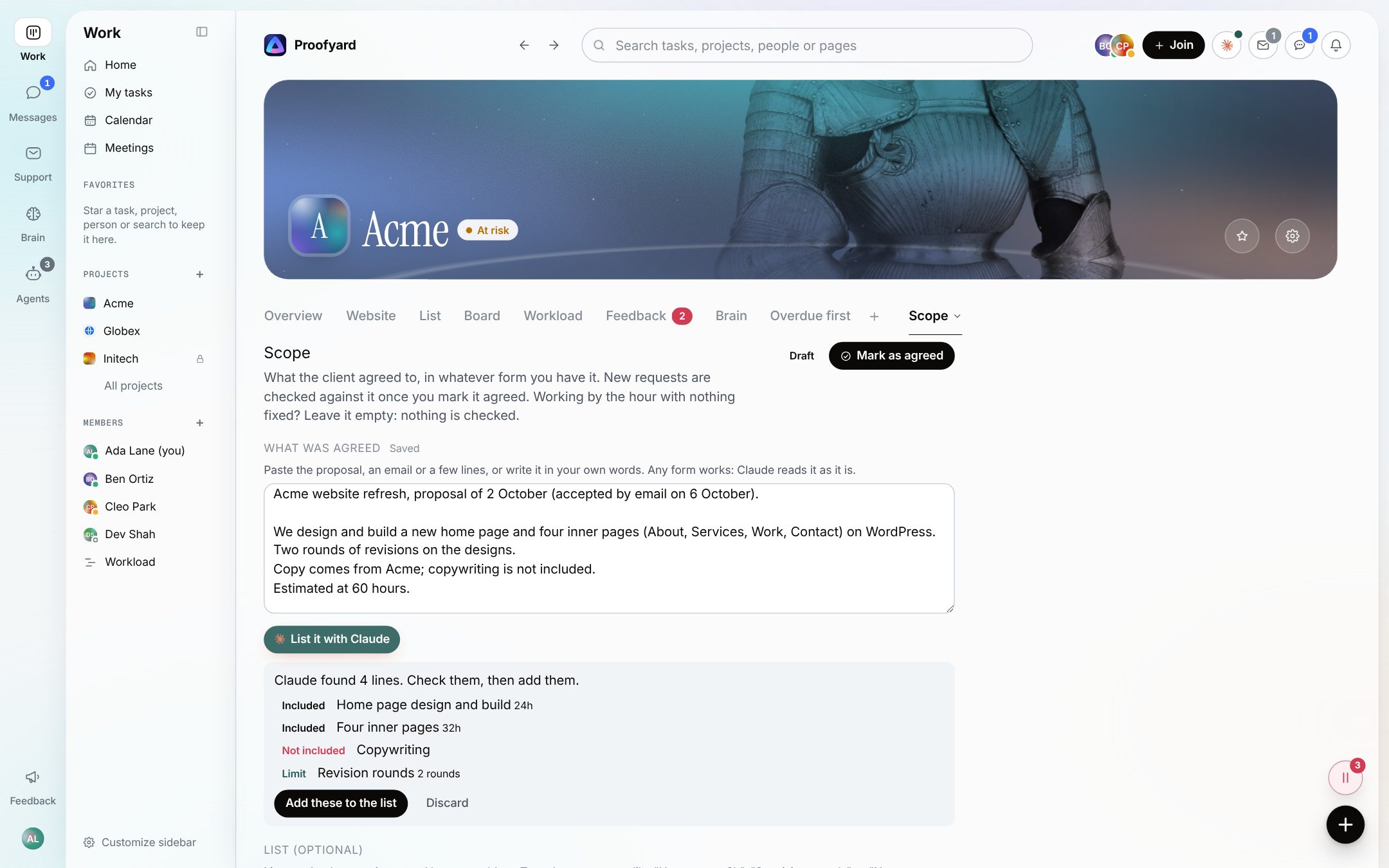
In the project, More, Scope, paste the proposal, the email the client said yes to or a few lines in your own words. The text alone is enough for the check. List it with Claude is optional: Claude lists what the text includes, leaves out and limits (such as two revision rounds), and you check the list before anything is added. You can also type lines your own way, like "Home page, 8h" or "No copywriting". Hours budget, hourly rate and currency are optional. Mark as agreed starts the check; working by the hour with nothing fixed, leave it empty and nothing is checked.
- 02
A request that looks out of scope is flagged, and you decide
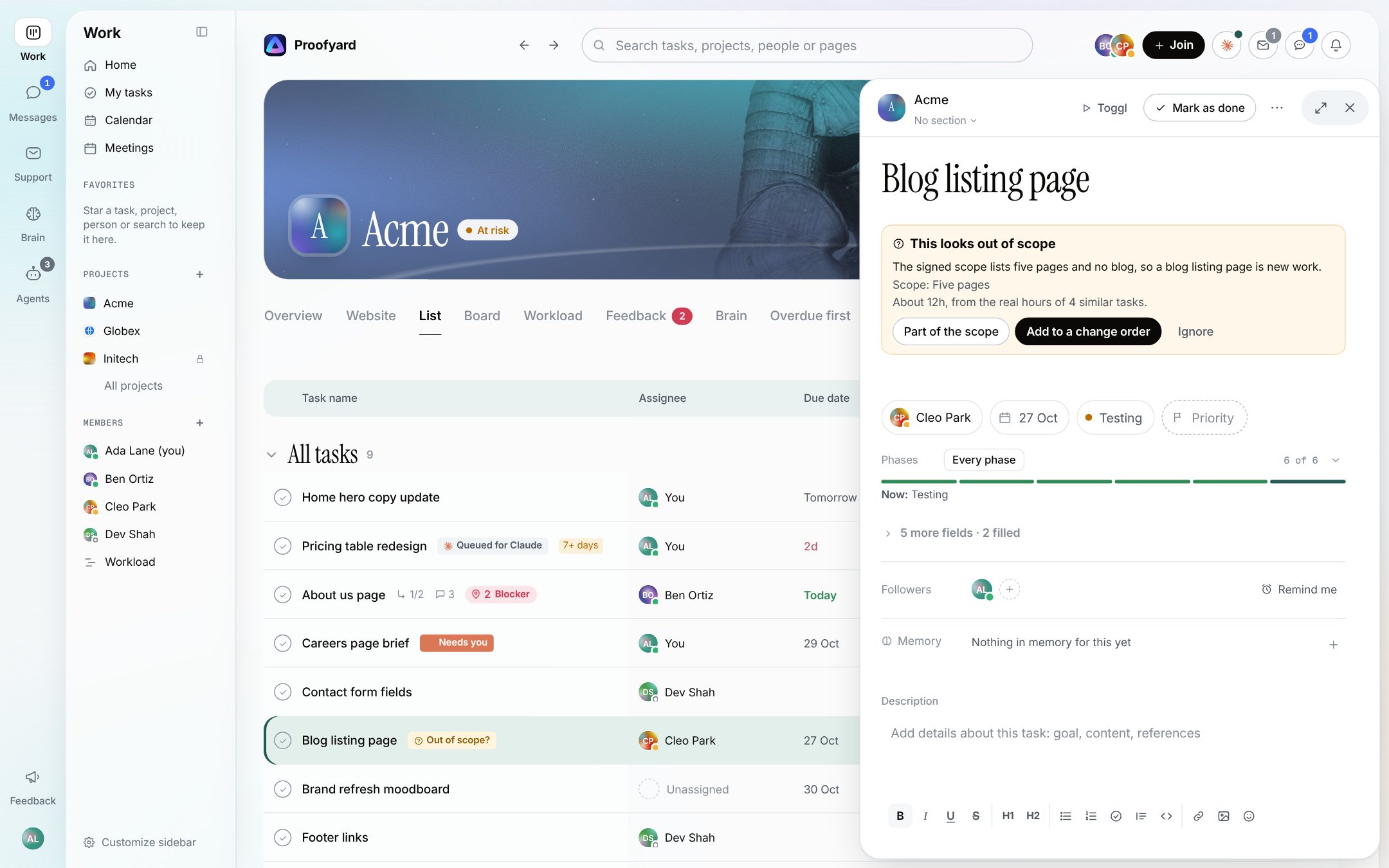
After a task is made in the project, on the board or through the connector, Claude reads it against the agreed scope. If it looks like new work, past a limit or something the scope leaves out, the card gets an Out of scope? chip and the task shows the reason, the scope lines it touches and an estimate: what similar finished tasks really took, or, without enough of those, the middle of what at least three similar tasks were estimated at. When it cannot tell, it says Scope unclear. The flag also waits under Decisions on the Home page of whoever made the task or has it. Then a person decides: Part of the scope keeps it as agreed work, Ignore leaves it as it is, and Add to a change order puts it on the project's draft change order with its hours. Each choice goes in the task's activity and has Undo. Claude cannot make this choice, not even through the connector.
- 03
Claude drafts the change order, a person sends it
The Scope tab collects the requests marked for a change order, with each one's hours and, if you set a rate, the price. Write it with Claude drafts a short email to the client from those facts, and is told not to invent prices, dates or work. You edit the subject and the message and press Send to the client, which asks first, because an email cannot be taken back. A sent change order stays as it was sent. When the client answers, mark Client accepted (the requests join the scope with their hours) or Client declined; both have Undo.
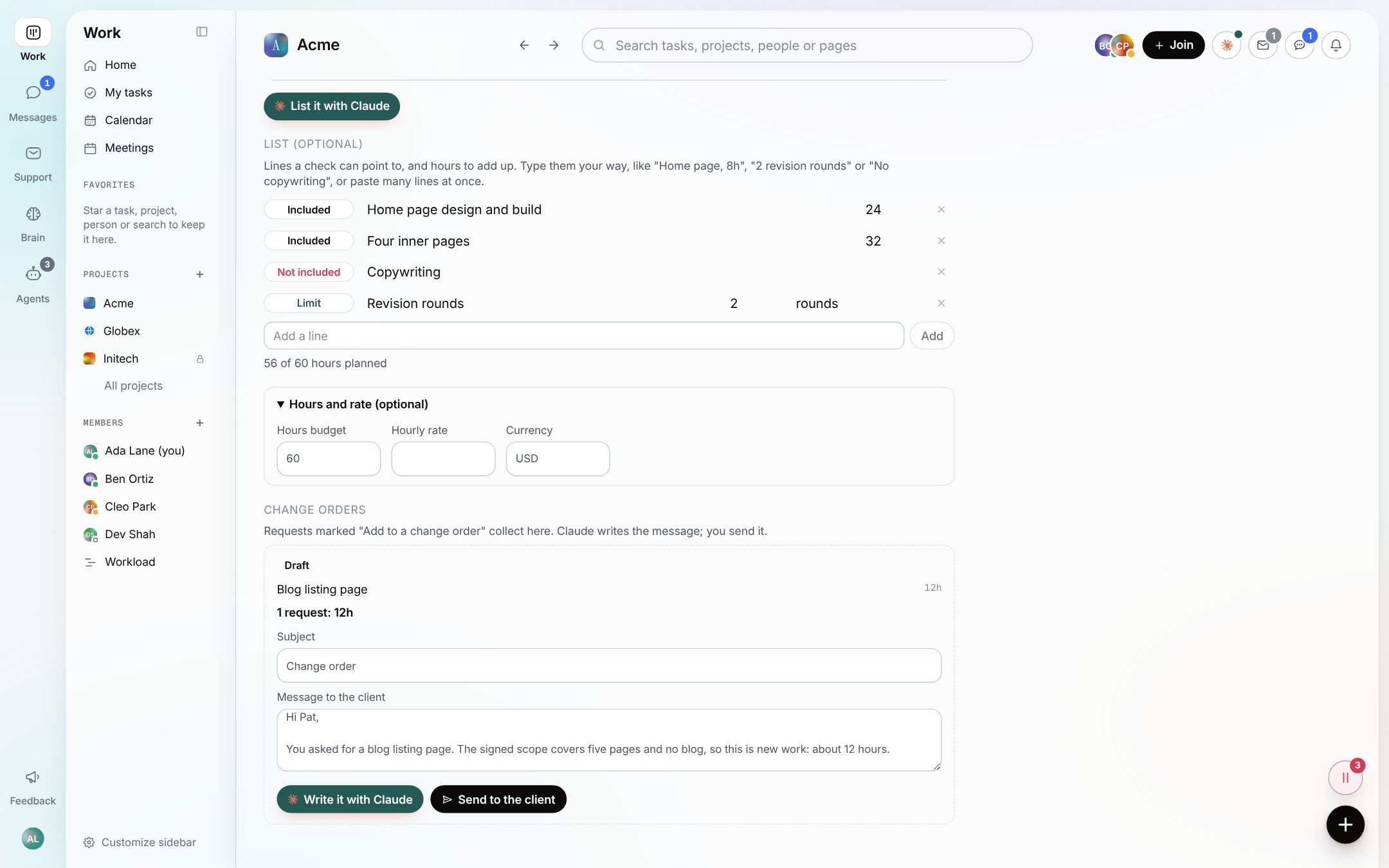
The screenshots are from the app with sample data: Acme, Maya and the team are made up.
Where agencies use it
The requests that used to slip through
"Could we also add a blog?"
A new page the proposal never mentioned. The flag says so, with the hours your last few similar pages took, before anyone starts designing it.
A third round of revisions
Write the limit as a line, "2 revision rounds", and a request that goes past it is flagged against that line.
Things you said you would not do
"No copywriting" or "Hosting not included" are lines too. A request to write the About page copy is flagged against them.
Small fixes stay quiet
Claude is told that small fixes and internal housekeeping are in scope, so a typo or a broken link does not raise a flag.
Retainers and hourly work
No fixed scope? Leave the Scope tab empty. Nothing is checked, and nothing is flagged.
Pricing the extras in one go
Several requests can join one draft change order, so the client gets one email with every extra, its hours and the total, not five separate asks.
What it will not do
Claude checks, a person decides
Claude never sends a change order or decides on a request. It flags and drafts; a person presses Send and picks Part of the scope, Add to a change order or Ignore.
It is not a contract or e-signature tool. Mark as agreed records that your team says the client agreed; keep the signed document where you keep contracts.
It checks new tasks made after the scope was marked agreed. Tasks that were already there are not checked again.
The estimate is only as good as your history: with fewer than three similar tasks it says it is too early to estimate, instead of guessing.
A change order goes by email to the clients added to the project. If the project has no client with an email, or email is not set up for the workspace, nothing is sent and the screen says why.
Questions
Scope creep
What counts as the scope?
Whatever you mark as agreed: the pasted text, the list, or both. Claude reads them together. The list is optional; it gives the flag lines to point to and hours to add up.
How does Claude estimate the extra work?
From the real hours logged on similar finished tasks in your workspace. Without enough of those, it takes the middle value of what at least three tasks of the same type were estimated at. With fewer, it says it cannot estimate yet.
Does the client see the flag?
No. Scope checks and change orders are for the team. The client sees only the change order email a person sends.
Can Claude send the change order for us?
No. Claude writes the draft when you press Write it with Claude. Sending needs a person, who confirms who it goes to first, and Claude cannot send it through the connector either.
What happens when the client accepts?
Mark Client accepted on the change order. Its requests join the project's scope as included lines with their hours, and Undo takes them out again.
Can I change the scope after marking it agreed?
Yes. Back to draft stops the checks; edit the text or the list and mark it agreed again. An accepted change order adds its lines for you.
Who makes it
Made by Woofocus, a web studio, for its own work first
Woofocus has built and looked after client websites since 2010. We made Proofyard because our own production was spread across a task tool, a feedback tool and long chat threads, and we are moving our studio's work into it now. Any agency can open its own workspace.

Ali Demirci
Founder of Woofocus
Ali has designed, built and looked after client websites since 2010 and runs Woofocus, a small web studio. Proofyard is the board he built to run Woofocus's own production after years of carrying work between Asana, BugHerd and chat.
- 4.99/5rating on Codeable across 219 projects for 74 clientsSource: Codeable profile, October 2026
- Since 2010building and looking after client websitesSource: woofocus.com
- ~7,000tasks in our own Asana workspace, the work Proofyard was built to runSource: Woofocus Asana workspace, read 3 October 2026
“Communication was always clear and timely, making it easy to stay aligned on progress.”
“Ali delivered on time and worked tirelessly with us to make sure that we were satisfied.”
Try it on your own work
Paste one project's scope
Open a workspace, paste a proposal into a project's Scope tab, mark it agreed and add a task it does not cover. Free for 14 days, no credit card needed.
- 14 days free, no credit card
- Clients and reviewers are free
- 3,000 Claude credits a person each month