Teamwork.com vs Proofyard
A Teamwork.com alternative for small web agencies
Teamwork.com is the closest thing to an agency tool among the big project apps: time tracking, budgets, retainers, invoices, resource planning, proofing and free client users. Proofyard does less of the money side and more of the production side: a client site goes from brief to launch in phases, clients approve and pin notes on designs and live sites, and Claude works the board while a person decides.
Free for 14 days, no credit card needed.
By Ali Demirci, Woofocus. Teamwork.com's pages read on 24 October 2026.
The short answer
Which one fits your agency
Pick Teamwork.com if you bill by the hour or run retainers and need the numbers in the same tool: timers and timesheets, time budgets, invoices from logged time, utilization and, on its Optimize plan, profit by project or client. It also has 150+ integrations, a public API, SOC 2 and ISO 27001, and years of agencies behind it. Its own agency page says it is "built for agencies of 50+ people".
Pick Proofyard if you are a smaller studio building client websites and the hard part is production, not billing: briefs, designs, client approvals, notes on staging and live sites, and the build. Claude drafts and connects the work, a person approves, and you pay one price per team member with Claude's AI credits included. Clients are free in both.
We have not run Woofocus's client work in Teamwork.com. What follows about it comes from its own pricing page, product pages and help center, read on the date above, with quotes where the wording matters. Where its pages disagree with each other we say so. The agency side is what we know first-hand from our own studio.
At a glance
Teamwork.com and Proofyard, feature by feature
From Teamwork.com's own pages, read on the date above, and from our app as it is today. Where a feature needs a higher plan we name it. Marks are short; the note beside each says what we mean.
| Feature | Teamwork.com | Proofyard |
|---|---|---|
| Planning the work | ||
| Phases that follow how a site is built | Board columns, task lists and project templates you set up yourself | A workflow per project, with a person, a checklist and a gate on each phase |
| List, board, table and Gantt views | Gantt, Table, List and Board on every plan | List, board and a Calendar by week or month; no Gantt |
| Workload by person | Workload and live capacity from Accelerate | A timeline per person, project or client, with capacity and Rebalance |
| Scheduling by role or skill | Roles, skills and tentative work on Optimize | No |
| Automations | If/then rules; 100 on Free up to 100,000 on Optimize | Rules that do the next step, with Undo |
| Time and money | ||
| Time tracking | Timers, timesheets, billable time and timesheet approval | A Toggl Track button on a task; no built-in timer |
| Budgets and retainers | Time budgets and retainers from Accelerate; financial and multi-currency budgets on Optimize | No |
| Invoices | Invoices from logged time from Accelerate; QuickBooks and Xero | No |
| Profit by project or client | Revenue, cost and profitability insights on Optimize | No |
| Quotes and a sales pipeline | Quotes and CRM pipeline to projects on Optimize | No |
| Working with clients | ||
| Free seats for clients | Client users are free, on Basics and up; each on up to five active projects | Clients and reviewers are free, on as many projects as you add them to |
| A client sees only their own work | Client users see the projects they are added to; a branded view, per its agency page | A client area shows only what you share |
| The client approves a design | Proofs: reviewers can approve or request changes, without a Teamwork.com login | Approve or Request changes in the client area or a review link, kept with the design version |
| Requests from outside the team | Intake forms; smart forms from Accelerate | A support inbox, in early access |
| A help desk for client email | Teamwork Desk, sold separately per agent | The same support inbox, in early access |
| Design and site feedback | ||
| Comments pinned on a design | Proofs for PDFs, Office files and images, with versions; 5 a month on Free, 20 on Basics, unlimited from Accelerate | Pins on each design version, from the client area or a review link |
| Pin a note on a live site | Proofs takes files and links to files; we found no notes on a live site | One script tag; each note keeps the page, device and a screenshot |
| Feedback on Claude Design boards | No | Each import is a version; clients pin from a review link |
| AI and tools | ||
| AI in the tool | TeamworkAI on paid plans, included for an introductory period; usage-based credits announced | Suggestions across the board, and Claude from any page; credits included per seat |
| AI agents | Scout and Flo on Basics, Remi on Accelerate, Kash and Jack on Optimize; some marked coming soon | Cowork, QA, Memory Expert and Skill Expert agents |
| MCP server | All paid plans, no extra cost from Teamwork.com; Claude, ChatGPT, Copilot and Cursor | claude.ai, Claude Code and Cowork |
| Public API | 150 requests a minute, more on Optimize and Enterprise | MCP is the only programmatic door |
| Integrations | 150+, among them Slack, HubSpot, QuickBooks, Xero, Salesforce and Harvest | Slack, Google and Outlook calendars, GA4 and Search Console, Toggl Track |
| Import from other tools | Wrike, Asana, Basecamp, ClickUp, Trello and monday.com | Asana, one project at a time; BugHerd's CSV for feedback |
| Hosting and security | ||
| Where the data lives | US or EU on every plan, on AWS | Frankfurt, EU |
| Compliance reports | SOC 2 Type 2 and ISO/IEC 27001:2022, per its security page | Not yet; our first line of code was written in October 2026 |
| Single sign-on | Enterprise | No |
| Mobile apps | Desktop and mobile apps on every plan | Installs from the browser as an app, with notifications; not in the app stores |
Pricing
What a year costs, at list price
Teamwork.com's Basics plan is $9.99 a user a month billed yearly ($13.99 monthly) with at least 3 users; Accelerate, where budgets, retainers and invoices start, is $24.99 ($29.99 monthly) with at least 5. Client users are free. Proofyard costs $12 per team member a month billed yearly, with Claude's AI credits included, and clients are free.
| Team | Teamwork Basics, yearly | Teamwork Accelerate, yearly | Proofyard, yearly |
|---|---|---|---|
| 2 people | $359.64 · 3 users billed | $1,499.40 · 5 users billed | $288 |
| 3 people | $359.64 | $1,499.40 · 5 users billed | $432 |
| 5 people | $599.40 | $1,499.40 | $720 |
| 8 people | $959.04 | $2,399.04 | $1,152 |
| 10 people | $1,198.80 | $2,998.80 | $1,440 |
| 15 people | $1,798.20 | $4,498.20 | $2,160 |
| 25 people | $2,997 | $7,497 | $3,600 |
- Teamwork.com: Free for up to 5 users and 5 projects; Basics $9.99 a user a month billed yearly or $13.99 monthly, at least 3 users; Accelerate $24.99 or $29.99, at least 5 users; Optimize and Enterprise by quote. Paid plans start with a 14-day trial, no card.
- Profit by project or client, financial budgets, quotes and scheduling by role or skill are on Optimize, which has no public price.
- On AI, the pricing page says "Teamwork AI is included in all paid plans for an introductory period." Its plan cards say usage-based AI credits "will launch in September 2026"; the same page and its Markdown copy say November 2026. We found no credit prices.
- Teamwork Desk, the help desk, is priced on its own: from $9.50 an agent a month billed yearly.
- Proofyard has no free plan: 14 days free with no card, then $12 a team member a month billed yearly or $15 monthly, with 3,000 AI credits a member a month in the workspace's pool.
What is different
Where the agency work goes
- 01
Phases that follow how a site is built
Each project runs in phases from brief to launch: brief, copy, design, approval, changes, build, testing. A phase can carry a default person, a checklist and a gate, such as an approval before the build starts. Teamwork.com gives you boards, task lists and templates to build that shape yourself, and is stronger on what comes around it: the budget, the hours and the invoice.
See the feature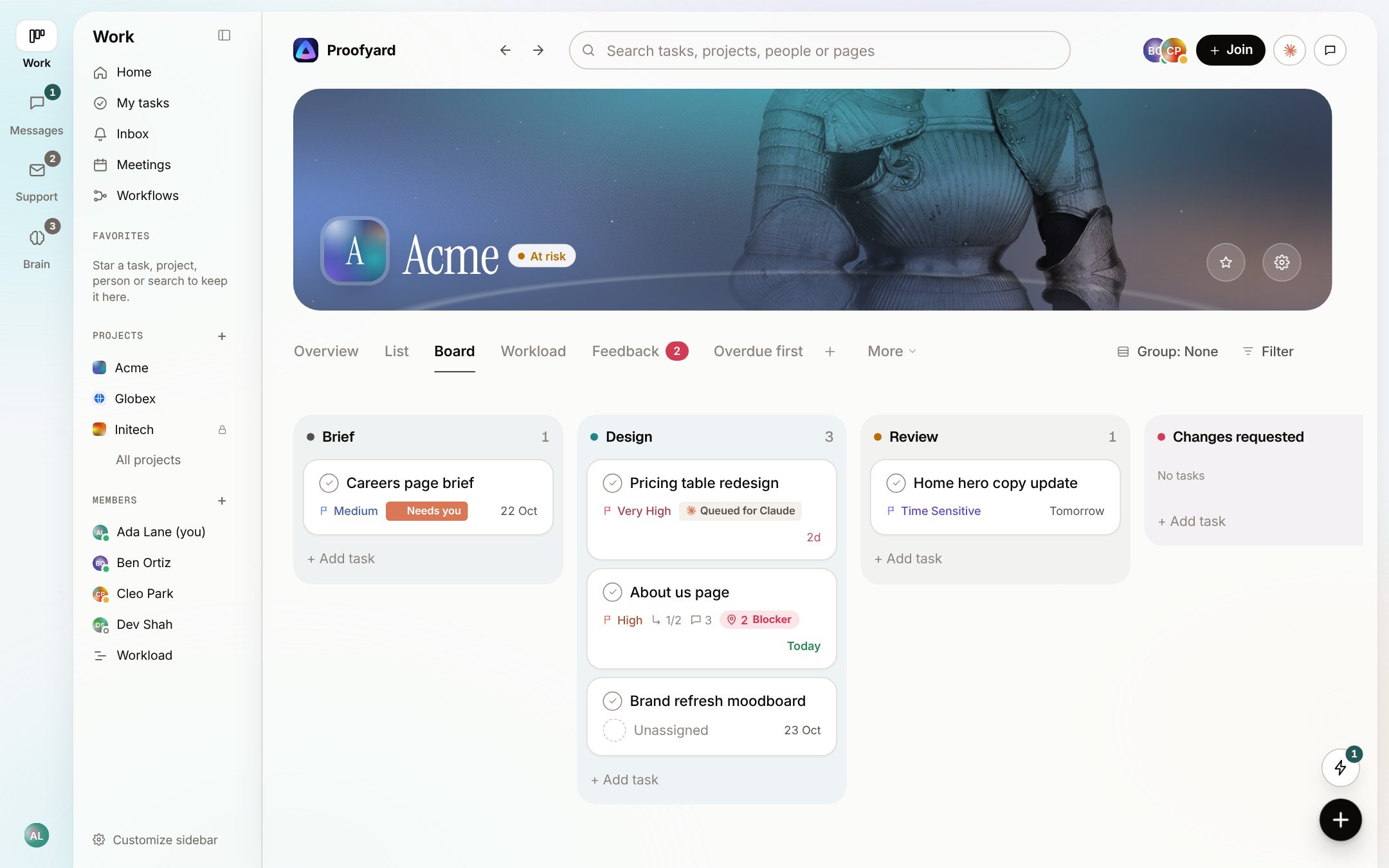
- 02
The client approves, and it is on record
A client sees what waits for them with the design beside it, and presses Approve or Request changes. The answer is kept with the design version and moves the task to its next phase. Teamwork.com's Proofs does approvals well for files: reviewers can approve without an account, and every version is kept. The difference is what is being approved: a PDF or an image there, a design version or a live page here.
See the feature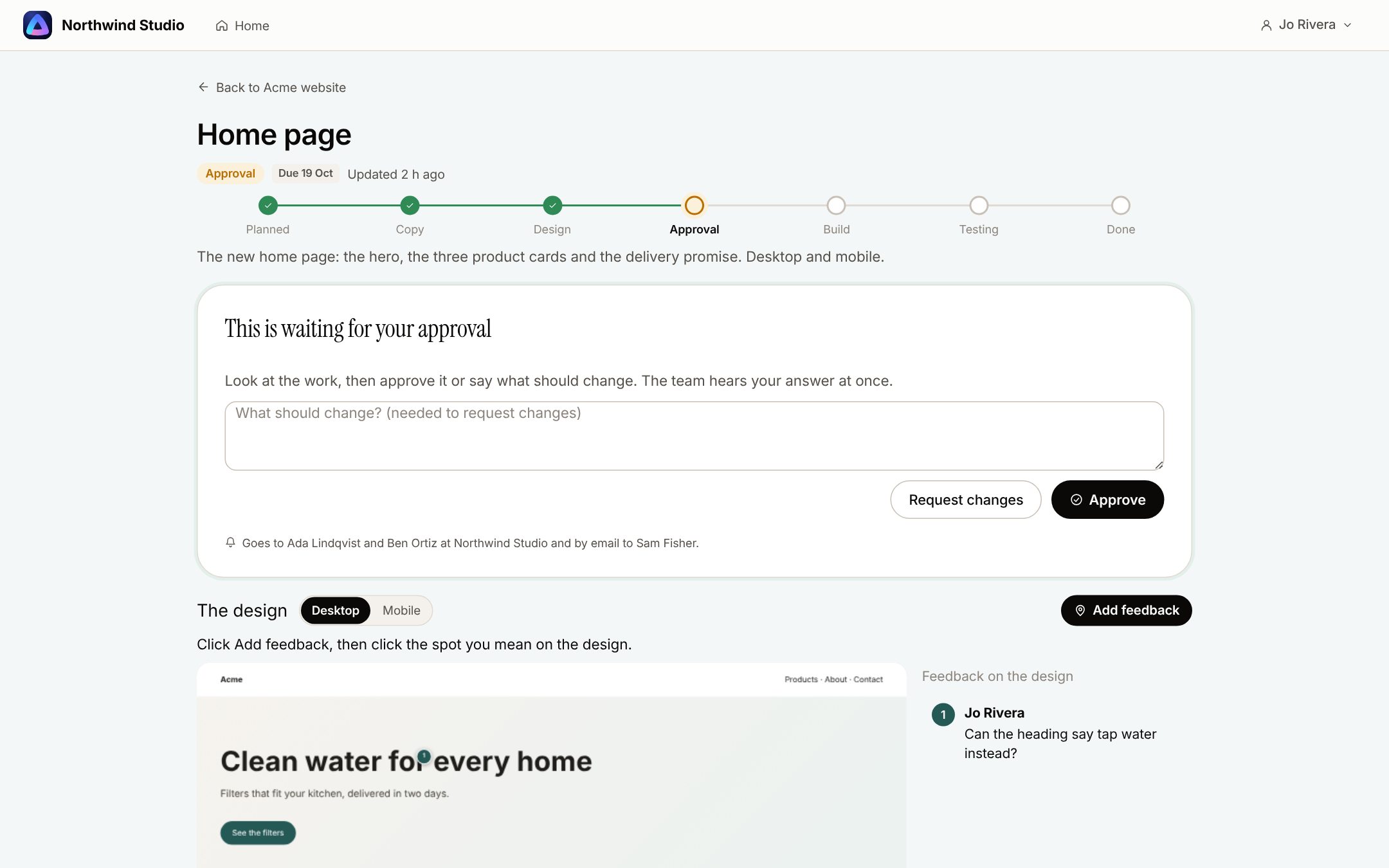
- 03
Notes pinned on designs and live sites
Clients pin notes on Claude Design boards from a review link, and on the staging or live site through one script tag. Each note keeps the page, the device and a screenshot, and lands on the project's Feedback board. Teamwork.com's Proofs takes PDFs, Office files and images, and links to Google Docs or Figma files, where its help center says comment annotations are not available. We found no notes on a live site.
See the feature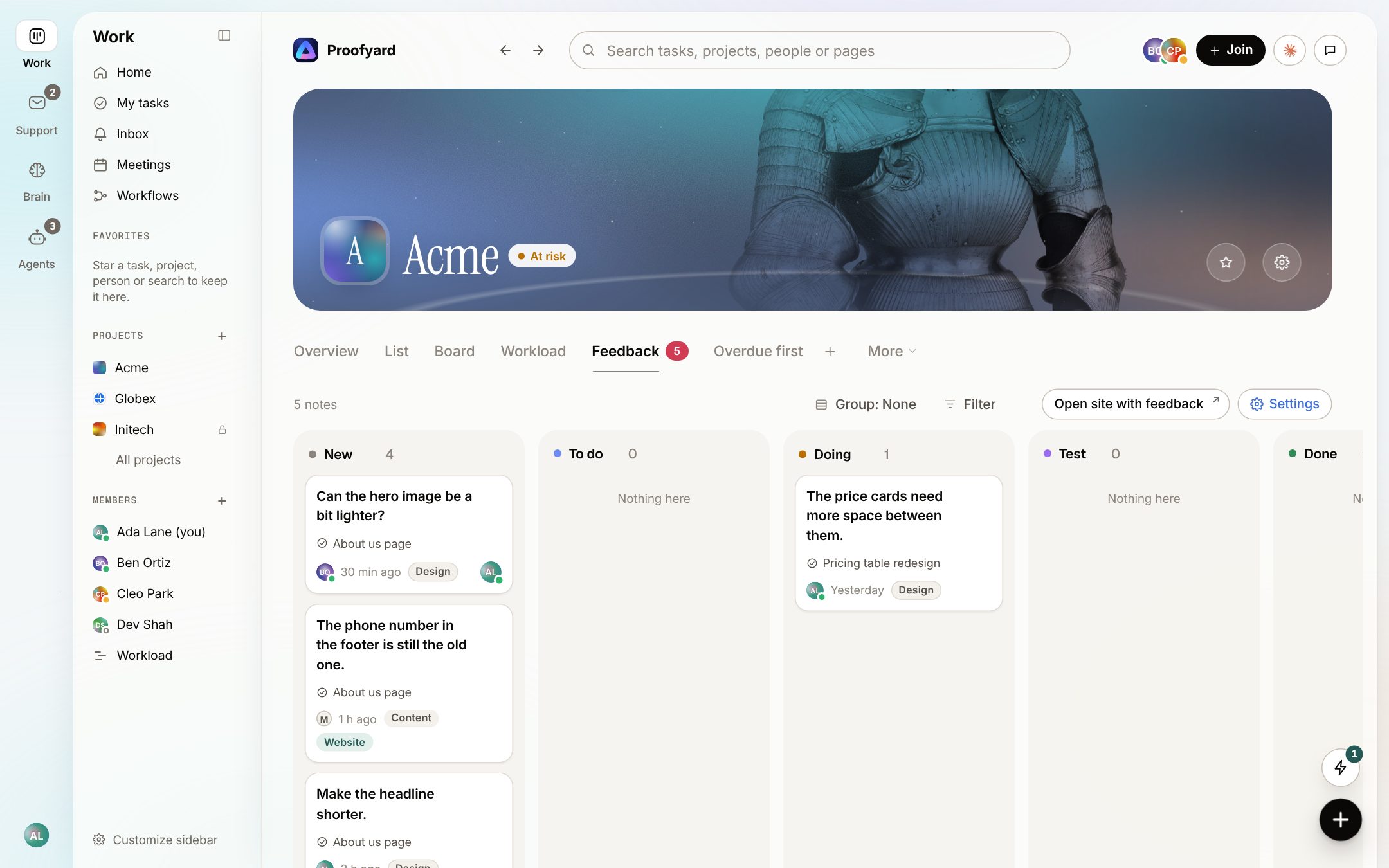
- 04
Claude works the board; a person decides
Claude suggests who, when and how urgent, drafts what it can and works the queue people hand it, through a connector from claude.ai, Claude Code or Cowork. It never approves, publishes or emails a client. Teamwork.com has its own AI and an MCP server too, listed below the screenshot.
See the feature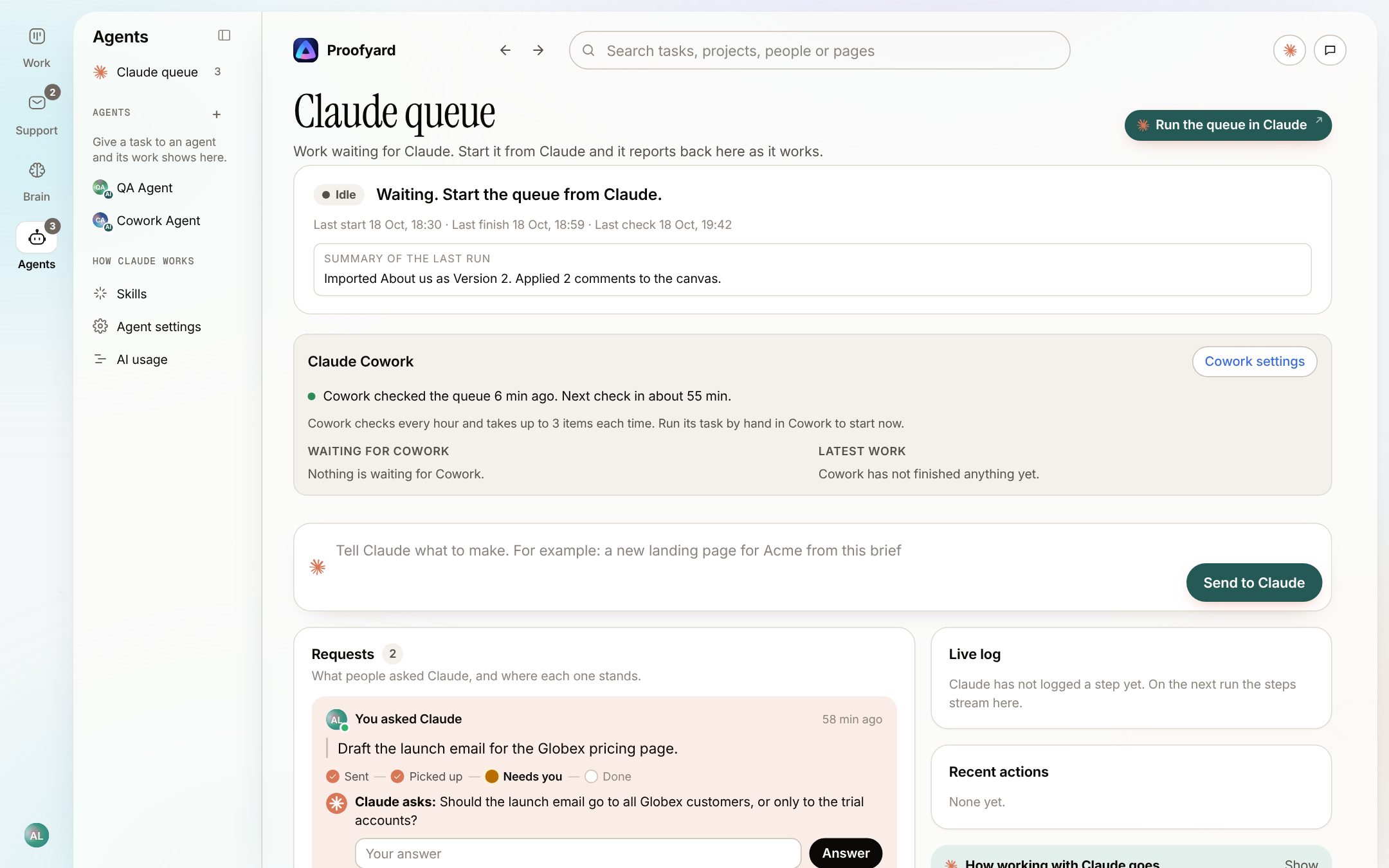
In Teamwork.com
- TeamworkAI summarizes comment threads, builds projects with a wizard, auto-assigns tasks and, on Optimize, forecasts project profitability.
- Named AI teammates by plan: Scout and Flo on Basics, Remi for resourcing on Accelerate, Kash for budgets and Jack for custom agents on Optimize. Its comparison table marks Remi, Kash and Jack as coming soon.
- An MCP server at mcp.ai.teamwork.com is "available to all paid customers", with "no additional cost from Teamwork.com", and setup guides for Claude, ChatGPT, Copilot and Cursor.
- TeamworkAI's page says your data is never used to train third-party models.
The screenshots are from the app with sample data: Acme, Maya and the team are made up.
To be fair
Where Teamwork.com is the better choice
We build Proofyard, so weigh this with that in mind. These come from Teamwork.com's own pages.
Budgets, retainers and profit
Time budgets and retainers from Accelerate; fixed-fee and multi-currency budgets, revenue, cost and profit by project or client on Optimize. If your margin is the question you ask every week, Teamwork.com answers it and Proofyard does not.
Time tracking and billing
Timers, timesheets, reminders, billable and non-billable time, timesheet approval and invoices from logged time, with QuickBooks and Xero. We have a Toggl Track button and no invoices.
Resource planning
Live capacity, utilization targets, placeholders that hold future capacity, and scheduling by role or skill on Optimize. Our workload view shows people and their load; it does not plan by role or forecast.
Integrations and an API
150+ integrations, a public API on every plan, webhooks, and an importer for Wrike, Asana, Basecamp, ClickUp, Trello and monday.com. We import from Asana only and have no public API.
Security and hosting choice
SOC 2 Type 2 and ISO/IEC 27001:2022 on its security page, US or EU hosting on every plan, and single sign-on on Enterprise. We have optional two-factor sign-in, EU hosting in Frankfurt, and no compliance reports yet.
Track record
Its help center still lists plans called Pro, Premium, Deliver, Grow and Scale from earlier years, and it sells a help desk and a chat app next to the project tool. Our first line of code was written in October 2026.
Price for a small team on Basics
Three people on Basics pay $359.64 a year billed yearly, against $432 for three seats of Proofyard. Basics has no budgets or invoices, though, and Accelerate, where they start, bills at least 5 users.
Trying it
Run one client project next to Teamwork.com
- 1
Keep the numbers where they are
If Teamwork.com runs your timesheets, budgets and invoices, leave them there. Proofyard does not replace that part.
- 2
Pick a website that is just starting
Bring its brief, designs, approvals and client notes into one project here. Moving a running project is the hard part; a new site is an easy test.
- 3
Count the chasing after the first launch
Count the approvals and notes you did not have to chase by email, and the hours you did not spend copying feedback into tasks, and decide from that.
Questions
Teamwork.com alternative
How much does Teamwork.com cost?
Free for up to 5 users and 5 projects. Basics is $9.99 a user a month billed yearly or $13.99 monthly, with at least 3 users. Accelerate is $24.99 or $29.99, with at least 5 users. Optimize and Enterprise are by quote.
Are client users free in Teamwork.com?
Yes. Its help center says "Client users are free", on Basics, Accelerate, Optimize and Enterprise. Each client user can be on at most five active projects. Proofyard has no such limit: clients are free on every project you add them to.
Does Teamwork.com charge for AI?
Not yet. Its pricing page says "Teamwork AI is included in all paid plans for an introductory period" and that usage-based AI credits are coming; the plan cards say September 2026 and the rest of the page says November 2026. Proofyard includes 3,000 AI credits per team member a month in the seat price.
Does Teamwork.com have an MCP server for Claude?
Yes. Its MCP page says it is "available to all paid customers" with "no additional cost from Teamwork.com", and its help center has setup guides for Claude and ChatGPT. Proofyard's connector works with claude.ai, Claude Code and Cowork.
Can clients leave feedback on a website in Teamwork.com?
On files and links to files, through Proofs. We found no way to pin a note on a staging or live site. In our app a script tag on the site lets clients pin notes with the page, device and a screenshot.
Is Teamwork.com good for small agencies?
It works for them, and Basics is cheap for three people. Its own agency page describes it as "built for agencies of 50+ people", and the money features that set it apart start on Accelerate (five users at least) or Optimize (by quote).
Can I import my Teamwork.com projects?
Not directly. We import from Asana, one project at a time.
Who makes it
Made by Woofocus, a web studio, for its own work first
Woofocus has built and looked after client websites since 2010. We made Proofyard because our own production was spread across a task tool, a feedback tool and long chat threads, and we are moving our studio's work into it now. Any agency can open its own workspace.

Ali Demirci
Founder of Woofocus
Ali has designed, built and looked after client websites since 2010 and runs Woofocus, a small web studio. Proofyard is the board he built to run Woofocus's own production after years of carrying work between Asana, BugHerd and chat.
- 4.99/5rating on Codeable across 219 projects for 74 clientsSource: Codeable profile, October 2026
- Since 2010building and looking after client websitesSource: woofocus.com
- ~7,000tasks in our own Asana workspace, the work Proofyard was built to runSource: Woofocus Asana workspace, read 3 October 2026
“Communication was always clear and timely, making it easy to stay aligned on progress.”
“Ali delivered on time and worked tirelessly with us to make sure that we were satisfied.”
Sources
Where every Teamwork.com fact comes from
- Teamwork.com pricing (Monthly and Annual), 24 October 2026
- Teamwork.com pricing, Markdown copy, 24 October 2026
- Teamwork.com help: license types (last modified 6 October 2026), 24 October 2026
- Teamwork.com: unlimited free client users, 24 October 2026
- Teamwork.com for agencies, 24 October 2026
- Teamwork.com: Proofs, 24 October 2026
- Teamwork.com help: create a proof (last modified 12 June 2024), 24 October 2026
- Teamwork.com: time tracking, 24 October 2026
- TeamworkAI, 24 October 2026
- Teamwork.com: MCP server, 24 October 2026
- Teamwork.com help: AI assistants and the MCP server (last modified 8 October 2026), 24 October 2026
- Teamwork.com security, 24 October 2026
- Teamwork.com integrations, 24 October 2026
Our side: the app as built on 24 October 2026; screenshots use sample data.
Try it on your own work
Try it on your next client site
Open a workspace and start one new client project. 14 days free, no card.
- 14 days free, no credit card
- Clients and reviewers are free
- 3,000 Claude credits a person each month
Proofyard is not affiliated with Teamwork.com. Teamwork.com is a trademark of its owner. Facts about Teamwork.com were read from its own pages on 24 October 2026 and may have changed since.