Approvals: client sign-off with a record
Design approval with a record of who said yes
Clients approve a design or ask for changes from a review link or their client area, with no account needed on the link. Every answer is kept with who gave it, when and which version, and a phase can refuse to move on without one.
Free for 14 days, no credit card needed.
Approvals
A thumbs-up in an email is not an approval
At Woofocus a sign-off used to be a line in an email, "looks great, go ahead", and three weeks later nobody could say which version the client had seen. Then the build started from a design that had changed twice since.
In Proofyard the client presses Approve or Request changes on the work itself. The answer is saved with the person, the time and the newest design version on the task at that moment, and a change request needs a note saying what should change. QA later compares the built page with the version the client approved, at the same widths.
- 01
The client approves where they look at the work
Send the task's review link: the client sees the design, pins notes on it, and presses Approve or Request changes. The link works for 30 days with no account; they add a name and an email. Clients you invite to a project do the same in their client area. Before they answer, a line says who hears it. The team is told at once, and an approval moves the task on to whoever builds it, unless the project's rules decide where it goes.
More on the client area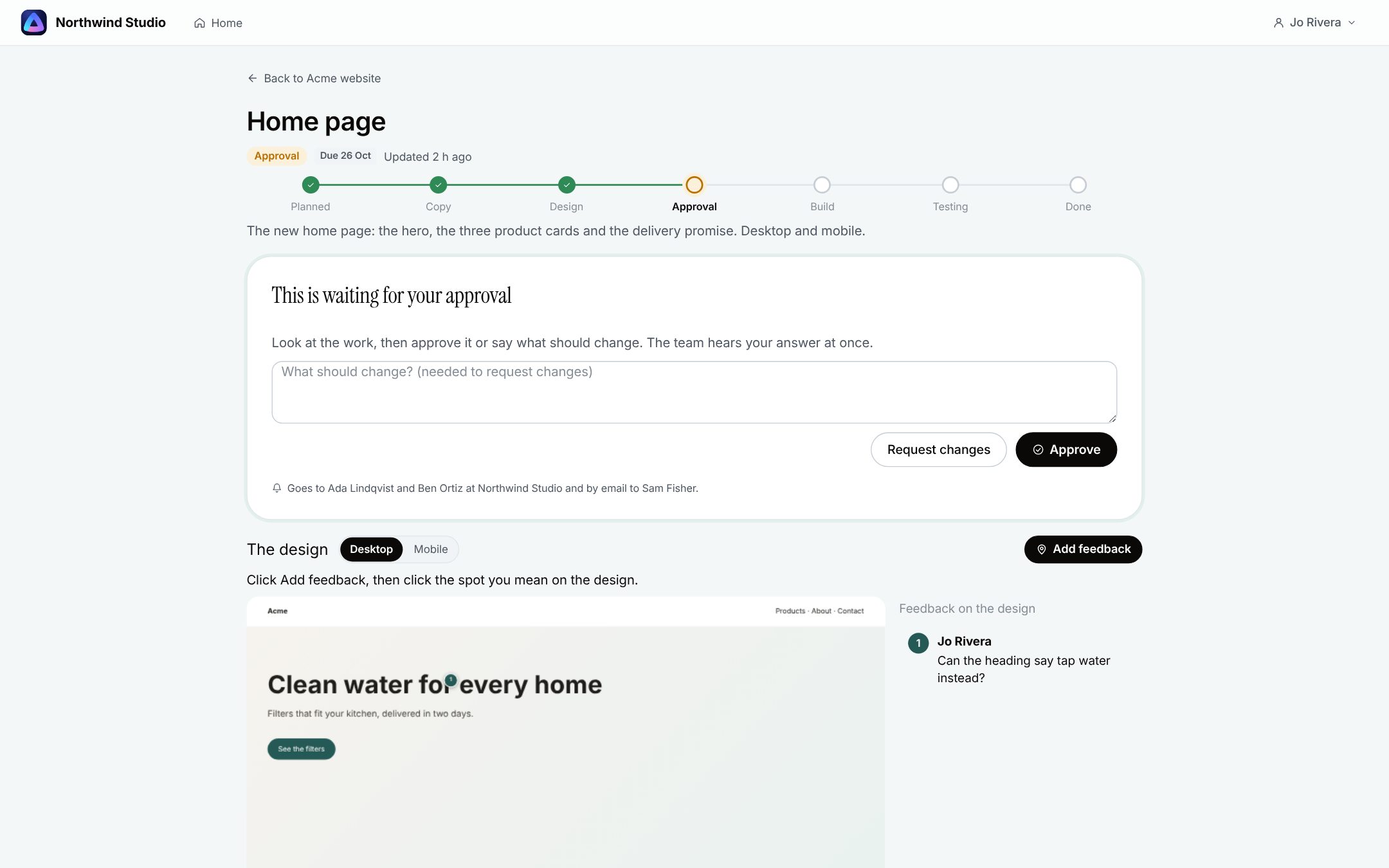
- 02
Ask a teammate to approve
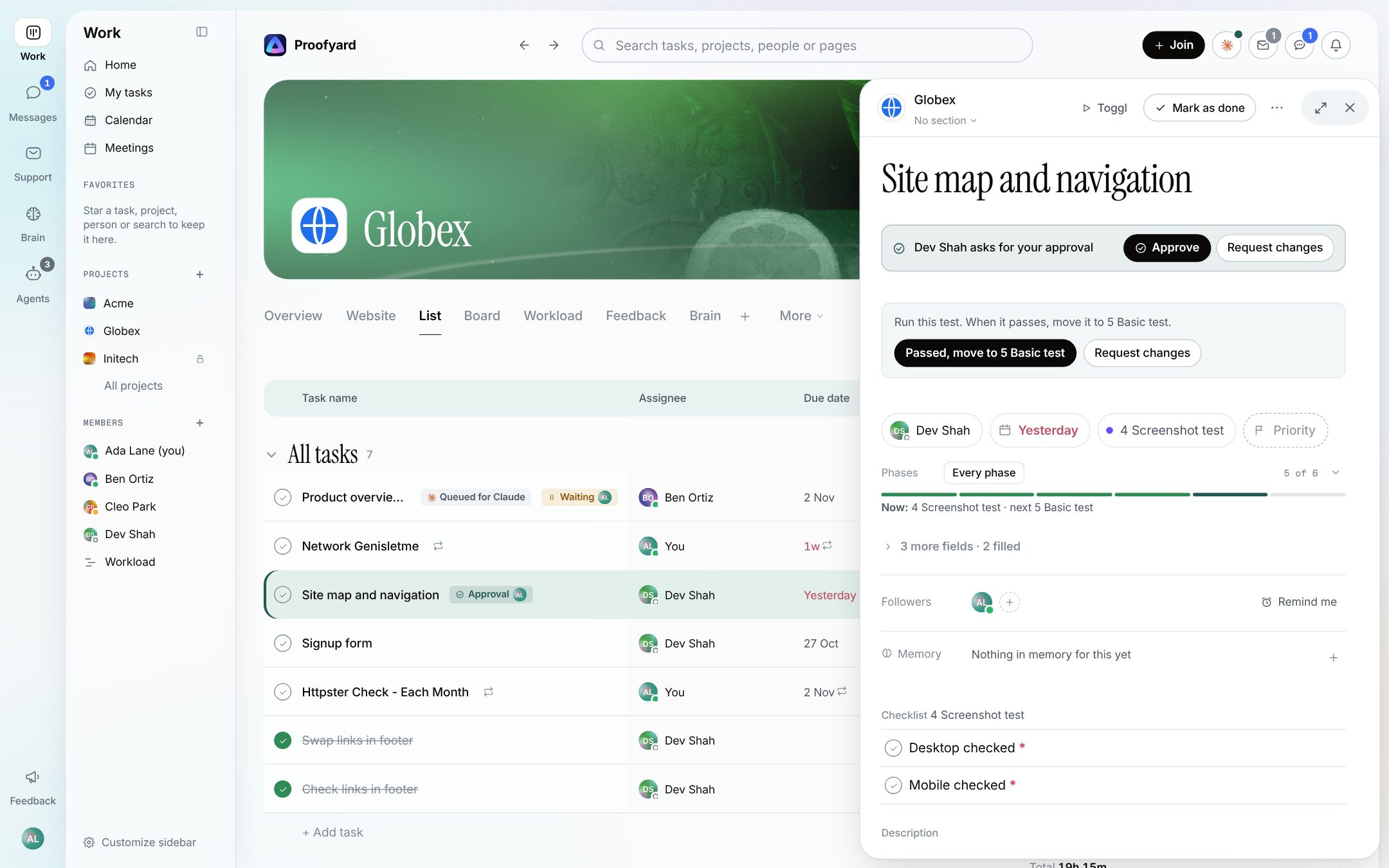
From a task's menu, or A on a row, pick a person and add a note. The task stays where it is with an Approval chip, and the person sees it under Decisions and in their Inbox. They approve or request changes with a note from the task itself, and whoever asked hears back in their Inbox. Every step has Undo, and whoever asked can withdraw it. Added on 16 October 2026.
- 03
Live changes wait for Approve
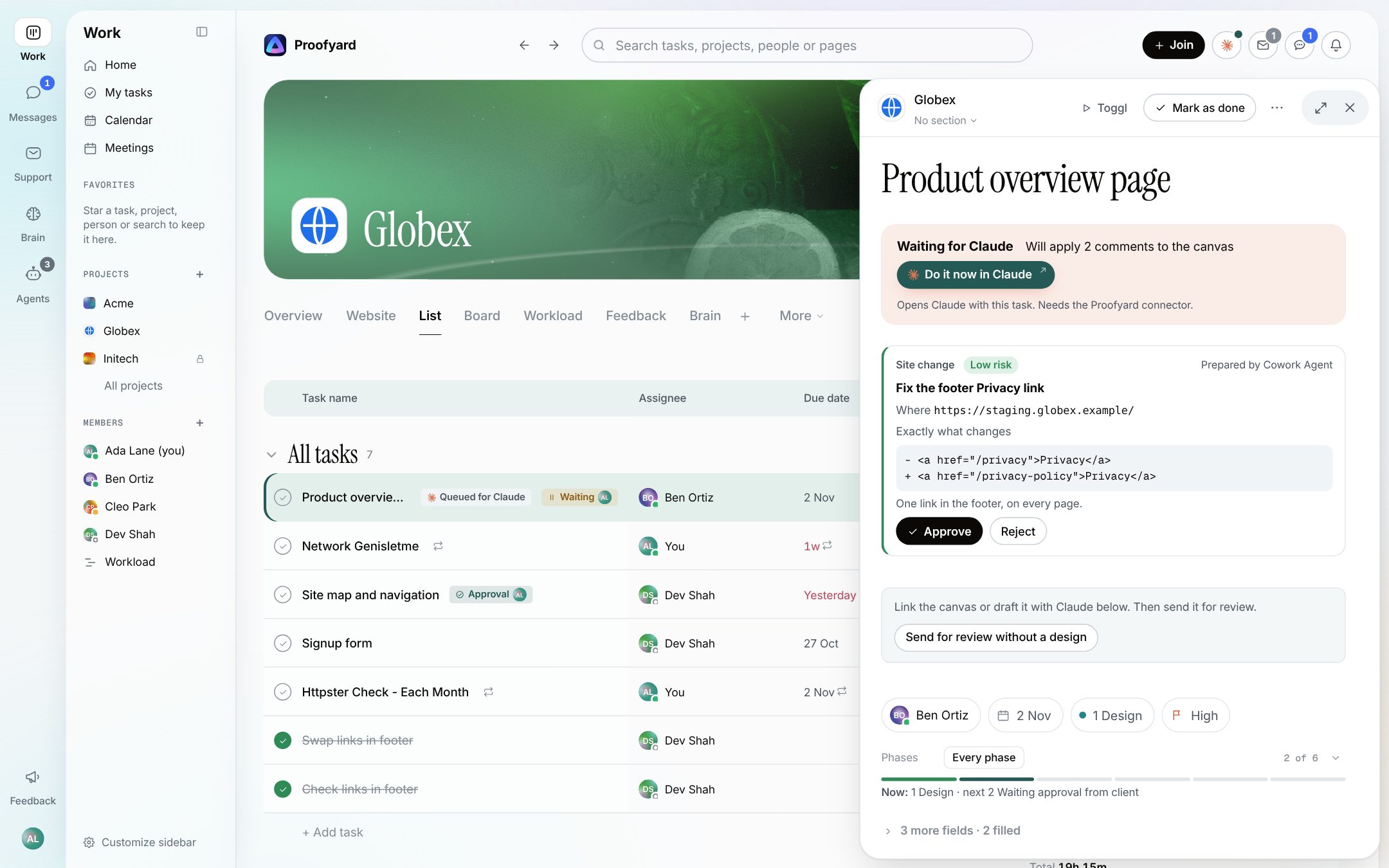
Before an agent changes a site, publishes or emails a client, it shows the exact change on the task, where it goes and the risk, and stops. An admin presses Approve or Reject; a comment such as "go ahead" never counts. The approval keeps the change as approved, and the agent makes only that change. Added on 18 October 2026.
The screenshots are from the app with sample data: Acme, Maya and the team are made up.
Where agencies use it
Every point where someone has to say yes
Design sign-off
The client approves the homepage design on the review link, and the record says which version it was.
A phase that waits
Turn on Needs a recorded approval for a phase in the workflow's rules. A task cannot leave it until there is an approval newer than the last Request changes.
Changes after a yes
If the client asks for changes after approving, the earlier approval no longer counts for the phase: the next version needs its own.
Internal review first
The designer asks the creative lead to approve before anything goes to the client, with the note and the answer on the task.
Building from the approved version
QA compares the built page with the design version the client approved, at the same widths, and shows a difference side by side.
Going live
An agent prepares a site change or a client email; an admin approves that exact change, and nothing else goes out.
What it will not do
A person always decides
Claude never approves, publishes or sends anything to a client on its own. It prepares; a person presses the button.
It is not an e-signature tool. For a contract or a signed scope, use one.
Approvals are on tasks: Claude Design boards and websites. It does not proof PDFs, images or video.
Asking a teammate does not pass a phase's approval rule by itself; that rule counts Approve on a task waiting for approval, by the client or the team.
Questions
Approvals
Does the client need an account to approve?
Not on the review link: it works for 30 days, and the client adds a name and an email. Clients you invite to a project approve in their client area with an email link to sign in.
Can we see who approved which version?
Yes. Each Approve or Request changes is kept with the person, the time and the newest design version on the task when they answered, and it shows in the task's activity.
What happens when the client approves?
The team hears it at once, and the task moves on to the next phase and whoever builds it, unless the project has its own rules for the client's answer.
Can a phase require an approval?
Yes. In a workflow's rules, a phase can need a recorded approval, filled fields or a finished checklist before a task leaves it.
Can Claude approve on our behalf?
No. Claude and agents never approve. A live change needs an admin's Approve on that exact change; a comment such as "go ahead" does not count.
Do clients see our internal comments?
No. They see the work you share with them and the comments marked visible to them, never the team's internal ones.
Who makes it
Made by Woofocus, a web studio, for its own work first
Woofocus has built and looked after client websites since 2010. We made Proofyard because our own production was spread across a task tool, a feedback tool and long chat threads, and we are moving our studio's work into it now. Any agency can open its own workspace.

Ali Demirci
Founder of Woofocus
Ali has designed, built and looked after client websites since 2010 and runs Woofocus, a small web studio. Proofyard is the board he built to run Woofocus's own production after years of carrying work between Asana, BugHerd and chat.
- 4.99/5rating on Codeable across 219 projects for 74 clientsSource: Codeable profile, October 2026
- Since 2010building and looking after client websitesSource: woofocus.com
- ~7,000tasks in our own Asana workspace, the work Proofyard was built to runSource: Woofocus Asana workspace, read 3 October 2026
“Communication was always clear and timely, making it easy to stay aligned on progress.”
“Ali delivered on time and worked tirelessly with us to make sure that we were satisfied.”
Try it on your own work
Send one design for approval
Open a workspace, share a task's review link with yourself and press Approve. Free for 14 days, no credit card needed.
- 14 days free, no credit card
- Clients and reviewers are free
- 3,000 Claude credits a person each month