 By Ali Demirci, founder of Woofocus · October 24, 2026 · 8 min read
The short answer
Every model made a page we could show a client, passed every automatic check, and applied the client's four notes without breaking anything else. Rebuilding a page from a screenshot, all four came within a fraction of a pixel; Sonnet's and Opus's copies were identical to the original, pixel for pixel.
So the differences are in the look and the price. Haiku 5.5 did the first design and the revision for $0.55 at API prices, with the plainest page of the four. Sonnet 5.5 and Opus 5.5 cost $3.83 and $4.34 and, in our view, made the most finished pages. Fable 5.1 cost $7.53, and its revision alone cost more than Haiku's whole job.
Our pick: Sonnet 5.5 or Opus 5.5 for a first design a client will judge, and Haiku 5.5 for the rounds of changes after it and for rebuilding a page from a picture. That is a judgement on looks, which is why the pages are below: look at them before you take our word.
- 4 of 4models passed every check on both jobs
- $0.55Haiku 5.5: first design and the client's notes
- $3.83Sonnet 5.5, the same two steps
- $4.34Opus 5.5
- $7.53Fable 5.1
The two jobs
Both briefs are made up, and so are the clients.
- A first design from a brief. Tallow & Oak, a two-person furniture workshop in Portland, wants a home page with one job: get people to book a visit. The brief gave the facts (three services, a three-step process, opening times, address), three brand colours, and the rules: one HTML file, system fonts, no images from the web, accessible, no sideways scrolling from 360 px phones up. Then we sent the client's notes: a new headline, two sections swapped, a new accent colour for the button with readable text, and a placeholder taken out, with "change only what these notes ask for".
- A page rebuilt from a screenshot. A 1440 by 900 picture of the top of a studio's page, the kind a client sends when they have no design file. Rebuild it in HTML and CSS, as close to the picture as possible, and make it stack sensibly on a phone, for which there was no picture.
How we tested
We ran every test on 24 October 2026 in Claude Code (version 2.1.310), the way a designer at a studio might use it: the model gets a folder with the brief and a script that takes screenshots of its page, so it can look at its own work.
- The models. Haiku 5.5, Sonnet 5.5, Opus 5.5 and Fable 5.1. Every response in the logs names the model that served it.
- The same prompt for all, with folders named by random codes, not by model. No web, no other agents, no advisor model.
- Checks written first. A script loaded each page in a browser and checked it: no sideways scrolling at four widths, no files loaded from outside, an automated accessibility scan with no errors, a visible focus outline, working without JavaScript, valid HTML, every fact from the brief on the page and no invented numbers. The client's notes had 7 checks of their own, including the button's text contrast and "nothing else changed".
- Effort. We ran the design jobs at the highest effort,
max, and did not repeat them at Claude Code's default. Partway through, the logs show the runs then in progress switching frommaxtoxhigh, one step lower, for their remaining steps; we did not change it on purpose. Haiku's and Fable's first designs and revisions ran fully atmax. Sonnet's and Opus's first designs, their revisions and all four rebuilds ran partly or wholly atxhigh. - Third attempts for two. Sonnet's and Opus's first attempts at the design were stopped by our own mistake: our script reported them finished early and we sent the client's notes while they were still working. The second attempts died when our test machine restarted. The pages here are their third attempts, each started from a fresh folder.
- One run each. A second run would give a different page.
- Cost is the run's tokens at Anthropic's API prices, read on 24 October 2026. On a Pro, Max or Team plan you pay a monthly price instead, and the numbers show how much of your usage a job takes.
The first design
Here is the first screen of each page at desktop width:
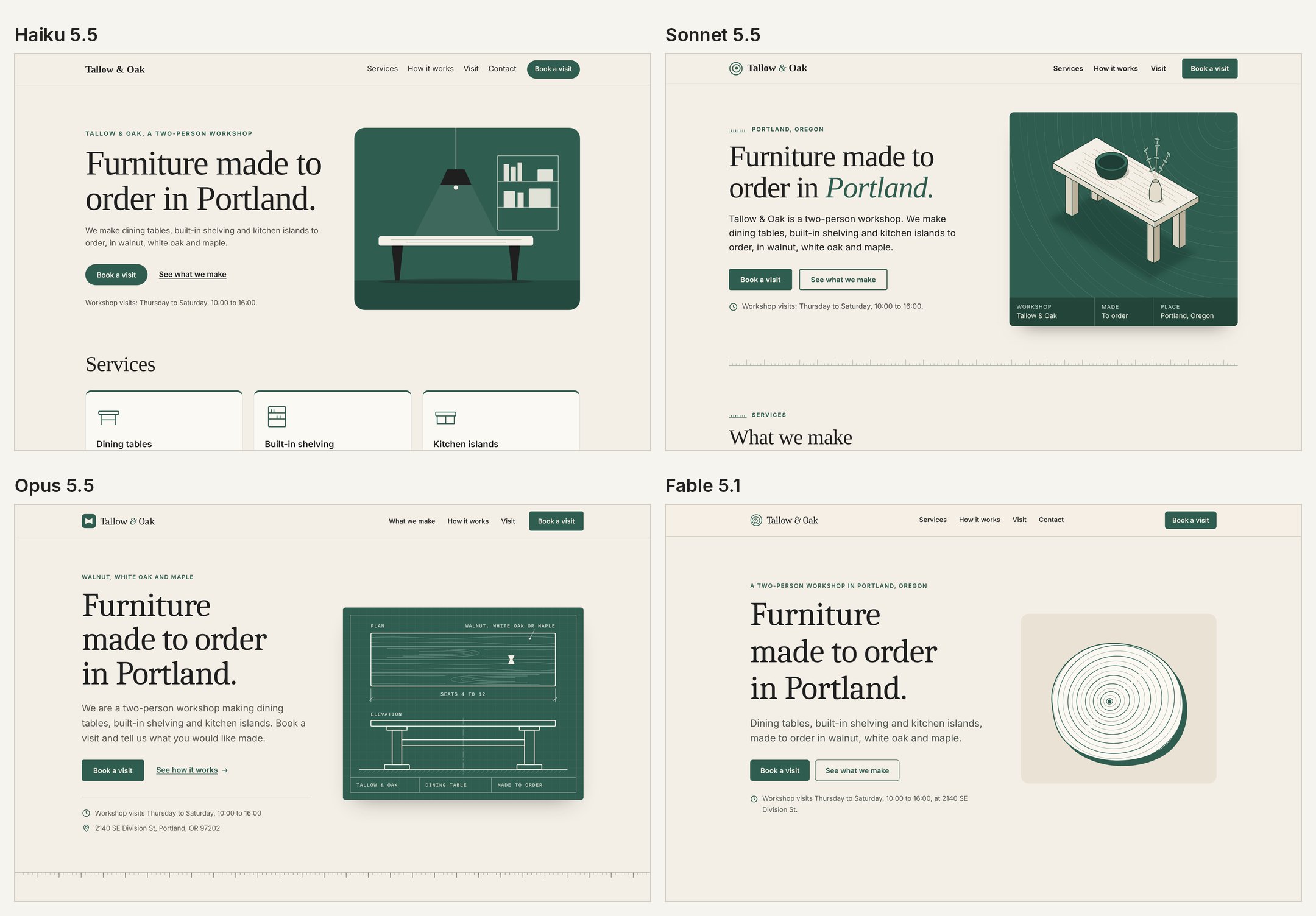
Every page used only the brief's facts and colours and drew its own illustration: a pendant lamp over a table from Haiku, a table in three dimensions from Sonnet, a workshop drawing with plan and elevation from Opus, and the growth rings of a log from Fable. The longer pages carry more: Opus wrote 419 words, Fable 392, Sonnet 283 and Haiku 206.
| Haiku 5.5 | Sonnet 5.5 | Opus 5.5 | Fable 5.1 | |
|---|---|---|---|---|
| Automatic checks | all passed | all passed | all passed | all passed |
| Words on the page | 206 | 283 | 419 | 392 |
| Cost, first design | $0.28 | $3.35 | $3.75 | $4.98 |
| Time, first design | 7.6 min | 23.4 min | 16.5 min | 12.2 min |
| Client's notes (7 checks) | 7/7 | 7/7 | 7/7 | 7/7 |
| Button text on the new colour | White, made 19 px bold (4.35:1, passes as large text) | Black (4.82:1) | Black (4.82:1) | Black (4.82:1) |
| Cost, notes | $0.27 | $0.48 | $0.60 | $2.55 |
| Time, notes | 2.6 min | 2.5 min | 2.3 min | 3.7 min |
On a phone all four stacked cleanly, kept the "Book a visit" button in the header and put the menu on a second row:
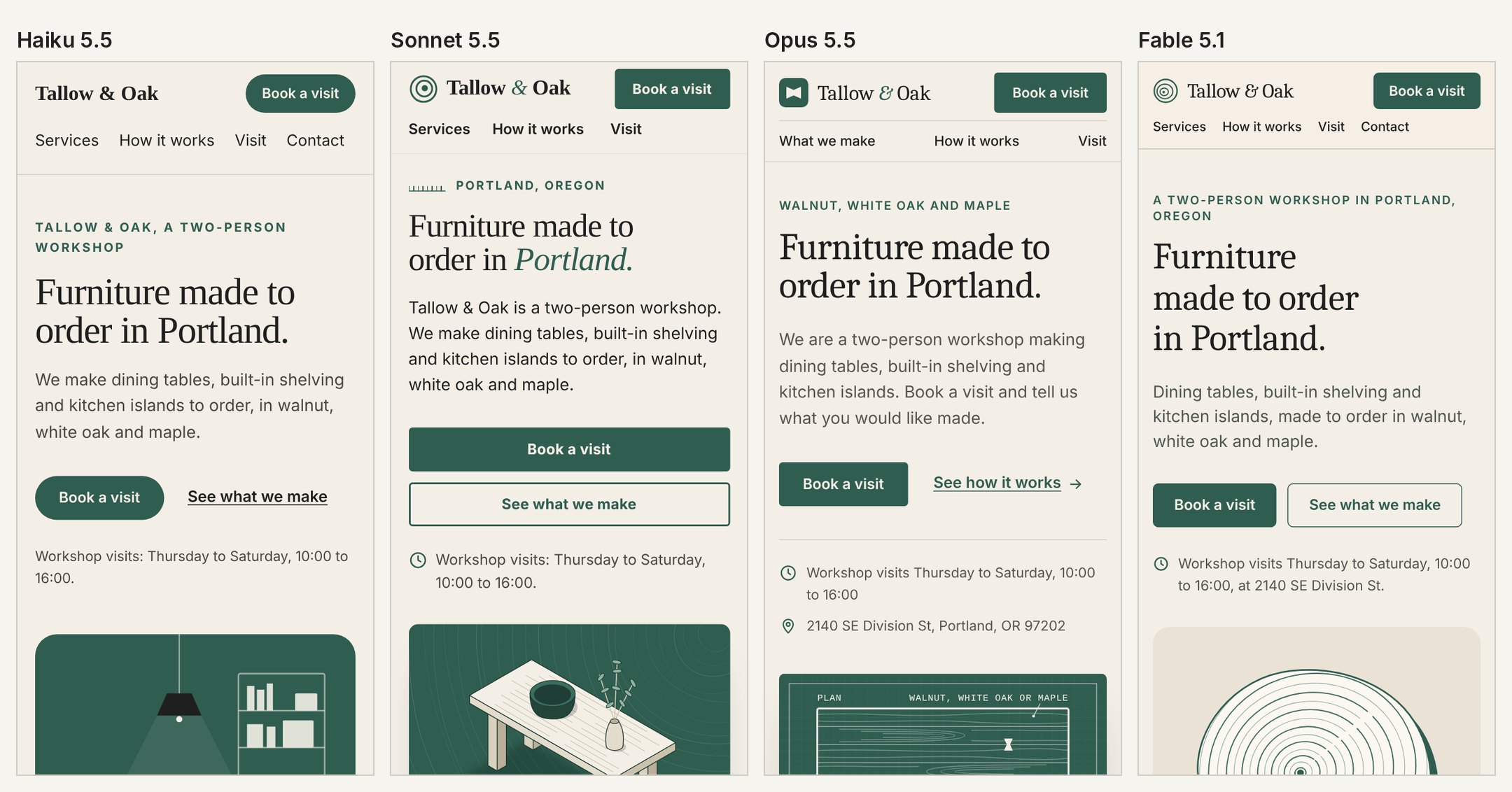
The small things each one added without being asked, from their own notes and from reading the pages:
- Opus put "for example: a walnut table for 8" in the form as a hint. The brief says tables seat 4 to 12, so it fits, but it is an example the client did not write.
- Fable put "© 2026" in the footer. Sonnet left the year out on purpose and said so, because the brief did not give one.
- Sonnet added a "Get directions" link to a map search for the address, and told us.
- Haiku added nothing we could find, and also wrote the least.
The client's notes
All four applied the four notes and passed all 7 checks. The hard one was the button: the client's new accent, #C8553D, is too light for white text at normal size under WCAG AA. Sonnet, Opus and Fable switched the button text to black, which passes at 4.82:1, and each said so in its notes. Haiku kept white text and made it 19 px bold, which counts as large text and passes at 4.35:1, and offered a slightly darker accent as an alternative.
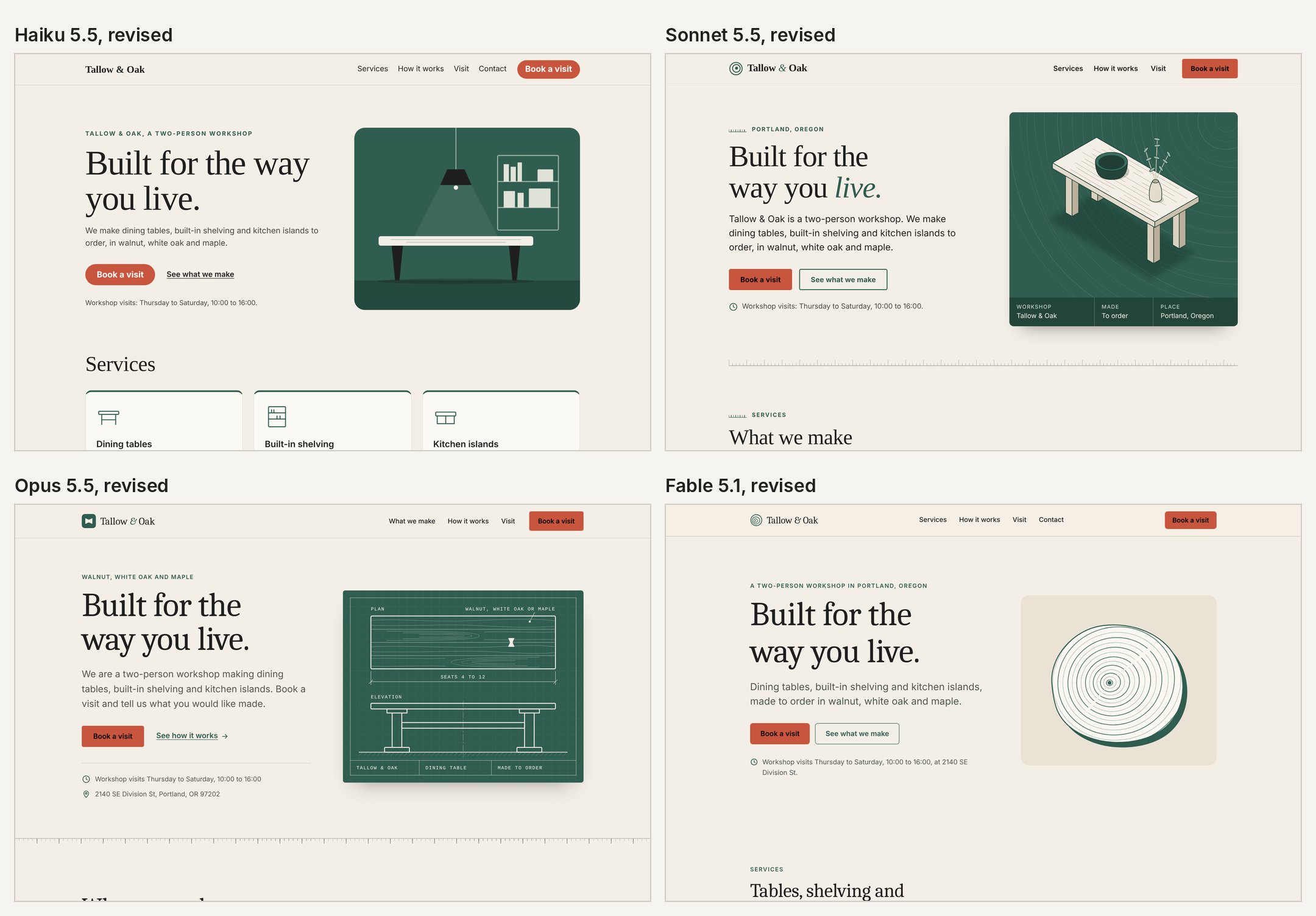
Three of the four also pointed out, without changing it, that the menu still listed Visit before Contact after the sections were swapped. That is the right call under "change only what these notes ask for", and the kind of thing a designer should mention.
The revision took two to four minutes for every model. Haiku's cost $0.27, Fable's $2.55.
The page from a screenshot
All four rebuilt the page so closely that our first check script got it wrong: it measured the boxes around elements, and Haiku and Fable had wrapped list text in a different element from the original, which moved the box but not a single visible pixel. We changed the script to measure the text itself and say so in the test log. With that fix:
| Haiku 5.5 | Sonnet 5.5 | Opus 5.5 | Fable 5.1 | |
|---|---|---|---|---|
| Pieces of text matched (of 23) | 23 | 23 | 23 | 23 |
| Average pixel difference (0 to 255) | 0.09 | 0 (identical) | 0 (identical) | 0.33 |
| Cost | $1.02 | $3.65 | $5.39 | $8.14 |
| Time | 15.8 min | 27.7 min | 20.6 min | 22.4 min |
The pixel difference is the average gap per colour channel between the model's page and the screenshot, on a scale of 0 to 255. Sonnet and Opus matched it exactly; Haiku's and Fable's differences are too small to see.
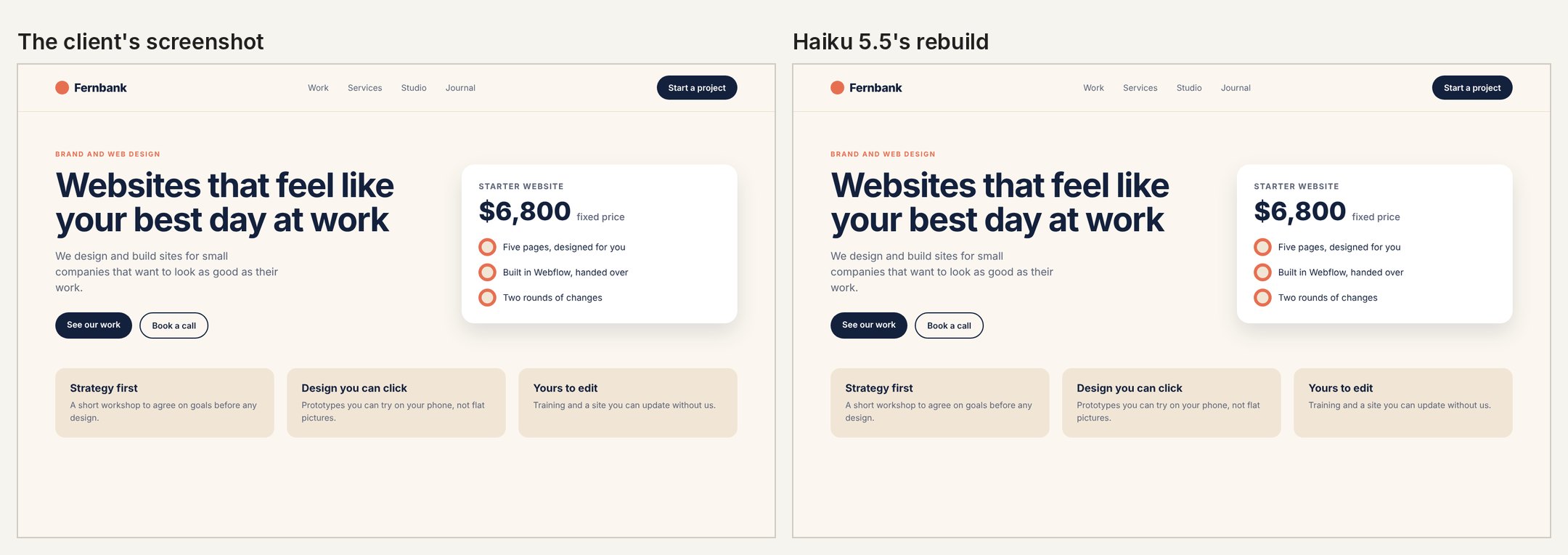
A caveat that matters: our screenshot was made in the same browser, with the same fonts, as the models' own screenshot script, so an exact match was possible. A real client's screenshot from a Mac uses other fonts, and no rebuild will match it to the pixel.
The phone layout had no picture to copy, so it shows each model's own choices:
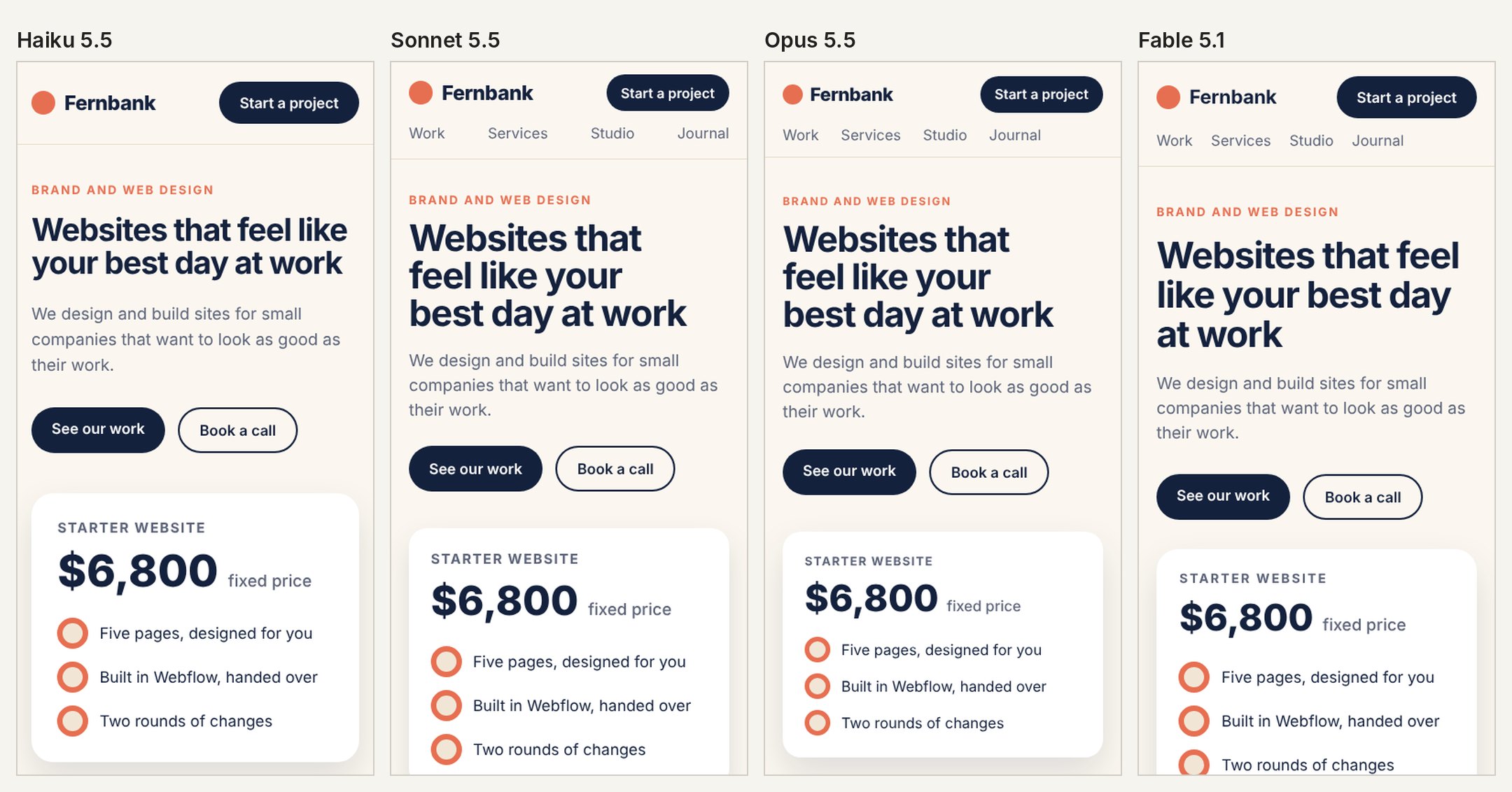
Haiku hid the menu links on phones and added no menu button, and said so in its notes. The other three moved the links to a second row.
What this test does not show
- Taste over many pages. One page per model is a small sample of style. A second run would look different.
- Your design system. We gave three colours and system fonts. Real work comes with a brand, components and a CMS.
- The default effort. We ran these jobs at
maxandxhigh. In our coding and writing tests Claude Code's default effort cost much less with similar scores, but we did not test design at the default. - Real photos. No images were allowed, so the models drew. With a client's photos the pages would change most.
Which model we would use
What is the job?
Use Sonnet 5.5 or Opus 5.5
In our view the most finished pages, for about $3.50 at API prices. Look at the pictures and decide for yourself.
- Setup
- A brief with the facts, the brand colours and what the page is for
- Claude sees
- The brief and its own screenshots
The design tools around these models matter as much as the model. If you design in Claude Design and review with clients, our notes on client feedback on Claude Design work cover the review side, and on Proofyard a client approves a design with pinned comments and a sign-off. Our other tests used the same method on coding, writing website copy and agent work on a project board; for prices and plans, see which Claude model for which job and our pricing.
The prompt we used
Every model got this, with only the folder changed:
The design prompt
You are a web designer at a small web studio. Do the task described in [~/clients/tallow-and-oak/home]/README.md. Rules for this job: - Work only inside [~/clients/tallow-and-oak/home]. Do not read, list or search anything outside that folder. - Do not use the web, and do not ask other agents or an advisor for help: work on your own. - You may run code inside the folder (for example `node shot.cjs`) and look at the screenshots it makes. - When you are done, reply with a short summary: what you made, how you checked it, and anything you are unsure about.
The client's notes (sent after the first design)
The client has seen the page. Their notes: 1. Change the main headline to exactly: Built for the way you live. 2. Put the contact section before the visit section. 3. Their new accent colour is #C8553D. Use it as the background of the "Book a visit" button, and keep the button's text readable (WCAG AA). 4. Take out the testimonial placeholder for now. Change only what these notes ask for, and keep everything else as it is. Save the result in index.html in the same folder. When you are done, reply with a short summary of what you changed.
Sources
- Our test runs, 24 October 2026: the briefs, the screenshot, the check scripts, run logs, pages and results, kept with the test kit.
- Anthropic API pricing, read 24 October 2026.
- Claude Code model configuration (effort levels and defaults), read 24 October 2026.
- WCAG 2.2, contrast (minimum), for the 4.5:1 and large text rules.