 By Ali Demirci, founder of Woofocus · October 31, 2026 · 8 min read
The short answer
A client portal earns its place when it answers the three things a client wants between calls: where the project stands, what you need from them, and one clear place to say yes. Invoices, contracts and chat are extras; some agencies need them, many already have them elsewhere.
There are three kinds. All-in-one portal tools (SuiteDash, Assembly, HoneyBook, Dubsado, Plutio, Bonsai) bundle the portal with billing and contracts, and most charge a flat price. Request portals for productized agencies (ManyRequests, Wayfront, Agency Handy) are built around clients ordering work. Project tools with a client view (Asana, Teamwork.com, Basecamp, ClickUp, monday.com, Productive, Notion) let clients into the tool you already use, with limits that vary a lot. The cheapest entry we found was free (Assembly, five clients); a flat plan with unlimited clients started at $180 a year (SuiteDash).
Why a client portal matters for an agency, and when it does not
We looked for research that measures what a portal changes for agencies, such as faster approvals or fewer lost clients. We did not find any that is solid. What exists is near the point, and mostly run by companies that sell something:
- Clients say they want updates in a portal, not only by email. Clio's Legal Trends Report 2021 surveyed 1,002 consumers about lawyers, and a summary of it reports that "roughly 60% of clients said they prefer to receive quicker status updates via secure client portal or video conference". Clio sells legal software with a portal, the clients are law clients, and we read the summary, not the report.
- Agencies think delivery is going better than clients do. Wpromote and Ascend2 surveyed "500+ decision-makers at brands and agencies": "76% of agencies report high confidence in their service delivery, but just 39% of brands are very satisfied", and speed of delivery was the top challenge. Wpromote is itself an agency.
Neither proves a portal fixes anything. Our own reason was simpler. When the answers to "where are we?" and "what do you need from us?" live on an internal board, someone on the team writes them into an email, again and again, and approvals end up spread across threads where nobody can find them at the next project. A portal moves that work from the team to a page.
It does not help everyone. A client who answers only email will not log in, and a one-off reviewer should not need an account at all. For those, a review link or a well-written email does more than a portal.
What clients actually do in a portal
When we designed our client area, we started from the moments a client has to act, not from a feature list:
- Approve. A design, a page, a copy deck. The approval needs the thing being approved beside it, and a record of which version was approved, by whom, and when. Our website client sign-off template lists what a client confirms at each stage.
- Answer and supply. A question from the team, photos, logins, copy, by a date.
- Check progress. In plain stages, without your internal phase names.
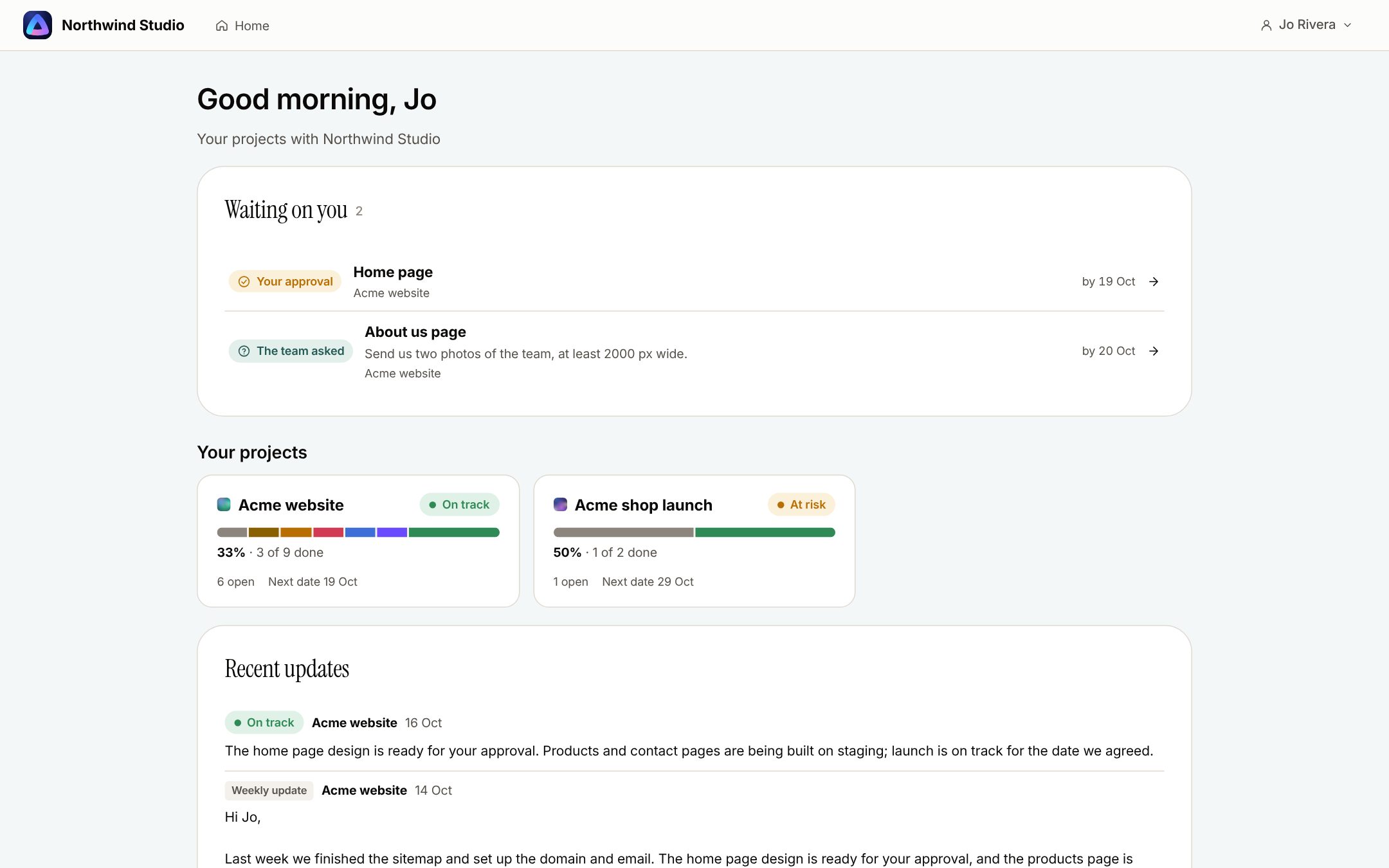
Everything else is secondary for most web and design projects. What matters as much is what a client never sees: briefs, assignees, estimates, internal comments and other clients' work. Ask any portal you consider how it keeps those out. On our board the database enforces it, not only the screen.
For marketing agencies, add reporting: a client who can see the numbers on their own project asks fewer "how is it going?" questions. Our client website reporting shows clients the same GA4 and Search Console figures the team sees.
Three kinds of client portal
Find yours:
| What do you need the portal for? | Look at |
|---|---|
| Invoices, contracts and payments as well as projects | SuiteDash, HoneyBook, Dubsado or Plutio Built for running a service business, with the portal where clients find the paperwork. Starts at: $180 a year flat on SuiteDash Watch for: Approvals with a design beside them are not their focus |
| Clients ordering set services | ManyRequests, Wayfront or Agency Handy Request forms, delivery and approval in one place, made for productized agencies. Starts at: $29 a month on Agency Handy Watch for: Seats on top of the base price |
| Clients inside the project tool you already use | Asana, Teamwork.com, Basecamp or Productive No second tool: clients see the same tasks, with permissions. Starts at: Free guests or client users on most Watch for: Your internal notes, unless everyone is careful |
| Design approvals and website feedback | A production board with a client area, such as ours Approvals recorded with the version, notes pinned on designs and live sites. Starts at: $12 a team member, clients free Watch for: No invoices or file uploads from clients yet in ours |
Client portal tools, priced
The cheapest plan that includes the client portal, read on each vendor's own pricing page on 31 October 2026. US dollars a month, billed yearly first and monthly second where the page shows both. "Flat" means one price for the account, not per person.
| Tool | Cheapest plan with the portal | Yearly / monthly | Priced | Clients | Own domain or white label |
|---|---|---|---|---|---|
| Assembly (formerly Copilot) | Free | $0 | Flat | 5 contacts, 1 internal user | Custom domain from Professional, $99 / $139 |
| SuiteDash | Start | $15 ($180 a year) / $19 | Flat | Unlimited clients and staff | "Extreme White Labeling" on Start |
| Plutio | Core | $15.83 ($190 a year) / $19 | Flat | 9 active clients | White label $9 a month on top |
| HoneyBook | Starter | $29 / $36 | Flat | Unlimited clients | "Powered by" removed from Essentials, $49 / $59 |
| Dubsado | Starter | $27.92 ($335 a year) | Flat | Unlimited clients; 3 extra users free | Not listed |
| Bonsai | Essentials | $19 / $25 | Per user | Not stated | Premium, $29 / $39; custom domain "expected to be released in 2026" |
| ManyRequests | Core | $39 / $59 | 1 seat, then $15 / $20 a seat | Unlimited clients | Custom domain included |
| Wayfront (formerly SPP.co) | Base | $99 / $129 | 5 seats, then $18 / $20 | Client coworkers from Pro, $249 / $299 | White-label portal and custom domain |
| Agency Handy | Freelancer | $29 monthly | 1 user | Not stated | Custom domain from Team Starter, $99 monthly |
| Clinked | Start Up | $8.80 / $11 | Per user | Members are paid seats | Own URL from Standard, $239 / $299 for 100 members |
| Softr | Basic | $19 / $25 | Flat | 5 team and 5 client users | Custom domain on Basic |
| Moxo | Not published | Ask sales | |||
| Proofyard (ours) | One plan | $12 / $15 | Per team member | Clients and reviewers free | Not yet |
A few things the table cannot show. Agency Handy and HoneyBook had sale banners up on 31 October 2026, so their yearly prices may be promotional. ManyRequests' page gives Core 1 TB of storage in one place and 500 GB in another. Softr's prices are drawn as images, so we read them from a screenshot.
What each one is built around:
- SuiteDash, HoneyBook, Dubsado, Plutio and Bonsai come from running a service business: proposals, contracts, invoices and payments, with a portal where the client finds them. SuiteDash's flat price with unlimited clients and staff is the cheapest way to give every client a login.
- Assembly gives each client a branded space you assemble from apps (messaging, billing, forms and more), with an AI app builder and an MCP connector on paid plans. Enforced MFA and an audit log start on Advanced, $499 / $599.
- ManyRequests, Wayfront and Agency Handy are for agencies that sell set services: clients order, you deliver, they approve. ManyRequests and Agency Handy both list proofing or file approval on their entry plans.
- Clinked is a secure file and collaboration portal, with file approval and file requests; enforced 2FA starts on Premium, $479 / $599.
- Softr builds a portal on top of your own data, from templates.
If your project tool already has a client view
Many agencies do not need a separate portal; they need clients in the tool they already use. From each vendor's own pages on 31 October 2026:
| Tool | What a client gets | What it costs |
|---|---|---|
| Asana | Guests who see what you share with them | "Unlimited free guests" from Starter, $10.99 a user |
| Teamwork.com | Client users with project permissions, "on up to five active projects" | Free, from Basics at $9.99 a user |
| Productive | Clients follow progress | "Adding clients to Productive is free of charge" |
| Basecamp | Clients inside each project | "every person you add is counted"; unlimited users on Pro Unlimited, $199 a month billed yearly ($329 monthly) |
| ClickUp | A limited number of guest seats with edit rights, unlimited read-only guests | Guest seats come with paid plans; more cost a seat |
| monday.com | Read-only viewers from Basic; guests on boards they are invited to from Standard | Basic $9, Standard $12 a seat, at least 3 seats |
| Notion | Guests invited to single pages | 10 guests on Free; guests on paid plans |
The catch with all of them is the same: the client sees your tool, not a page made for them. Approvals become a comment or a status change, and keeping internal notes out depends on everyone remembering where they wrote them. Our Asana alternatives guide compares these tools on more than the client view.
What to check before you choose
Tick what the portal you are weighing does
0 of 7
Not a portal yet: a good email and a review link may serve your clients better.
On security, ask four questions and expect a plain answer: can you enforce two-factor sign-in for clients, not just offer it; where is the data kept; is there an audit log of who saw and approved what; and what happens to files when you cancel. Assembly's security page says "MFA can be enforced on top" and keeps data in the United States; Clinked offers a choice of US, EU or rest-of-world data centres on its Enterprise plan. None of the pages we read said what happens to files after cancellation, so ask.
How we built ours
We make Proofyard, a production board for web and design studios, and its client area is our answer to the moments above. From our own code and feature page:
- Waiting on you comes first: approvals, then the team's questions with their dates, then projects in plain stages and the updates you chose to share.
- Approve with the design beside it: Approve, or Request changes with a sentence, and the approval is recorded with the design version, as our design approval page explains.
- One-off reviewers get a link, 30 days, no account, for someone who will never log in.
- Clients are free. Team members are $12 a month billed yearly; the details are on our pricing page.
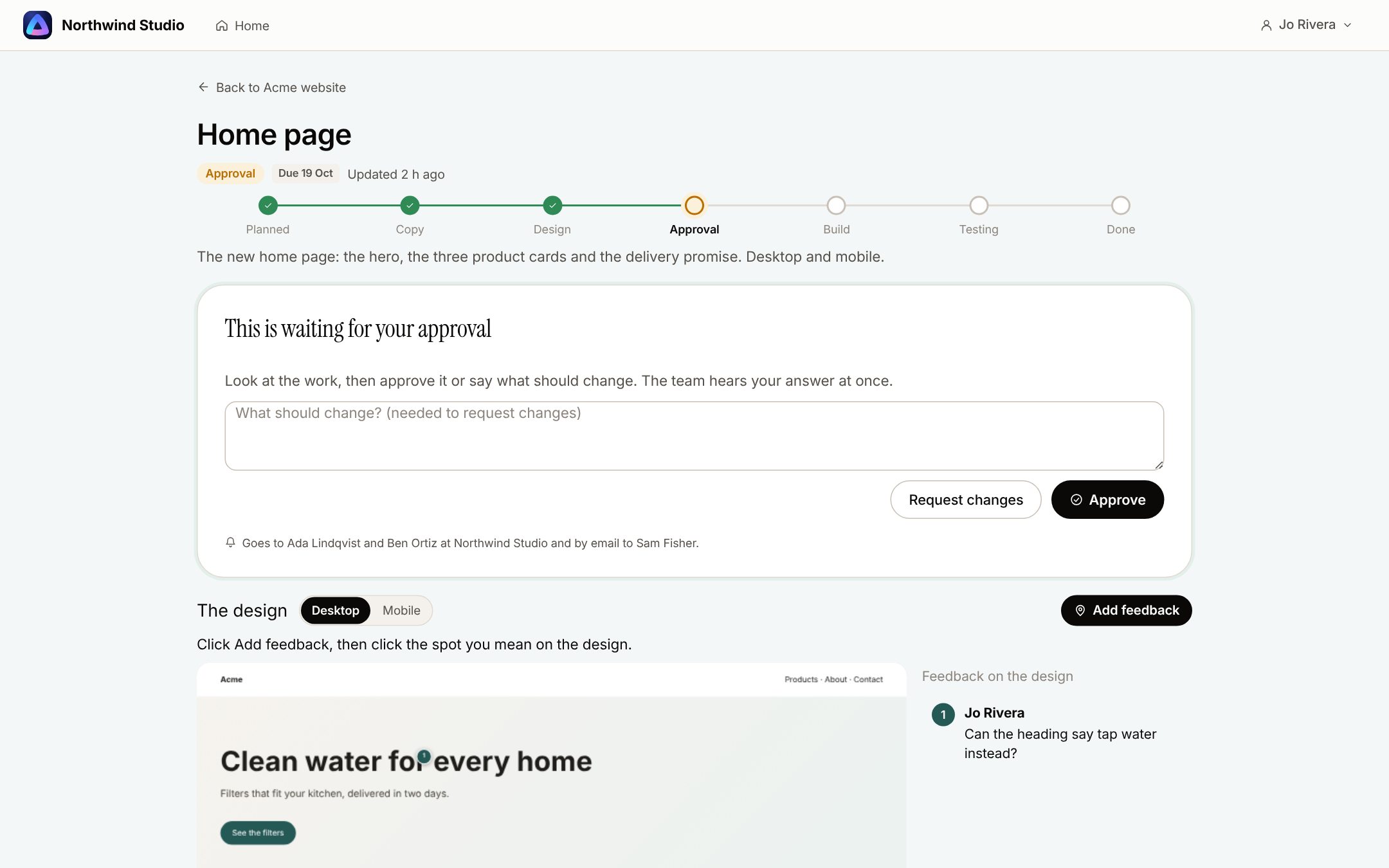
The limits, as of 31 October 2026: clients cannot upload files from their area yet, the page refreshes every 30 seconds rather than live, and your own logo and colours on the client area are not built yet. No invoices, contracts or payments either; if those are what you need a portal for, SuiteDash, HoneyBook or Dubsado do them and we do not.
Feedback on live sites goes through our website feedback tool, and client email lands on its project in the shared support inbox. The data behind our lead, the five people and no clients in our Asana, is in 90 days of our own Asana.
Sources
Every page read on 31 October 2026.
- Pricing: Assembly (renamed from Copilot on 30 September 2025, Assembly), SuiteDash, Plutio, HoneyBook, Dubsado, Bonsai, ManyRequests, Wayfront (formerly SPP.co), Agency Handy, Clinked, Softr, Moxo (no public pricing).
- Client access: Asana pricing, Teamwork.com license types, Productive pricing, Basecamp pricing, ClickUp pricing, monday.com pricing, Notion pricing.
- Security: Assembly security, Clinked pricing.
- Surveys: Clio Legal Trends Report 2021, as summarised by 2Civility; Wpromote and Ascend2, Mind the Gap.
- Proofyard: our client area and pricing on 31 October 2026; the screenshots are sample data from our preview.