 By Ali Demirci, founder of Woofocus · October 27, 2026 · 6 min read
The short answer
A skill is a folder with one file, SKILL.md: a name, one sentence on when to use it, and the steps. An agent reads only the name and that sentence until a task matches, then reads the steps. Since 22 October the format belongs to a neutral foundation, so a skill you write for Claude is not tied to Claude.
For an agency, the processes that pay back first are the ones you repeat in the same order and get wrong when someone is in a hurry: the launch checklist, the page QA round, the weekly client update, sorting client feedback. Write each one as numbered steps with a clear "done", keep client details and passwords out of it, and have a person approve every skill before an agent uses it.
What changed on 22 October
From Anthropic's post of that day:
- The standard moved. Anthropic gave Agent Skills, with its name, logo, GitHub organization and the agentskills.io domain, to the Agentic AI Foundation, which sits under the Linux Foundation.
- It is already widely read. "More than 70 agent platforms, including ChatGPT, Cursor, GitHub Copilot, and VS Code, have integrated Agent Skills" since it was published in December 2025, and Anthropic says 1 million skills have been published and nearly 280 million installed.
- Engineers from several companies maintain it as individuals, with David Soria Parra and Mahesh Murag as lead maintainers. Anyone can use it or contribute without joining the foundation.
- What comes next is a proposed roadmap with versioned releases, a formal proposal process and "security guidance for people who write and install skills".
The practical meaning: a procedure written as a skill is portable. The same file works in Claude Code, in another vendor's agent, and in a project board that reads skills, which is where we come in later.
What a skill is
The specification is short. A skill is a folder whose only required file is SKILL.md, which starts with two fields:
- name: up to 64 characters, lowercase letters, numbers and hyphens, the same as the folder's name. For example
launch-checklist. - description: up to 1,024 characters, saying "both what the skill does and when to use it".
Below them come the instructions, in plain Markdown. The folder can also hold references/ for longer documents, scripts/ for code the agent can run and assets/ for templates.
The design choice that matters is what the spec calls progressive disclosure. An agent loads only the name and description of every skill at the start, about 100 tokens each; the full instructions, recommended under 5,000 tokens and 500 lines, only when a task matches; and the reference files only when they are needed. So the one sentence in the description decides whether the skill is ever used. "Helps with launches" will be missed; "Use when a site is about to go live" will not.
Which of your processes make good skills
Pick a process to see whether it is worth writing down:
Which process are you thinking of?
Worth a skill? Yes, first
Same steps every time, and a missed step (forms, redirects, indexing) costs a client.
- Put in the steps
- Each check, and what counts as done
- Keep out of the skill
- Hosting logins and the client's URLs
A rough test before you write anything:
Is this process ready to be a skill?
0 of 5
Not yet: do it a few more times and note the steps.
How to write one
Our own rules for writing skills, the ones Claude follows on our board when it drafts one:
- A name that says the job: lowercase words with hyphens, such as
launch-checklistormonthly-client-report. - A description that starts with "Use when" and says when the skill applies, not only what it does. The agent decides from that sentence alone whether to read the rest.
- Numbered steps, one action each, in the order the team does them, with what to check and what counts as done.
- Keep it general. Client details belong in the project's files: say which file to read instead of copying from it.
- No secrets. Never a password, a key or a login link; say where it is kept.
- Long checklists go in a reference file, not in the steps.
- End with what to report when the work is finished, and when to stop and ask a person.
Here is a launch checklist written that way. It is an example to adapt, not our client process:
launch-checklist/SKILL.md (example)
--- name: launch-checklist description: Use when a client site is about to go live, to run the same checks before and after the switch. --- 1. Read the task and [client-context.md] for the domain, the hosting and who signs off. 2. Submit every form on the staging site and check the message arrives. 3. Check that each old URL in the redirect list goes to its new page. 4. Check the page titles and meta descriptions on the main pages. 5. After the switch, turn off noindex on the live site only, and check robots.txt. 6. Report on the task what you checked, what failed and what you could not check. Stop and ask a person before you change DNS, publish anything or email the client.
Who approves a skill
A skill is a set of instructions an agent will follow with whatever access it has. A careless one can tell an agent to turn off a site's search indexing on the wrong server; a malicious one, installed from somewhere you did not check, can do worse. The foundation's roadmap promises security guidance; until then the rules are the same as for any agent action, which our guide to what an AI agent should ask you before it acts covers:
- Read every skill before you install it, the steps and any scripts, as you would a plugin.
- Prefer your own. A procedure your team wrote and runs is safer and more useful than a stranger's.
- A person approves every new skill and every change to one, and can see who approved it.
- A skill never outranks the person. If a step conflicts with what someone asked, or with a rule that keeps a client safe, the agent should stop and ask.
How Proofyard handles skills
We build Proofyard on Claude, and skills are part of the board. From our own code:
- The Library keeps the team's skills in the same shape as a
SKILL.md: a name, a "Use when" description, the steps and an optional longer reference. You can paste aSKILL.mdto add one, or download one to use in another agent. - Claude finds them over the connector. In Claude Code, Cowork or claude.ai it lists the skills, reads the one whose description fits the task and follows it. The instructions it gets say a skill never overrides the person's request, the board's rules or safety.
- Ready-made ones come with every workspace, such as a weekly client update, a project from a brief and triaging feedback, and a team can copy one to change it.
- Claude proposes, a person approves. When a task followed steps the team will repeat, Claude can draft a skill. An agent you can add from the agent settings, the Skill Expert, reads the work done each day and drafts skills for procedures the team keeps repeating. Every draft waits in the Library until someone approves, edits or rejects it, with Undo, and a rejected draft is not proposed again.
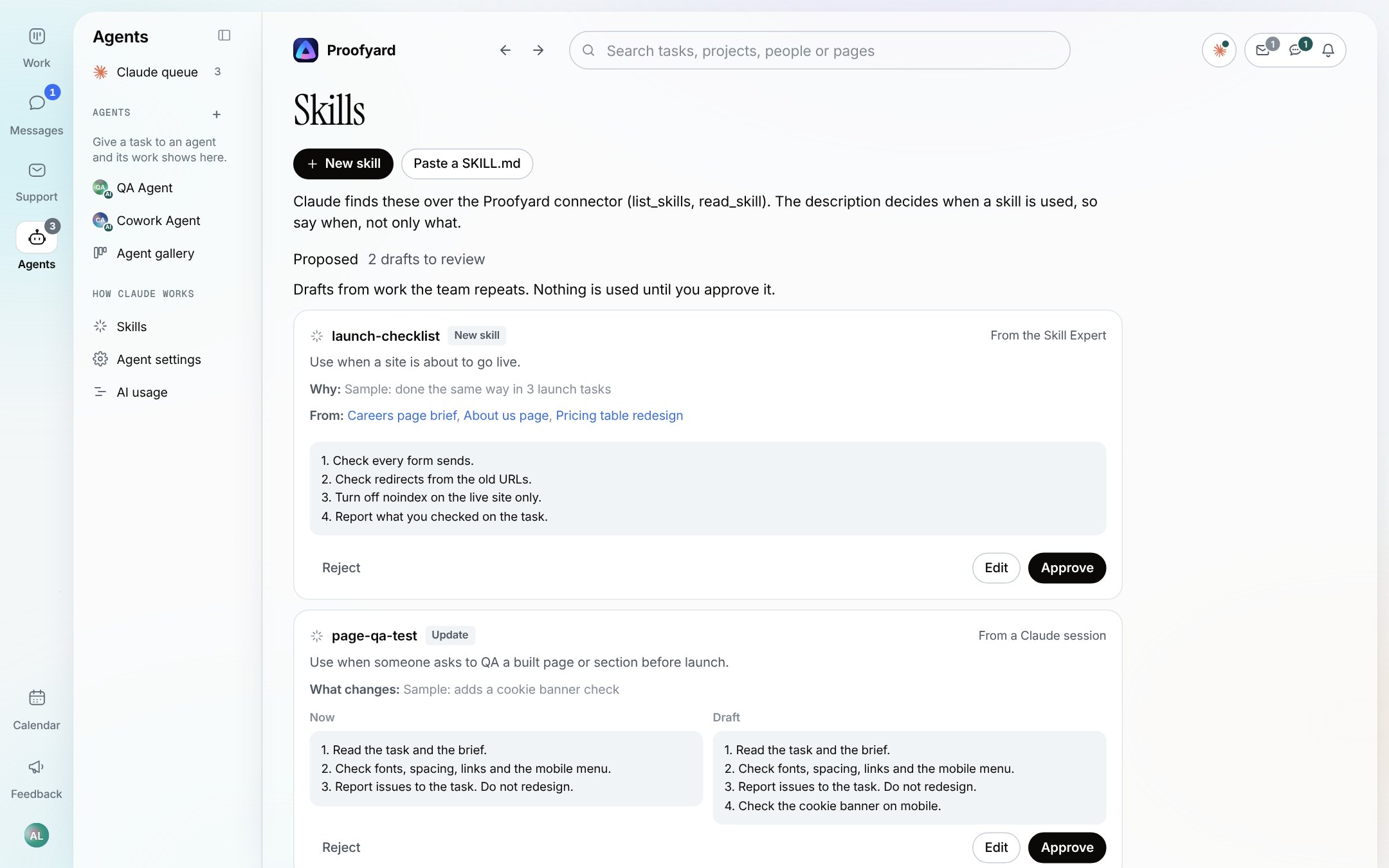
Our own studio is early here. On 18 October our workspace had two skills the team wrote, a client health check and a page QA test that reports problems and never redesigns, beside the seven ready-made ones. Our guide to a shared AI knowledge base tells how we got there.
Skills hold the how. The facts about a client, such as their brand, their contacts and what they signed, belong in the project's knowledge, which our AI knowledge base page covers. For the wider setup, see Claude for project management and the smart actions Claude runs on the board; for what it costs, our pricing.
What we do not know yet
- The security guidance. It is on the proposed roadmap, not published.
- How each platform reads skills. The format is shared; how an agent picks, loads and limits a skill is up to each product, and the spec marks one field,
allowed-tools, as experimental for that reason. - Whether a skill makes a given agent better at your work. We have not measured it. In our agent test, clear written rules got four models through 40 client notes with one slip in eight runs; a skill is a way to keep such rules in one place.
Sources
- Anthropic, Donating Agent Skills to the Agentic AI Foundation, 22 October 2026, read 27 October 2026.
- Agent Skills specification, read 27 October 2026.