 By Ali Demirci, founder of Woofocus · October 29, 2026 · 4 min read
What Revolut did
Nik Storonsky, Revolut's co-founder and CEO, described it on David Senra's podcast, published on 25 October. Asked how he spreads a good idea through the company, he gave design as the example:
"Right now, I support that one team is actually producing designs much faster using LLMs. And then instead of actually designing in a certain interface or the product, they simply uploaded our design system on the code level to LLM. As a result, the whole design is not really a frame in Figma, but it's like a live interface on your laptop or on your simulator. So you can click through things, it reacts and so on. But the most important thing, you can do it three, four times faster compared to doing frames in Figma or screens in Figma. And then I'm pushing the whole system to all designers now."
A post on X turned that into "Revolut's designers are moving off Figma", and the design world had its argument for the week: is AI replacing Figma? Revolut itself has said nothing more that we could find, so the three-to-four-times figure is the CEO's own description, not a measurement anyone has published.
Designing and assembling are not the same thing
Putting an interface on a screen is the most visible part of design and the easiest. The hard part is deciding what goes on it: which problem the person has, what the screen has to say, how the pieces work together. Those questions are not answered fast or slow. They are answered by understanding.
That is not what sped up at Revolut. What sped up is putting new screens together on top of a design system someone built with care over years. The team did not design faster; it assembled faster, on a system that took the real effort to make. That effort is still people's work.
Most AI design tools today aim at exactly that point: production. I have not seen a tool that spends weeks understanding a problem, pushes back on a wrong assumption, or cares more about the story a page tells than about how its parts are lined up.
What we saw in our own test
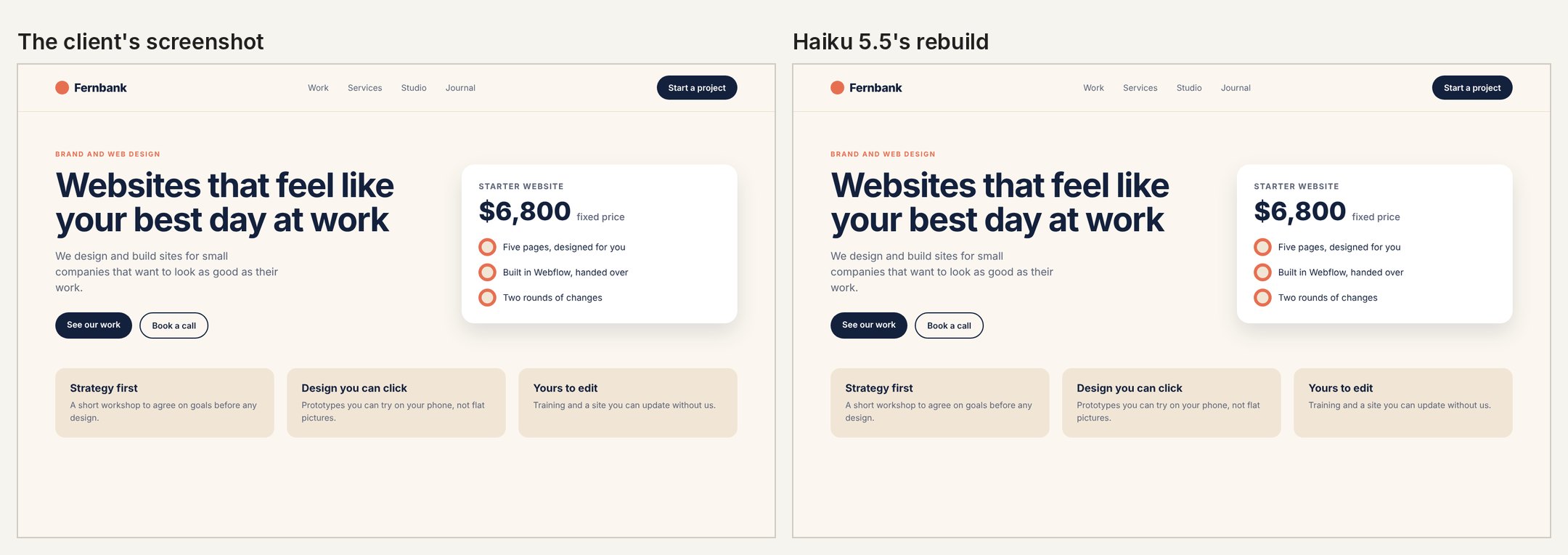
We ran the same kind of work on 24 October, when we gave four Claude models a furniture workshop's home page to design, the client's notes on it, and a screenshot of another page to rebuild. The full results are here; three things from them bear on this argument.
- Assembly was close to perfect. Rebuilding a page from a screenshot, Sonnet 5.5 and Opus 5.5 matched it pixel for pixel, and the other two came within a fraction of a pixel.
- Changes were fast. Every model applied the client's four notes, including a new accent colour with readable button text, in two to four minutes.
- The decisions were ours. We wrote the brief, chose the facts, the colours and what the page had to do. The models made four good-looking pages from it, and each slipped in small things nobody asked for: a year in a footer, an example in a form, a phone menu with no button. A person had to catch those.
What does "three to four times" measure?
Speed figures sound good, but what they count is often unclear. Screens made? Work approved? Features that reached customers?
A flow built from a few prompts tends to look finished before it is. The spacing, the in-between states, the error messages and the edge cases are where it slips, and the time spent fixing them afterwards is easy to leave out of the figure. Revolut may well count all of that; from the outside we cannot tell.
Speed measured without a quality bar is only faster output. Not better work.
Is the craft being lost?
There is a feeling behind the worry too. "I don't use Figma any more" goes round some circles like a boast. But what makes design valuable is the care that goes into it, whatever the tool. Dropping a tool is no achievement; knowing why you dropped it, and what you put in its place, is.
Figma is not standing still either. It put its own design agent on the canvas in May, working from a team's components and tokens. So the question is not Figma or AI. AI is already going into every tool.
The realistic way: both
Both sides of the argument are partly right. With a mature design system and a clearly defined problem, AI really does speed up production, and gives teams live, testable interfaces instead of static drawings. But a person still builds the system, defines the problem and approves the result.
For most teams the sensible split is this: AI produces quickly, the designer directs, refines and approves. A canvas such as Figma for exploring and working together; models working in code for the production that repeats. Pick the work in front of you:
What is the work?
Who leads The designer, on a canvas
This is the understanding part; no tool shortens it much.
- What AI does
- Gathers material, drafts options to react to
- What a person does
- Decides the problem and the direction
Four takeaways for agencies
AI is not replacing the designer. It is handing back the time the designer spent on production. The people who spend that time thinking will come out ahead.
How we work this way
On Proofyard, a design is a task on the production board like any other: Claude can draft and change it from the brief, and the client reviews it with pinned comments and a sign-off before anything is built. If you design in Claude Design, our guide to client feedback on Claude Design work shows the review side, and our web design project management page shows the whole flow. The rule underneath is the one in our guide to what an AI agent should ask you before it acts: Claude prepares, a person approves. What it costs is on our pricing page.
Sources
- David Senra, "Competition, Intensity & Building a $115 Billion Global Bank", with Nik Storonsky, 25 October 2026, transcript read 29 October 2026.
- Figma, The Figma Design Agent is here, 20 May 2026.
- Our web design test, 24 October 2026: briefs, checks, pages and results kept with the test kit.